Hello @thisterm
Absolutely! Here’s how you can add navigation menus and sub-menus with AMP theme support:
Leverage theme support for AMP with the nav_menu_toggle flag. This allows you to inject custom code snippets specifically for your AMP navigation.
Within the custom code, you can implement the logic for displaying and handling navigation menus, including sub-menus.
While the nav_menu_toggle approach is great for custom navigation menus for developers, the AMP Generic Compat plugin simplifies the process by providing a user-friendly interface to enable the toggle feature without needing to write custom code.
We hope this helps!
I see the compatibility plugin adds amp-bind.js script, will the nav_menu_toggle function also add the same script? If not please I would like to make the toggle work without the amp-bind.js script to improve LCP.
Please analyze my site on how to make this function work
add_theme_support( ‘amp’, array( ‘nav_menu_toggle’ => array( ‘nav_container_id’ => ‘site-navigation’, ‘nav_container_toggle_class’ => ‘toggled-on’, ‘menu_button_id’ => ‘site-navigation-toggle’, ‘menu_button_toggle_class’ => ‘toggled-on’, ), ) );
Hello @thisterm
Our analysis of your site data indicates you’re using a premium theme. Unfortunately, we don’t have access to the inner workings of those themes. To gain a more profound understanding and locate the elements you need, we’d have to examine your code.
The reason your menu and buttons lack IDs is likely due to the theme’s structure. In such cases, we typically use XPath expressions to target specific elements. However, identifying the appropriate XPaths requires inspecting your code.
Given this situation, I recommend reaching out to AMP experts who specialize in troubleshooting premium theme integrations. They’ll be well-equipped to assist you further.
@thisterm As we didn’t receive a response I’ll mark this as resolved. Feel free to open a new support topic if you require any further assistance.
Hello AMP
The theme I am using is Magnitude Pro by Afthemes, the premium version has same features as the free version. Please analyse the free version to determine the XPath expressions to target specific elements (toggle & search) for me
-
This reply was modified 2 years, 1 month ago by
 Pretertiary.
Hello @thisterm
As I mentioned before it will be best if you contact AMP experts as they can guide you better with your custom solutions, you can also find XPath from chrome DevTools
1. Right click “inspect” on the item you are trying to find the xpath
2. Right click on the highlighted area on the console.
3. Go to Copy xpath
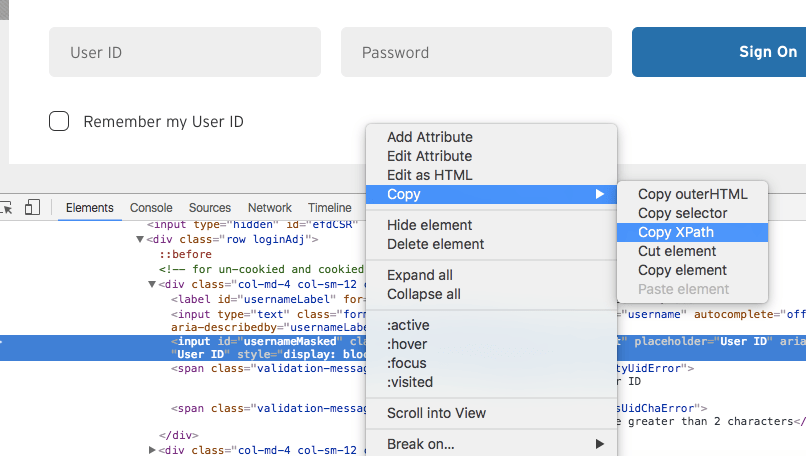
We hope this helps
@thisterm As we didn’t receive any further response I’ll mark this as resolved. Feel free to open a new support topic if you require any further assistance.


