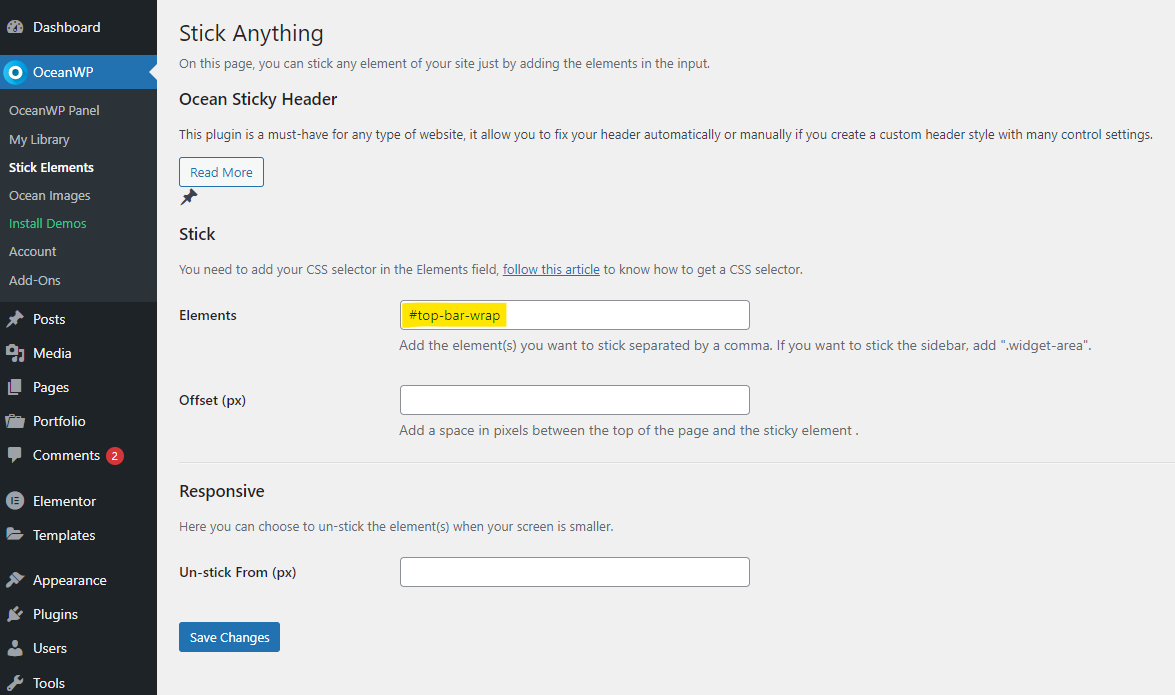
Hello @leobughi,
Please navigate to WP Admin > OceanWP > Stick Elements, then add this ID: “#top-bar-wrap” to the “Elements” field. Like this: https://i.postimg.cc/15NsXK6L/image.png. After that, save changes, clear all level cache(Cookie, CDN, etc.), and recheck your issue.
To find the correct ID or selector, please follow the steps explained in this link: https://docs.oceanwp.org/article/529-how-to-get-a-css-selector.
I hope that helps.
Best Regards
Hi
thanks for your reply.
There’s something good and something wrong.
On this page for example, top bar works perfectly -> https://www.lauravannimedicinacinese.it/coppette-per-il-viso-autotrattamento-per-il-benessere/
On this page, top bar is a previous version and doesn’t sticky (I already flushed the cache) -> https://www.lauravannimedicinacinese.it/tutti-gli-articoli/
Any other idea how to solve the issue?
Thanks
Hello @leobughi,
It seems the JS didn’t load on the archive page on your website. I checked it and didn’t see any issue on my end(on a fresh WP installation). Perhaps it conflicts with other plugins you have(like assets manager, etc.)
For troubleshooting, please do the following steps and let me know the results:
1. Head over to WP Dashboard > Plugin.
2. Deactivate all plugins.
3. Then, first activate the Ocean Extra plugin.
4. Check your issue.
5. Then, activate your plugins one by one
6. After activation of any plugins, check your issue
Note 1: You can try troubleshooting on the staging website.
Note2: if you have any cache plugin or server cache(CDN / Browser Cache and Cookies and …), you need to clear its cache contents or disable them to see your changes. Also, don’t forget to click on the regenerate all assets file and data in Elementor > Tools.
If the above troubleshooting didn’t help you to find the conflicts plugin, please put the CSS below in Customizing > Custom CSS/JS > CSS Code:
#wrap #top-bar-wrap {
    position: fixed;
    width: 100%;
}
Please read this link for more information about the CSS/JS code on the customizer: https://docs.oceanwp.org/article/354-add-custom-css-and-js-to-your-website.
I hope that helps.
Please keep us posted.
Best Regards
-
This reply was modified 3 years, 7 months ago by
 Shahin.
Hi
now it works!
It was a database issue.
Thanks!
You’re very welcome.
I’m glad that you were able to resolve that.