• Resolved JS Morisset

    (@jsmoriss)


    Under the WooCommerce > Settings > Advanced > Woocommerce.com page, if we uncheck “Enable tracking”, but then enable the WooCommerce > Settings > Advanced > Features > Advanced > Navigation option, it forces us to enable tracking – which is unpleasant, but probably ok by the rules, but then if we uncheck the WooCommerce > Settings > Advanced > Features > Advanced > Navigation option, it disables the navigation option but leaves tracking on. That doesn’t seem right. It forces us into tracking, but then when we disable the option, it leaves tracking on?

    js.

Viewing 6 replies - 1 through 6 (of 6 total)
  • con

    (@conschneider)

    Engineer

    Hi JS,

    All in all I agree with you. This is inconsistent.
    I did some proper clicking: https://a.cl.ly/eDu794wn
    Am I testing this correctly?

    You mention “it forces us to enable tracking” – I think I am missing this. How exactly does the tracking get / forced toggled for you?

    Kind regards,

    Thread Starter JS Morisset

    (@jsmoriss)

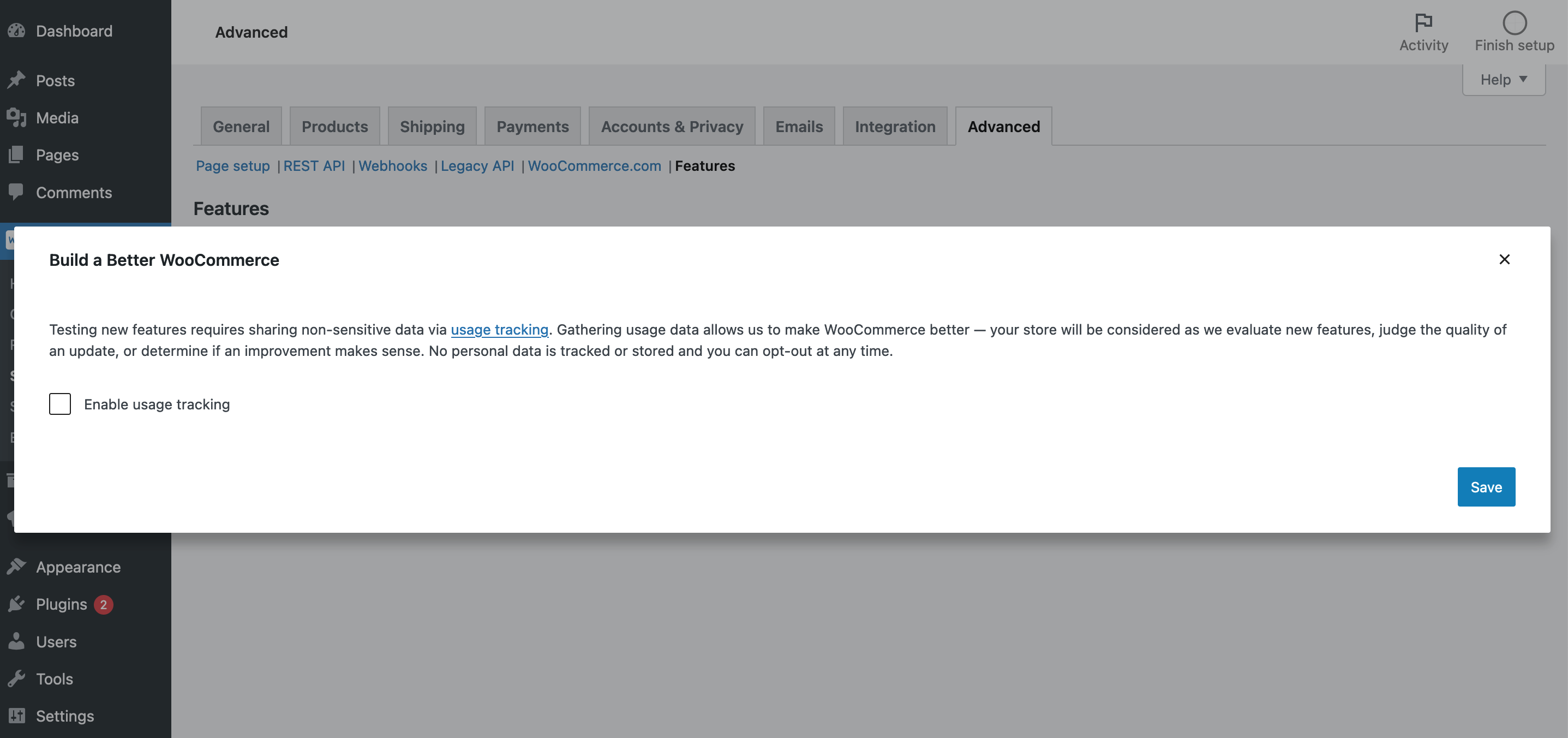
    After clicking the WooCommerce > Settings > Advanced > Features > Advanced > Navigation option, I get this popup, which your video does not show.

    https://surniaulula.com/wp-content/uploads/wc-navigation-option-popup.png

    js.

    con

    (@conschneider)

    Engineer

    Hi again,

    Did a conflict check. I can reproduce now: https://a.cl.ly/yAuQvQjL
    I have no pull with with how this is decided 😉 but I am gonna try and get some input for us.

    Kind regards,

    Thread Starter JS Morisset

    (@jsmoriss)

    Thanks. The plugins team at ww.wp.xz.cn thought this could have been an oversight (ie. leaving tracking enabled) and suggested I post about the issue here first. 🙂

    js.

    Thread Starter JS Morisset

    (@jsmoriss)

    FYI, this is still a problem in WooCommerce v6.9.0.

    js.

    con

    (@conschneider)

    Engineer

    Hi @jsmoriss,

    The plugins team at ww.wp.xz.cn thought this could have been an oversight (ie. leaving tracking enabled) and suggested I post about the issue here first. 🙂

    Fine by me 🙂.

    FYI, this is still a problem in WooCommerce v6.9.0.

    Yup. So far I managed to start an internal discussion and the point is seen as valid, but no guarantees ;).

    Kind regards,

Viewing 6 replies - 1 through 6 (of 6 total)

The topic ‘Tracking Stays Enabled’ is closed to new replies.