Trying to access array offset on false in
-
Warning: Trying to access array offset on false in H:\root\home\magentasoft-001\www\islamicafinance\wp-content\plugins\ocean-extra\includes\adobe-font.php on line 262
any solutions ?The page I need help with: [log in to see the link]

-
Hello @shaghouri,
Thank you for reaching out,
I fully examined the issue you have raised on this topic and could not see it on my end.Actually, it’s just a warning and it does not hurt your website.
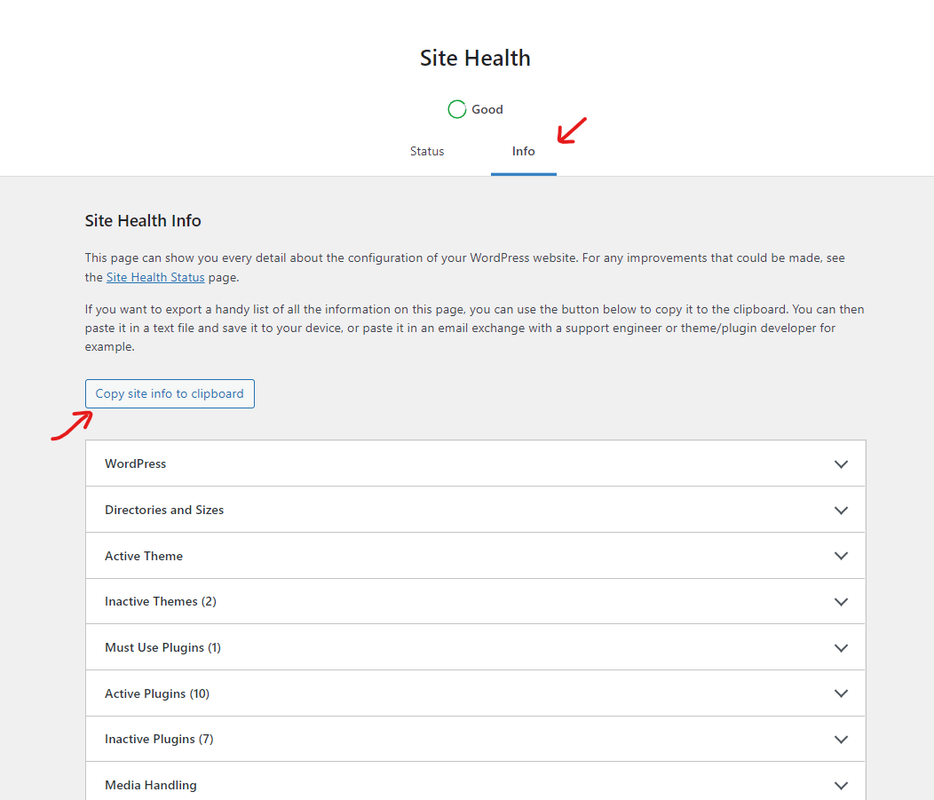
However, please provide us with your system environment information. To do this, please go to WP Dashboard > Tools > Site Health > Info Tab and click on the button Copy site info to clipboard. You can send the information as code here or upload them to http://pastebin.com/ and get an exclusive link: https://i.postimg.cc/fbjtkFyJ/image.png(you can remove your email address from the content).Note: You can turn off your WordPress debugger to hide it: https://ww.wp.xz.cn/support/article/debugging-in-wordpress/#wp_debug.
Please keep us posted.
Thank you,
Best RegardsBest Regards
Thanks for the immediate respond
Thank you very much for the help
I hope to find a solution. I have done what you asked me to do
There appears to be a problem with the font array code in Adobe` wp-core version: 6.4.3
site_language: ar
user_language: ar
timezone: +00:00
permalink: /%postname%/
https_status: false
multisite: false
user_registration: 0
blog_public: 1
default_comment_status: open
environment_type: production
user_count: 1
dotorg_communication: true wp-paths-sizes wordpress_path: H:\root\home\magentasoft-001\www\islamicafinance
wordpress_size: 294.64 ميغابايت (308947291 bytes)
uploads_path: H:\root\home\magentasoft-001\www\islamicafinance/wp-content/uploads
uploads_size: 47.51 ميغابايت (49814233 bytes)
themes_path: H:\root\home\magentasoft-001\www\islamicafinance/wp-content/themes
themes_size: 35.90 ميغابايت (37645930 bytes)
plugins_path: H:\root\home\magentasoft-001\www\islamicafinance/wp-content/plugins
plugins_size: 189.03 ميغابايت (198214374 bytes)
database_size: 32.38 ميغابايت (33949420 bytes)
total_size: 599.45 ميغابايت (628571248 bytes) wp-dropins (1) advanced-cache.php: true wp-active-theme name: OceanWP (oceanwp)
version: 3.5.4
author: OceanWP
author_website: https://oceanwp.org/about-oceanwp/
parent_theme: none
theme_features: core-block-patterns, widgets-block-editor, align-wide, wp-block-styles, responsive-embeds, editor-styles, editor-style, menus, post-formats, title-tag, automatic-feed-links, post-thumbnails, custom-header, custom-logo, html5, woocommerce, wc-product-gallery-zoom, wc-product-gallery-lightbox, wc-product-gallery-slider, customize-selective-refresh-widgets, widgets
theme_path: H:\root\home\magentasoft-001\www\islamicafinance/wp-content/themes/oceanwp
auto_update: مُفعّل wp-themes-inactive (4) OceanWP Child Theme: version: 1.0, author: OceanWP, التحديثات التلقائية معطّلة
Twenty Twenty-Four: version: 1.0, author: the WordPress team, التحديثات التلقائية معطّلة
Twenty Twenty-Three: version: 1.3, author: the WordPress team, التحديثات التلقائية معطّلة
Twenty Twenty-Two: version: 1.6, author: the WordPress team, التحديثات التلقائية معطّلة wp-plugins-active (21) Arabic Webfonts: version: 1.4.6, author: Jozoor, التحديثات التلقائية معطّلة
Elementor: version: 3.19.0, author: Elementor.com (latest version: 3.20.0-dev4), التحديثات التلقائية معطّلة
Elementor Beta (Developer Edition): version: 1.1.2, author: Elementor.com, التحديثات التلقائية معطّلة
EmbedPress: version: 3.9.12, author: WPDeveloper, التحديثات التلقائية معطّلة
Essential Addons for Elementor: version: 5.9.11, author: WPDeveloper, التحديثات التلقائية معطّلة
Image Optimizer by Elementor – Compress, Resize and Optimize Images: version: 1.3.0, author: Elementor.com, التحديثات التلقائية معطّلة
Ocean Custom Sidebar: version: 1.1.2, author: OceanWP, التحديثات التلقائية معطّلة
Ocean Extra: version: 2.2.6, author: OceanWP, التحديثات التلقائية معطّلة
Ocean Modal Window: version: 2.2.0, author: OceanWP, التحديثات التلقائية معطّلة
Ocean Posts Slider: version: 2.0.6, author: OceanWP, التحديثات التلقائية معطّلة
Ocean Social Sharing: version: 2.0.6, author: OceanWP, التحديثات التلقائية معطّلة
Ocean Stick Anything: version: 2.0.7, author: OceanWP, التحديثات التلقائية معطّلة
Smart Slider 3: version: 3.5.1.21, author: Nextend, التحديثات التلقائية معطّلة
Starter Templates: version: 4.0.13, author: Brainstorm Force, التحديثات التلقائية معطّلة
The Post Grid: version: 7.4.3, author: RadiusTheme (latest version: 7.5.0), التحديثات التلقائية معطّلة
TranslatePress - Multilingual: version: 2.7.3, author: Cozmoslabs, Razvan Mocanu, Madalin Ungureanu, Cristophor Hurduban, التحديثات التلقائية معطّلة
Ultimate Post Kit: version: 3.11.2, author: BdThemes, التحديثات التلقائية معطّلة
WP-Optimize - Clean, Compress, Cache: version: 3.3.0, author: David Anderson, Ruhani Rabin, Team Updraft (latest version: 3.3.1), التحديثات التلقائية معطّلة
WP File Manager: version: 7.2.4, author: mndpsingh287 (latest version: 7.2.5), التحديثات التلقائية معطّلة
WPForms Lite: version: 1.8.7.2, author: WPForms, التحديثات التلقائية معطّلة
WPvivid Backup Plugin: version: 0.9.97, author: WPvivid Team, التحديثات التلقائية معطّلة wp-plugins-inactive (2) Akismet Anti-spam: Spam Protection: version: 5.3.1, author: Automattic - Anti-spam Team, التحديثات التلقائية معطّلة
Hello Dolly: version: 1.7.2, author: Matt Mullenweg, التحديثات التلقائية معطّلة wp-media image_editor: WP_Image_Editor_GD
imagick_module_version: غير متوفر
imagemagick_version: غير متوفر
imagick_version: غير متوفر
file_uploads: 1
post_max_size: 128M
upload_max_filesize: 128M
max_effective_size: 128 ميغابايت
max_file_uploads: 20
gd_version: bundled (2.1.0 compatible)
gd_formats: GIF, JPEG, PNG, WebP, BMP, AVIF, XPM
ghostscript_version: unknown wp-server server_architecture: Windows NT 10.0 AMD64
httpd_software: Microsoft-IIS/10.0
php_version: 8.3.3 64bit
php_sapi: cgi-fcgi
max_input_variables: 10000
time_limit: 300
memory_limit: 512M
max_input_time: 60
upload_max_filesize: 128M
php_post_max_size: 128M
curl_version: 8.6.0 OpenSSL/3.0.13
suhosin: false
imagick_availability: false
pretty_permalinks: true
current: 2024-03-15T21:38:43+00:00
utc-time: Friday, 15-Mar-24 21:38:43 UTC
server-time: 2024-03-15T21:38:31+00:00 wp-database extension: mysqli
server_version: 8.0.33
client_version: mysqlnd 8.3.3
max_allowed_packet: 134217728
max_connections: 1000 wp-constants WP_HOME: undefined
WP_SITEURL: undefined
WP_CONTENT_DIR: H:\root\home\magentasoft-001\www\islamicafinance/wp-content
WP_PLUGIN_DIR: H:\root\home\magentasoft-001\www\islamicafinance/wp-content/plugins
WP_MEMORY_LIMIT: 40M
WP_MAX_MEMORY_LIMIT: 512M
WP_DEBUG: false
WP_DEBUG_DISPLAY: true
WP_DEBUG_LOG: false
SCRIPT_DEBUG: false
WP_CACHE: true
CONCATENATE_SCRIPTS: undefined
COMPRESS_SCRIPTS: undefined
COMPRESS_CSS: undefined
WP_ENVIRONMENT_TYPE: غير محدد
WP_DEVELOPMENT_MODE: undefined
DB_CHARSET: utf8mb4
DB_COLLATE: undefined wp-filesystem wordpress: writable
wp-content: writable
uploads: writable
plugins: writable
themes: writable wpforms version: 1.8.7.2
lite: 26 فبراير، 2024 at 11:29 م
upload_dir: Writable
total_forms: 1
total_submissions: undefinedWordPress debugger is false i check the wp-config.php file
Hello @shaghouri,
Thank you for getting in touch and providing additional information.
I can see that you are currently using PHP version 8.3.
To resolve your issue, please use PHP version 8.2 instead.It is possible that your website may require some compatibility due to the PHP version you are currently using. You can ask your hosting provider to switch to PHP 8.2 to ensure better compatibility with the theme and other plugins. Although it’s not essential, upgrading to PHP 8.2 is recommended to improve your website’s compatibility with other plugins. Don’t worry; that warning won’t harm your website.
Best Regards
oky i do it
php 8.2
still the problem
I deleted the code error line and this is a temporary solutionHello @shaghouri,
Thank you for reaching out to us,
If you are interested in using the dev version,
please update the theme to this version: https://drive.google.com/file/d/1GDQyVx_GvOF0N9c0u_LlwjLL6z8Gd6y8/view?usp=sharing.
In this version, it shouldn’t record that warning on the log file.But please test this version on a staging site. If you want to create a staging website, you can simply use this plugin: https://ww.wp.xz.cn/plugins/wp-staging/ or ask your host provider to create a new one for your current website.
To update the theme, please navigate to Plugins > Add New and upload the zip file. Then click on the “Replace current with uploaded” button.
– Note 1: Before updating, please get a full backup from your website, and also make sure to use the latest version of the theme.
– Note 2: if you have any cache plugin or server cache(CDN / Browser Cache and Cookies and …), you need to clear its cache contents or disable them to see your changes. Also, don’t forget to click on the regenerate all assets file and data in Elementor > Tools.
Please let me know if you have any questions about the above steps.
I hope it helps.
Best Regardsthanks alot
i will download any try bcz i get another one
Warning: Packets out of order. Expected 1 received 0. Packet size=145 in ~\wp-includes\class-wpdb.php on line 2349Hello @shaghouri,
Thank you for your feedback,
A temporary communication glitch between WordPress and MySQL often causes that warning message. Also, high traffic or database load could cause this error if your web hosting plan has limited resources. You can check it with your host provider, maybe they have a solution that we are not aware of.
I hope it helps.
Best Regards

The topic ‘Trying to access array offset on false in’ is closed to new replies.