Hi @pravinlpatel ,
Please post a test reply to this topic, then delete all caches and test it again. Let me know the result.
Thread Starter
 Pravin
(@pravinlpatel)
@gvectors-team I cleared full cache multiple times but issue is not resolving.
@pravinlpatel ,
Ok, please update wpForo to 2.2.4 version, then go to wpForo > Overview admin page, scroll down, find and click the [Delete all Caches] button. Then use another topic URL to test the structured data.
Thread Starter
Pravin
(@pravinlpatel)
@gvectors-team I followed your steps but issue still persist. It seems it is programmatic error and dev has forgotten to close the tag
@pravinlpatel ,
You either didn’t deleted website cache (if you have a cahce plugin please purge that cache as well) or you have not updated wpForo to 2.4.4 version.
I still see the old structured data in your forum. So you have not done what I asked.
Thread Starter
Pravin
(@pravinlpatel)
@gvectors-team issue is resolved now.
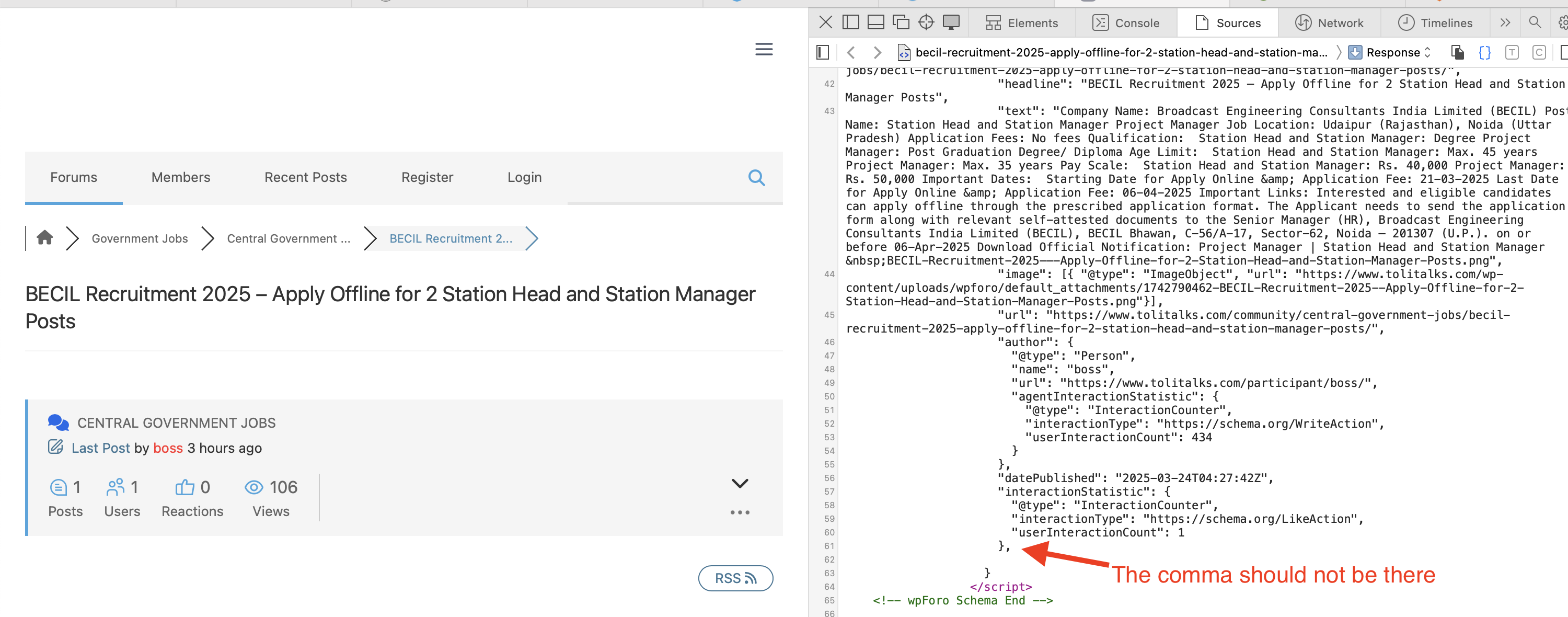
@pravinlpatel the problem is in the extra comma in the JSON object. This comma has been removed in 2.4.4 version. But I still see it in your website. So you should make sure you use wpForo 2.4.4 and make sure the website cache is deleted (wpForo cache and LiteSpeed Cache).
I followed your steps but issue still persist. It seems it is programmatic error and dev has forgotten to close the tag
There is no any unclosed tag, please don’t guess the reasons just make sure your website caches are fully purged so the JSON object should be generated with/o an extra comma:
https://wpforo.com/wp-content/uploads/2025/03/Screenshot-2025-03-24-at-11.36.02.png
Also, please exclude wpForo from the Lightcache:
- Please navigate in Dashboard to LiteSpeed Cache > Cache admin page
- Go to Exclude Tab, find the “Do Not Cache URIs” option
- Insert the URL path(s) of your forum page(s) one per line in the option textarea:
- /community/
- /participant/
- /sign-up/
- /sign-in/
- /change-password/
More info: https://wpforo.com/community/faq/wpforo-and-cache-plugins/#post-37150