[Update 2.1.3 ]
-
Hello,
For me version 2.1.2 works very well.
I updated with the new version and everything is a bit broken, especially the CSS.
I constantly have to make new modifications to get the same css update after update. It’s getting a bit complicated and time consuming.
If it works well for me with 2.1.2, can I stay with this version?
Or are there security changes for example ?
Thanks you 🙂

-
I’m sorry that I caused you issues. I was convinced that I left everything untouched that you are using, especially the 3-column layout of the reference container, but I’ll diff and look what I got wrong.
No so far the security is fixed, please stay with 2.1.2 until I get clear.
My apologies!
I’m unable to locate my changes affecting your design.
Would you like to share your concerns? That would help me a lot!
Thank you.
The problem as I see it now is that given I’m not yet done redesigning the settings, I omitted the info that the 3-column layout (number, arrow, text) for the reference container is only available when combining identical footnotes is turned off. That is consistent because there is never more than a single arrow, so it cannot link back to more than one referrer. In order for the layout to work that visitors are accustomed to, combining identical footnotes needs to be turned off.
Combining identical footnotes has only a single layout option, consistently with the need to be able to enumerate multiple backlinks in a single table cell. So I’ll need to replace the switches with an options select box.
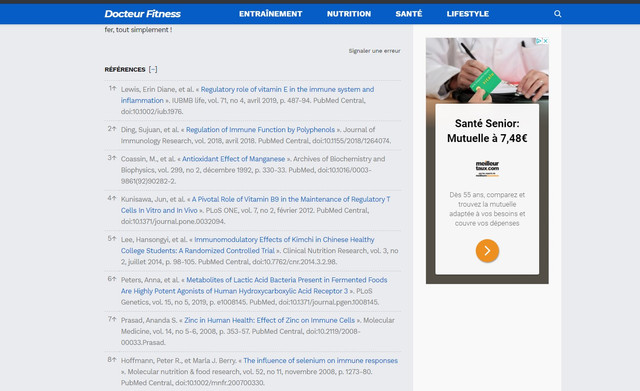
Further, I didn’t expect a stacked arrow to be preferred, and was careful to get the arrow prepended by wrapping it with the index number in a no-break span. On https://www.docteur-fitness.com/pourquoi-devrait-on-faire-des-pompes-plus-souvent I see the no-break disabled, and the arrow stacked on top of the index number. That makes quite a lot of options, I’m lost.
What I did exactly between 2.1.2 and 2.1.3 with respect to CSS is to append
!importantto all tooltip style settings, namely text color, background color, border color, border width, corner radius, and the maximum width, because I noticed that settings may be inadvertantly overridden by site-wide rules, causing issues with customization not working. Beside prioritizing these settings, I also prioritized the plugin’s embedded custom CSS in the text area below the settings, over those settings, because this CSS code is intended to fix things that the settings don’t catch. Initially, this custom CSS was set to be overridden by the settings, and even by hard-coded defaults:padding: 12px; font-size: 13px;. I did also delete the new CSS classfootnote_plugin_index_combithat was added in 2.1.1 so as to not interfere with the existingfootnote_plugin_index, but turned out useless and was now removed to streamline in the hope that nobody used it already, notably because I was sure that you didn’t. Turns out I was wrong. Lastly I’ve added this:> /* > prevent long URLs from expanding the reference container in mobile view: > */ > .footnote_plugin_text a { > word-wrap: anywhere; > }That is indispensable because of defective Unicode implementation in some user agents, see https://ww.wp.xz.cn/support/topic/footnotes-on-mobile-phones/
That is all i could find out about CSS by diffing 2.1.2 and 2.1.3. But given the circumstances, I understand that I’ve hurt, and apologize, although I’m unable to see how I could have done better except by never adding that new class name, that I did not suspect to be already used in customization (and I only used it in 2 instances and redundantly, hence it is now removed).
Please let us know your preferences, we’ll take them into account.
As of the rest:
- Now combining identical footnotes does not prevent the index table cell of single notes from being clickable as it is when combining identicals is turned off.
- The widget_text hook is disabled by default to avoid issues with accordions in Elementor;
- The default priority of the_content is set to 10 because this avoids the reported issues and still works with Elementor (priority 9).
- Footnotes in excerpts is now turned off by default in both related settings because it often doesn’t work. Footnotes needs Advanced Excerpts plugin for the footnotes to display properly in excerpts in all themes, while turning it off never works.
Best regards
Hello 🙂
Thanks for your answers.
For information, here are the few files I modified.
Mainly I removed the and replaced by <span>, and I also removed the comma between the different notes grouped with a display one below the other.
I really like the display I have now, it’s the most successful I’ve managed to do (to my taste) and everything is functional so it’s really perfect.
Thank you for sharing this resource. I’ll diff it against 2.1.2 and implement it. So far:
- The <a> element is needed to get the styling right, so Footnotes needs an option “apply hyperlink styling to referrers and backlinks”, because as mentioned, AFAIK CSS does not provide keywords telling the browser to color a span like it was a link while the linking functionality is performed by JavaScript (to prevent it from being logged in the browsing history, and for animation). In general, the theme’s link color is preferred for these elements, but we really need to add the alternative as an option. Thanks for pinpointing it.
- The issue about separators is also very good as they need to become customizable. Neither the dot is universally preferred, nor the comma for enumerated backlinks. Things grow complicated with so many options: a terminator for single notes (dot, no dot, colon, …), a separator (comma, no comma, …).
- Stacking the individual backlinks of grouped notes is also a good option, and initially I thought it would be best, but grouped instances may be so numerous that stacking is a no-go, and enumeration is widely preferred.
There shall be a setting for the column width of the backlink column, but it cannot reliably be used to get the backlinks stacked, e.g. when 1 and 2 are stacked, 20 does not fit the width; typically units were grouped by two on a line. So we need to add a setting for a line break to be inserted before each added backlink in a combined footnote.
I’ll look closely at how you performed the layout, and take example, eventually adding a new table row template if needed.
Also I understand that you have no noticeable concerns about CSS, as you did not include this part, only the templates folder and task.php (the script that fills in the placeholders in the templates and generates the completed page code).
I’m glad that you got the optimal solution, and I’ll strive to stabilize it at plugin level so that everything can be managed in the plugin’s dashboard and Custom CSS (that can also be added in Footnotes’ dashboard).
Everybody is welcome to post how Footnotes should work, and we’ll be glad to ultimately ship a template library fitting every user’s needs and every visitor’s expectations.
Probably the next release will require some action to set the new options. Sorry in advance.
Thank you for your new contributions!
Thank you for your response. Your kindness and caring are very rare!
Thank you. Yep, it’s not so easy for me, and I’m now definitely lost: The reference container table row template
reference-container-body.htmlyou redacted the <a> elements in, is not the one you are using:reference-container-body-combi.html(that does not include <a> elements, but task.php does add them). Alsoreference-container.htmlis from 2.1.1 at most. While the plugin does not load any scripts when alternative tooltips are enabled (tooltips as such being disabled notwithstanding), it does need to load its style sheet for public pages to display properly when it comes to keeping arrows and numbers together. Currently on https://www.docteur-fitness.com/que-faut-il-manger-pour-avoir-un-systeme-immunitaire-performant the first footnote has the arrow after the 1, but all others have the number shifted below: https://ibb.co/QYYtZr8 supposedly because this rule in public.css is missing from the page:.footnote_backlink, .footnote_plugin_link { white-space: nowrap; }Ultimately it’s unclear either how you got the arrow switch side without either using
reference-container-body-switch.htmlby enabling theSymbol appended, not prepended:option, or switching placeholders right in the template or in task.php respectively. Indeed in the code:<span […] ><span class="footnote_index_arrow">↑</span>1</span>but in the page we see “1↑”.
Whatever, I’ll re-add the new class
footnote_plugin_index_combiconsidering that you keep it in use. Hopefully that will resolve the bulk, along with making the <a> element optional, the removal of which the edits shared now boil down to.It’s all about getting this plugin right. But now I feel farther than ever during these days (i.e. since the biggest bugs are away).
Thank you for any help.
Hello,
It’s strange, for me, footnotes are ok (chrome and mozilla)
https://i.ibb.co/FWcLxVM/Sans-titre.jpg
Here is all my css, sorry there is a lot of modification
/* FOOTNOTES AJUSTEMENT SOUS TITRE */
.footnote-reference-container
{ margin-top: -1.5rem; }/* CITATION SOULIGNE */
#footnote_references_container td a
{text-decoration: underline; }/* CITATION */
/* AVEC ° */
.footnote-reference-container sup
{vertical-align: baseline;}/* MOBILE*/
@media only screen and (max-width: 768px)
{
.footnote-reference-container td
{font-size: 0.90rem;}
}
/* REGLAGE HAUTEUR SOMMAIRE FOOTER */
.footnote-reference-container
{margin-top: 0.5rem;}.footnote_reference_container_collapse_button { font-size: 1.05rem!important; vertical-align: 0px;}
/* SEPARATION CITATION */
.footnote-reference-container td {border-top: 1px dashed #c3c3c3!important;}
body.wp-night-mode-on .footnote-reference-container td {border-top: 1px dashed #3b3b3b!important;}
.footnotes_reference_container
{margin-bottom: 10px!important;}/* FIN CITATION */
/* REGLAGE POUR FOOTNOTE DUPLICATE SOURCE */
.footnote_plugin_index_combi span {max-width: 50px; width: max-content;display: block;white-space: normal;}
.footnote_backlink:hover
{text-decoration: none!important; color: #075dc6;}.footnote-reference-container .footnote_plugin_index_combi:hover
{ text-decoration: none!important; }.footnote_plugin_tooltip_text
{ color: #1a1a1a; letter-spacing: -0.01rem; margin-right: -0.1rem;
margin-left: 0.1rem;}/* FOOTNOTES */
sup {vertical-align: super; font-size: 0.70rem!important;}#footnote_references_container tr {line-height: 1.3rem;}
.footnote_index_arrow {float: right;}
.footnote_plugin_link {padding-right: 0px; padding: 0.5rem 0rem;}
.footnote_plugin_text {padding: 0.5rem 0.3rem!important;}
.footnote_plugin_tooltip_text {top: 0.6em !important; vertical-align: top!important;
position: relative!important;}#footnote_references_container { margin-top: 0px; }
.footnote_container_prepare { display: inline-block!important; padding-top: 0px !important; margin-top: 0px!important; margin-bottom: 0px!important; }
.footnote_container_prepare > p {border-bottom: none!important; -webkit-margin-before: 0em !important; -webkit-margin-after: 0em !important;}
.footnote_container_prepare > p > span:first-child {padding-left: 0px !important; font-size: 1rem!important; letter-spacing: -.04em; text-transform: uppercase; font-family: worksans-700; font-weight: 700; }
#footnote_references_container table td {border-top: none;}#footnote_references_container td a:hover {color:#075dc6;}
#footnote_references_container {line-height: 1.3rem;font-size: 0.96rem;color: #181818;}
#footnote_references_container td a {color: #181818;}.footnote_plugin_index_combi a:hover, .footnote_plugin_text a:hover { text-decoration: none!important; }
.footnote_plugin_index_combi span, .footnote_plugin_link span
{ cursor: pointer;float: right;}.footnote_plugin_index_combi
{ cursor: default;}.footnote_container_prepare>p>span:last-child a:hover, .footnote_plugin_tooltip_text:hover
{ text-decoration: none; }@media (max-width: 1023px)
{
#footnote_references_container
{ margin-bottom: 0px; }
}.footnote-link:hover
{background-size: 0!important;}/* DARK MODE */
body.wp-night-mode-on #footnote_references_container td a {color: #ffffff!important;}
body.wp-night-mode-on #footnote_references_container td a:hover {color: #408dea!important;}/* FIN FOOTNOTES */
Kind regards
Hello,
That may be because my Firefox is 25 major version numbers behind (58.0.2).
Don’t worry, I’ll look into this.
Best regards
Hello,
First of all: Bugfix 2.1.4d2 just went out the door and is currently available at https://downloads.wp.xz.cn/plugin/footnotes.zip
It has the link elements (almost all of them) made optional through a new setting under the first dashboard tab > Other settings > Use the link element for referrers and backlinks: -> No. The default is Yes, so it requires an action on your side for the disabling to take effect.The goal of this development version update is that you may check whether it works for you, and whether upcoming updates will be seamlessly automated on your end.
Then I need to justify my use of an outdated Firefox. In 2018 I was among those reporting on a mailing list that after an update, Firefox started messing with user input. I needed to restore Windows to get the previous Firefox back, and—of course—stopped updating it. Switched to Opera and was satisfied until an upgrade, then to Chrome. Used this everywhere, until this month it broke on Ubuntu, as it had done for many users. I’m fine with the Firefox I got on the Ubuntu bootable flash drive. Distrust prevents me from upgrading. But when switching temporarily to Windows these days, first thing: installed latest Chrome.
Sorry for not yet analyzing the style sheet you are using. This will be next, and hopefully we’ll find out. Thanks for any hints on your part as of why the arrows are switched in display, while not in code, and why it depends on latest browser features to look good.
Best regards
-
This reply was modified 5 years, 6 months ago by
pewgeuges.
Hello 🙂
Waouhh !
This latest version is really excellent.
I have no problem with the css with the changes I had made.
There’s just one thing I’ll remove is the commas.
I don’t mind having a long list like on the screenshots this way because it’s very, very rare.
oops, I just discovered a bug.
It happens only on smartphone and I don’t think it was present before because I had tested the plugin through and through. I’m not sure with which version it happened.
It happens only on smartphone so when you get to the second article with the auto load post, the “click” on the [+] doesn’t work. The “links” to go to the footnote doesn’t work either.
That is scary. I’ll look into this!
Also, I forgot about the commas, sorry about that. Shall be in next.
So far I’ve looked closely into your CSS and taken steps to take the conclusions into account:
Thanks for sharing the footnotes part of your websites style sheet. Everything becomes clear, and it helps define our roadmap.
First my apologies for cancelling the footnote_plugin_index_combi class forked from footnote_plugin_index. It has been restored (since the current development version available for download) by duplicating it from footnote_plugin_index and restoring it in the template (the one for combining identical footnotes enabled mode). I didn’t suspect that it was already used, based on the assumption that you were using the legacy 3-column layout, that is only available if combining identical footnotes is turned off, consistently with its design featuring a single arrow per footnote, and as a consequence, unable to link back to more than a single footnote. It was inconsistent with the option to re-use a footnote and to not multiply it in the list.
The flaw is in the dashboard not graying out and setting to No the 3-column option when combining identicals is turned on.
Another flaw is related to the arrow switching side. There is a mode for that, but again it is available only when combining identicals is turned off, consistently with the legacy behavior that did not support it otherwise (it did allow it and fake it but didn’t work, so it was a no-go). You found means to get the arrow to the right while combining identicals is turned on, by setting display to block and let the arrow float to the right. Experience shows that this is not solid enough to be sure it displays correctly everywhere. As a consequence, the arrow switch needs to be supported when combining is turned on, too. No problem, the algorithm has now been adapted. Sorry for not timely following through, and for causing you all that headache. Our new development version 2.1.4d3 is featuring support for hard-coded, rock-solid appended arrows.
Another issue is caused by the backlink underline on hover. I found it useful to maximize the incentives to click the backlinks to get back to the referrer, as user feedback declares this action unintuitive by lack of explicit arrows. Other user feedback shows that arrows next to the backlinks are disliked. Indeed on the other hand these arrows may seem ostentatiously fool-proofing and somewhat overkill. So I thought that the hover underline may advantageously help the pointer shape underscore the functionality as long as this seems to be sometimes considered unexpected.
Yet I noticed that this underline needs to be prioritized or it is overridden by site-wide rules. By contrast, on your website, what is actually disliked is that underline, because it makes think at external links. So you had a hard time disabling it and needed to add ancestor selectors to strengthen the opposite rule. Therefore, the priority is now removed to ease customization and streamline enforcing the underline’s removal.
The hover underline is now removed from the plugin’s style sheet as of the footnote referrers.
Our new development version 2.1.4d3 reflects these changes. It is now available at https://downloads.wp.xz.cn/plugin/footnotes.zip
Hopefully this solves the issues other than the bugs you reported now. Please let us know whether it fits your needs by enabling to set things in the dashboard and making your website’s style sheet work again.
Thank you for contributing!
Hello,
thanks for your answer,I cleaned up my css code to keep only what is really useful to me (there was quite a lot of obsolete code)
I share it here if need be 🙂
/* FOOTNOTES */ sup {font-size: 0.70rem!important;} .footnote_plugin_text {padding: 0.5rem 0.3rem!important;} .footnote_plugin_tooltip_text {top: 0.6em !important;vertical-align: top!important; position: relative!important; letter-spacing: -0.01rem; } .footnote_container_prepare {padding-top: 0px!important; } .footnote_container_prepare > p {border-bottom: none!important;} .footnote_container_prepare > p > span:first-child {font-size: 1rem!important; letter-spacing: -.04em; text-transform: uppercase; font-family: worksans-700;} .footnote_plugin_index_combi a:hover, .footnote_plugin_text a:hover { text-decoration: none!important; } .footnote_plugin_index_combi span { cursor: pointer;float: right;width: max-content;} .footnote_plugin_index_combi { cursor: default!important;} .footnote_plugin_tooltip_text:hover { text-decoration: none; } /* MOBILE*/ @media only screen and (max-width: 768px) { .footnote-reference-container td {font-size: 0.90rem;} } .footnote_reference_container_collapse_button { font-size: 1.05rem!important; vertical-align: 0px;} /* SEPARATION CITATION */ .footnote-reference-container td {border-top: 1px dashed #c3c3c3!important;} body.wp-night-mode-on .footnote-reference-container td {border-top: 1px dashed #3b3b3b!important;} .footnotes_reference_container {margin-bottom: 10px!important;} /* REGLAGE POUR FOOTNOTE DUPLICATE SOURCE */ .footnote_backlink:hover {color: #075dc6;} .footnote_index_arrow { padding: 0 0.05rem; } /* FIN FOOTNOTES */Thanks a lot for sharing this resource—and for testing our current v2.1.4d3 that follows through on the arrow switch—so we can see how to get closer to user expectations. The bottom line is to add more settings, defaulting to the current rules.
- Some rules carefully make the footnote referrers tiny. I see this as a good design decision, if that doesn’t get them overlooked. No doubt they should only be noticed when reading thoroughly anyway. Perhaps we should add an option where superscript is enabled in the dashboard under the Customize tab.
- You have a nice hover color instead of hover underline for the backlinks in the reference container. Footnotes does rely on the theme’s link hover color, so the underline should become optional—it may be too much noise.
- Footnotes keeps legacy 24 pixels padding on top of the reference container; you set it to zero; so it shall become a setting.
- The container-wide underline of the label may also be disliked; so the border width and color shall become settings.
- The font size of the label—like that of the tooltips if enabled—needs to be a setting. Condensed and family however should probably be left to custom CSS.
- The spacing around the backlink symbol is also a good fit for a new setting.
- The pointer shape of the mouse cursor however is set to match the functionality. Since 2.1.3, when combining identical footnotes is enabled, the backlink’s whole table cell is clickable if the footnote is single, like when combining identicals is off. That improves UX and usability. When the
pointershape is disabled on the cell, we end up with a mouse pointer looking casually one some parts of the cell while a click anywhere triggers an up scroll. - The
float: rightmay be canceled now that the symbol actually switches side even when combining footnotes. It seems to cause the disorder https://ibb.co/m8P2xq4 in my old Firefox, while the newer yet fragile Chrome does display it correctly: https://ibb.co/qCgcggD - Beware of these, that needed to be deleted in Footnotes 2.0.6 as causing issues in some themes and browsers, with footnote referrers set to baseline or subscript instead of intended superscript:
.footnote_plugin_tooltip_text {
    top: 0.6em !important;
    vertical-align: top !important;
    position: relative !important;
}
If they work on your website like they did in some other themes and other browsers, then good luck; see https://ww.wp.xz.cn/support/topic/subscript-not-superscript/ and https://ww.wp.xz.cn/support/topic/ongoing-issues-despite-having-updated-to-v2-1-0/#post-13636936 and https://ww.wp.xz.cn/support/topic/footnotes-appear-in-random-places-on-academic-website/#post-13631280 and https://ww.wp.xz.cn/support/topic/footnotes-now-appear-in-summaries-even-though-this-is-marked-no/#post-13685416
- I tweaked the collapse button’s vertical align to make it more like a Twemoji sitting on the baseline; I don’t know if that should become a setting too.
- Can we add, as an option, the nice dashed line delimiting references in the container? It looks great! You even make it responsive to WordPress’ dark mode!
Again, thanks a lot!

The topic ‘[Update 2.1.3 ]’ is closed to new replies.