Update Team Records
-
After data is entered in to the team records table and updated, when I go back into that league/season and click on the Update records Table, it doesn’t show me the previous (current) values. Should it?

-
Right. This one has been asked and answered, but it is confusing. Even the contextual help on the Update Records screen should be better, but it’s right as far as it goes. So …
- Select a league and a season and click on the Update Records Table button at the top. This will change the table to reflect the current data for the selected league and team.
- Update the data table.
- Click Update Records
If you update the records table, then click the Update Records Table button, it will re-load the table with the existing data, NOT save the changes you just made.
This is sub-optimal, to put it kindly. I will to change the button name, and a big warning, and update the contextual help tonight. Thanks for reminding me of this lovely feature.
-Mark
Followed exactly what I did.
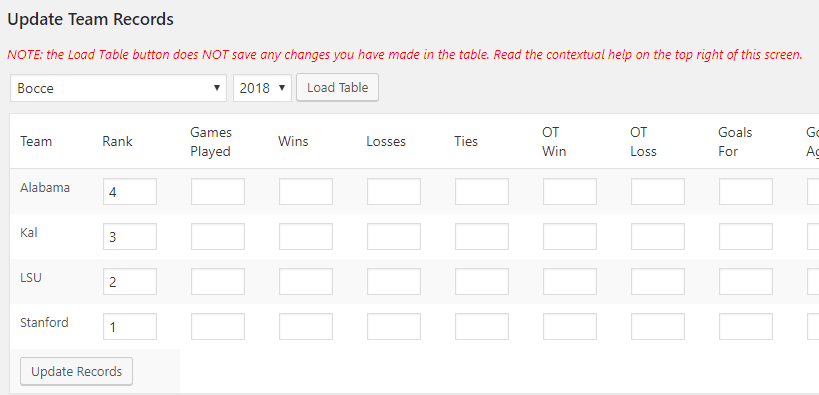
The current table has values in the rank for each team.
Doing step 1 should bring up EXISTING values. No? It doesn’t.
Hers’s a screen shot showing the populated values: https://screencast.com/t/Ks5WSXf9P
Now here’s what comes up when I do step 1: https://screencast.com/t/cdJvOuVJWhat am I missing?
Thank you for the screenshots. That is always helpful.
1. Did you set that sport (not league) Standings Order to Rank on the Setting screen (Standings tab) ?
2. What are your shortcode incantations?
BTW, I updated the button titles and the contextual help. The changes have been updated to the development tree on ww.wp.xz.cn. One file changed – mstw-lm-update-records-class.php. You can download it and replace the existing file in your plugins/mstw-league-manager/includes directory should you choose.
Yes. I set the sport setting.
Incantation: [mstw_league_standings league=’hfcc-bocce-white’ season=2018-spring]But my issue has to do with the update team records funtion. As previously stated and illustrated, whe I select the league and season and click on “Update Records Table” I’m expecting to see the CURRENT values stored. I just see blank values. That does not seem right.
Okay, I understand the issue. And what you are describing is NOT right. I have checked it out on my dev machine with no problem.
Here’s the admin screen after I saved it. http://shoalsummitsolutions.com/wp-content/uploads/bocce-admin.png
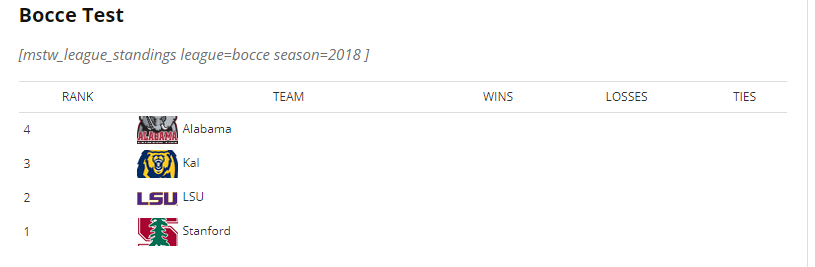
And here’s the standings table. http://shoalsummitsolutions.com/wp-content/uploads/bocce-standings.png The settings for the sport (gymnastics) are standings order by rank and sort order high-to-low, so this order (4, 3, 2, 1) is correct. I switched the order, and it still works (1, 2, 3, 4).
Hummm … SOMETHING is different between your system and mine. So let’s back up a step or two:
What version of the plugin are you running?
Do you have the Add-ons installed? If so, what version?
What version of WordPress are you running?
What version of PHP are you running?Have you tried changing the records (ranks) and saving them again? Does the admin disappear again? Does the front end change?
Have you tried creating a new test league, putting it in a different sport, adding the same teams to it, and trying to update the records again? Same result?
Let me know. We’ll figure it out.
-Mark
WP 4.9.4 PhP 5.6.3
League Manager 2.1 No add-onsI will try to do a new league as you request. I do suspect something along those lines myself. I’ll report results.
Thanks. I will stay tuned.
Added a new league, moved a couple of teams to that league.
Same result.
SHould I be adding new TEAMS as well?Added new teams to new league. Some records are “taking”. Very strange behavior. Hard to describe in detail.
Jay-
Is this sorted out now?
-MarkSOLVED. Thanks Mark!

The topic ‘Update Team Records’ is closed to new replies.