Updating Breaks Conditional Fields
-
For a very long time, we have kept the plugin at version 21.1 which is a very old version, because that’s the most recent version where this problem does not occur.
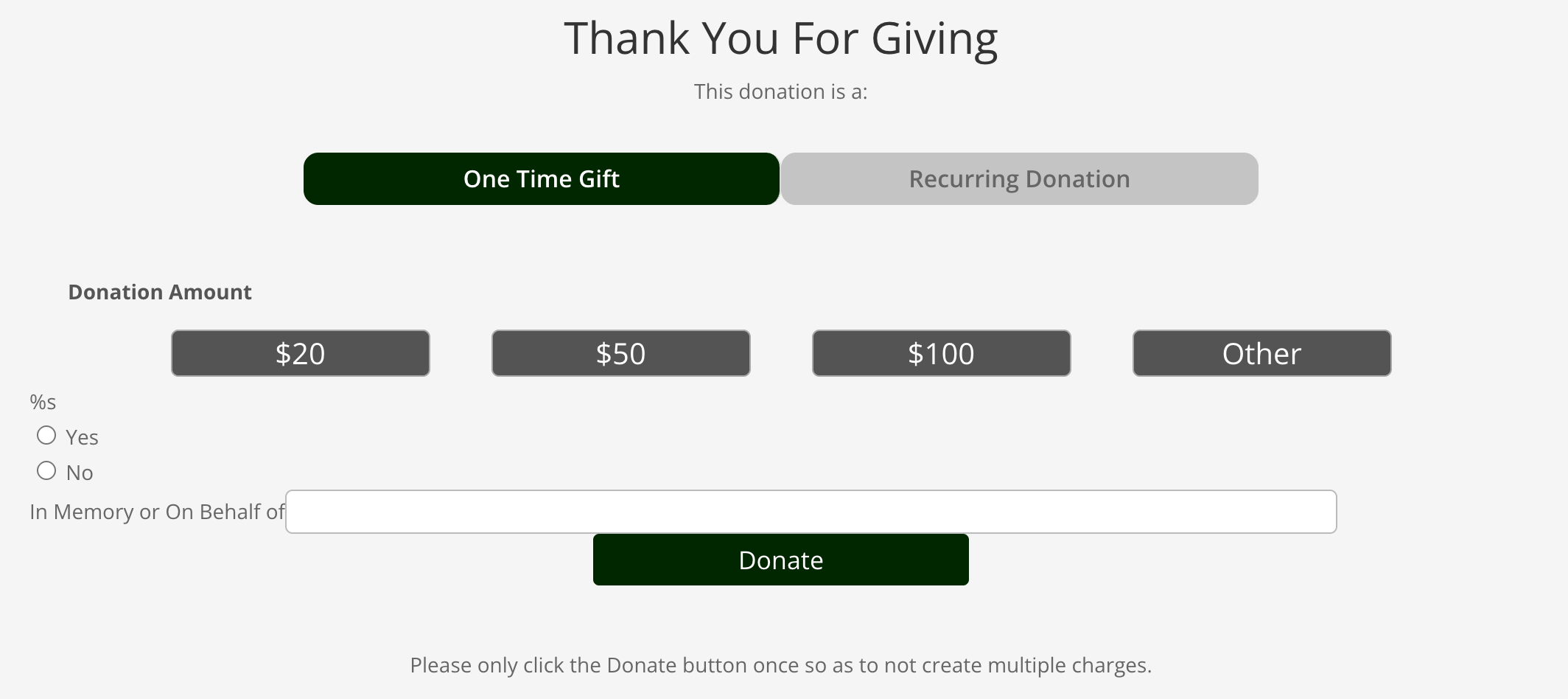
If you take a look at the page, it outputs “%s” instead of the first field’s title, and then it lists both fields. The second field, “In Memory or On Behalf of” is set to display conditionally only if “Yes” is selected from the previous field.
We are using Divi, and this product is being pulled in via the Add to Cart module.
The page I need help with: [log in to see the link]

-
Hi,
Thank you for writing. As you might understand, we are not able to provide support for such an old version.
However, if we can replicate any issue with the latest version of the plugin, we are more than happy to help get that fixed.
To better understand this we would need you to:
- let us know if this is replicable without Divi
- Share screenshots of your exact setup, so we can try to replicate this.
Thank you!
This happens in the latest version, which is why we haven’t updated until now.
It happens outside the Divi Builder as well – here on the product page it behaves similarly: https://lesfeldick.mystagingwebsite.com/product/one-time-donation/
Though it never shows the second field, even when “Yes” is selected.I am having this same error. https://ww.wp.xz.cn/support/topic/title-not-showing-and-working-inconsistently/
Why was this marked as resolved? This issue persists, and there is not a plugin update.
Can you share some screenshots of your exact setup, so we can try to replicate this?
Thank you!
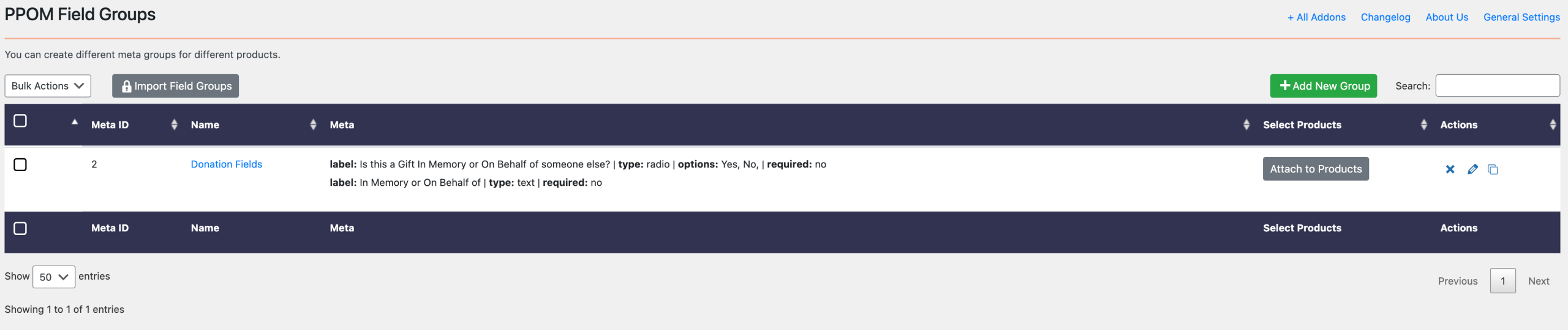
Field Group: https://lesfeldick.mystagingwebsite.com/wp-content/uploads/2025/12/download-6-scaled.png
Products Assigned: https://lesfeldick.mystagingwebsite.com/wp-content/uploads/2025/12/download.png
PPOM Fields: https://lesfeldick.mystagingwebsite.com/wp-content/uploads/2025/12/download-1-scaled.png
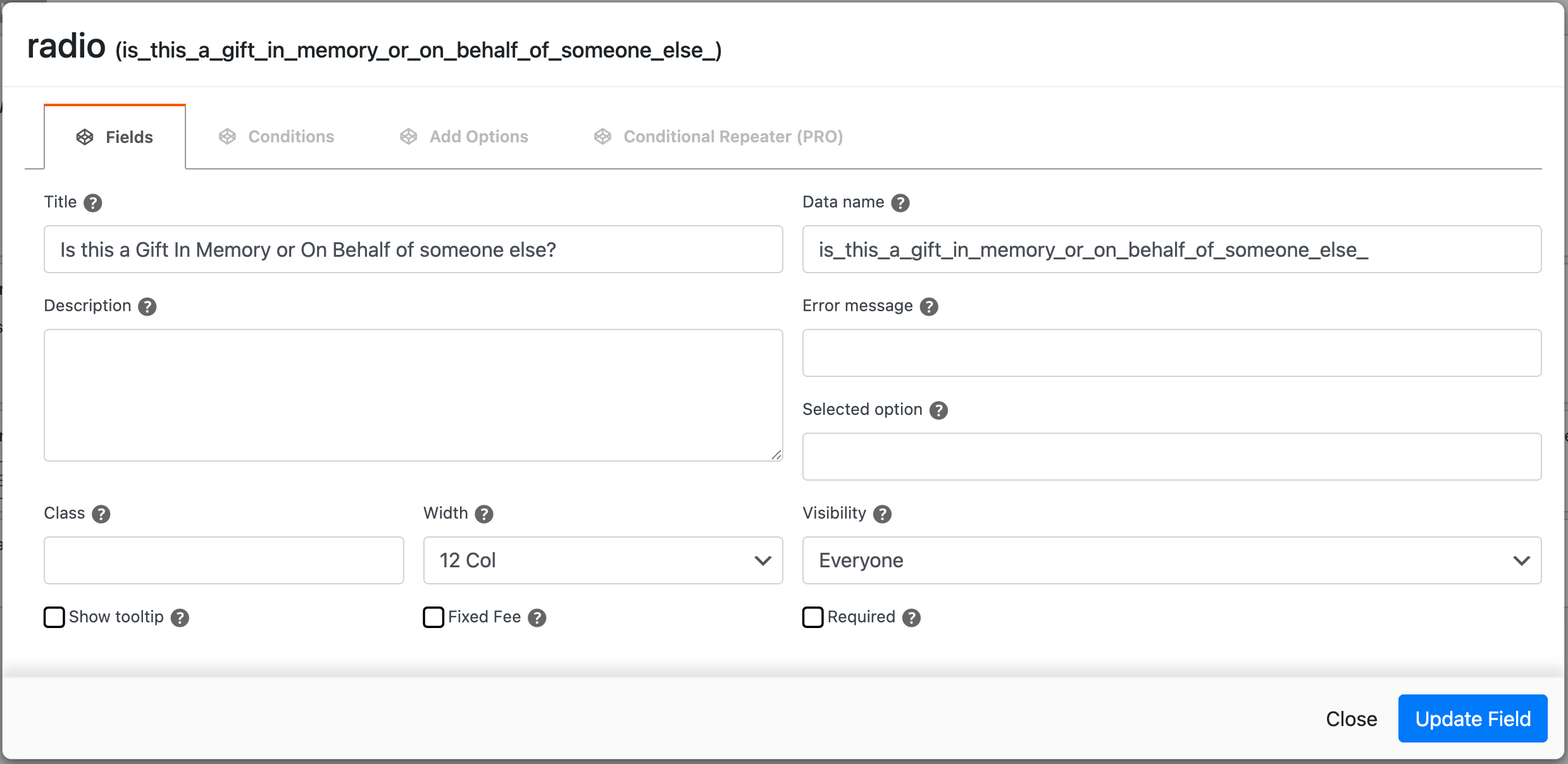
Radio button field settings: https://lesfeldick.mystagingwebsite.com/wp-content/uploads/2025/12/download-2.png
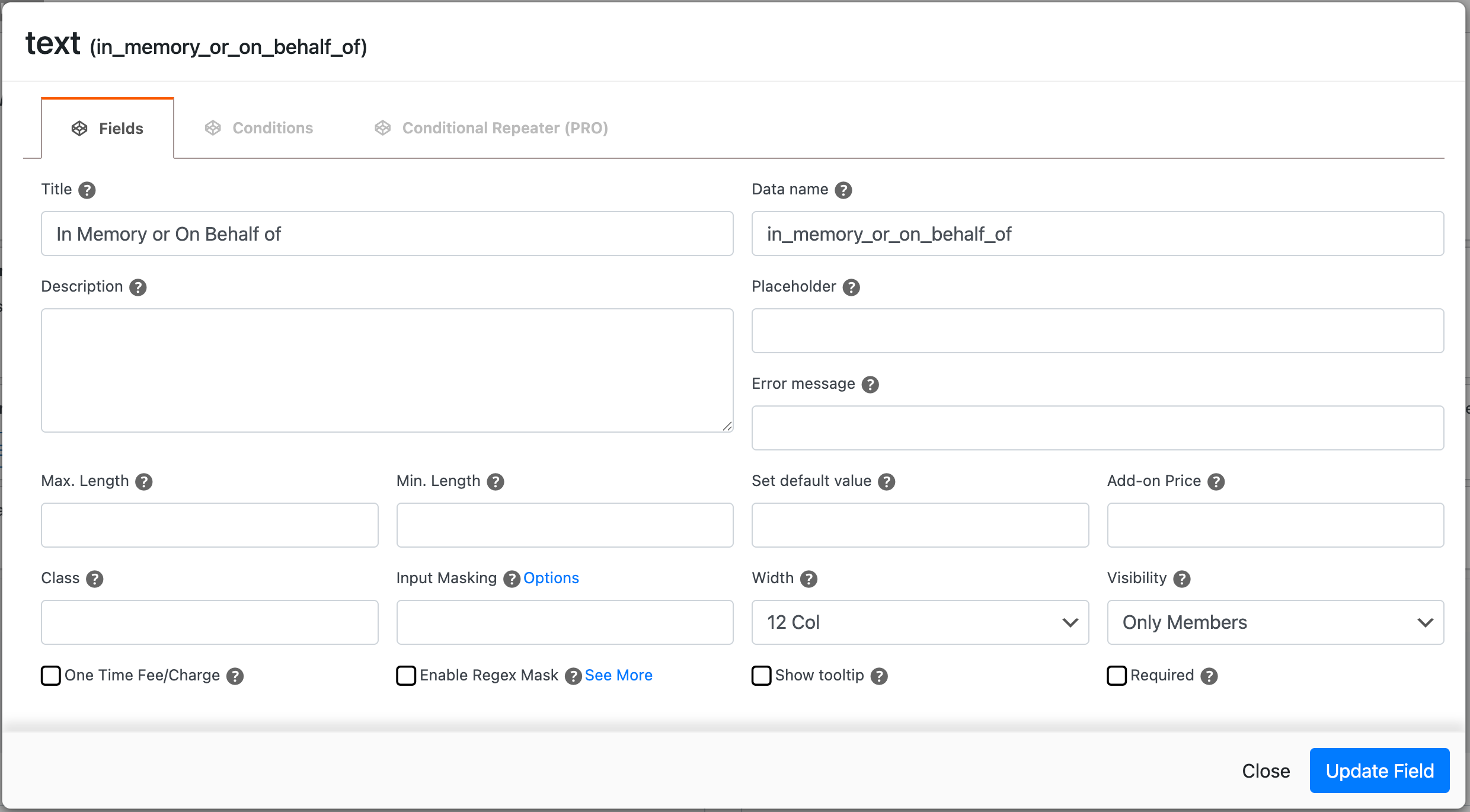
Text field settings: https://lesfeldick.mystagingwebsite.com/wp-content/uploads/2025/12/download-3.png
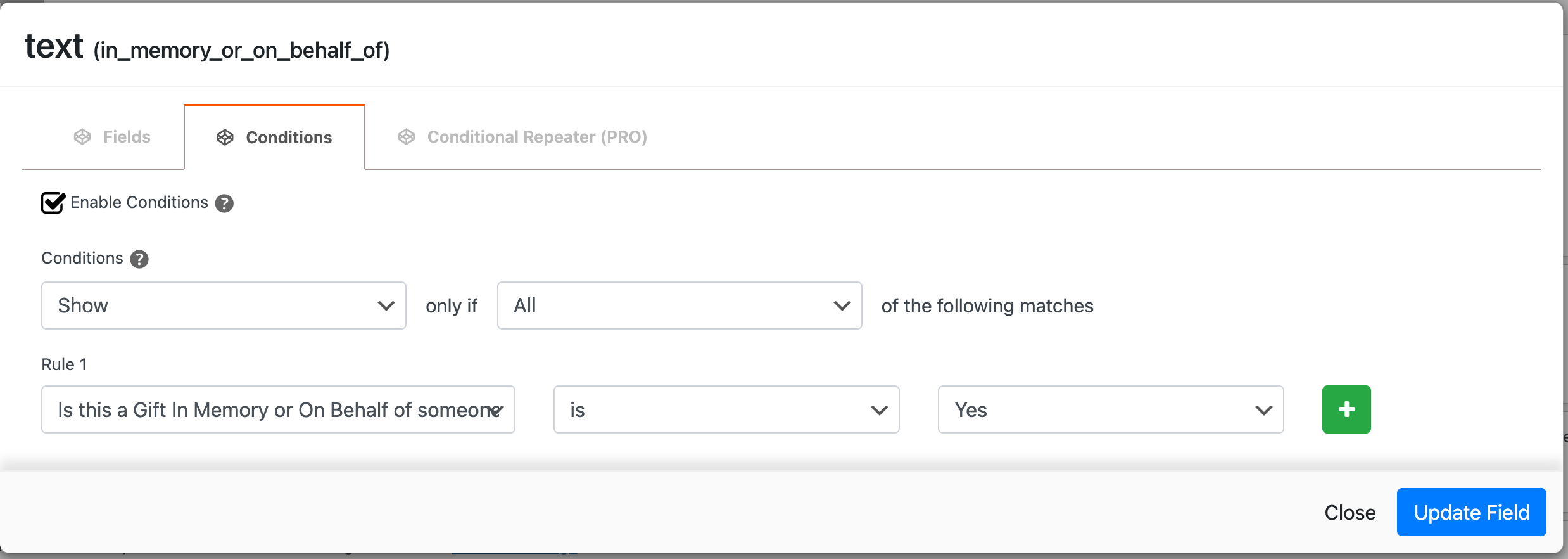
Text field conditional logic settings: https://lesfeldick.mystagingwebsite.com/wp-content/uploads/2025/12/download-4.png
Output in Divi Product module: https://lesfeldick.mystagingwebsite.com/wp-content/uploads/2025/12/download-5.png
Thanks for sharing the screenshots! I tested the same field combination on my side but wasn’t able to reproduce the issue.
To investigate this further, please try a quick conflict check using the Health Check & Troubleshooting plugin (here’s our detailed guide). When you enable troubleshooting mode, only you will see the site with plugins disabled — your visitors won’t be affected.
- Enable troubleshooting mode
- Turn on only WooCommerce and PPOM plugin.
- Check if the %s label still shows up
If the issue persists during troubleshooting, please install a Debug Log Manager plugin, recreate or re-save the field, and then check whether any error or warning appears in the debug log.
Additionally, please let us know:
- If you are using any translation or multilingual plugin
- Your PHP version
- The locale/language of your site
These details will help us pinpoint the cause more accurately.
I deactivated all plugins other than WooCommerce and PPOM fields – the issue persists. I tried creating the fields again from scratch – the issue persists. I even tried switching to a default WP theme, Twenty Twenty-Five – the issue persists.
I added the Debug Log Manager plugin, recreated the fields, assigned them to the products, and all that displayed was this PHP warning:
Function ID was called incorrectly. Product properties should not be accessed directly. Backtrace: require(‘wp-blog-header.php’), require_once(‘wp-includes/template-loader.php’), include(‘/plugins/woocommerce/templates/single-product.php’), wc_get_template_part, load_template, require(‘/plugins/woocommerce/templates/content-single-product.php’), do_action(‘woocommerce_single_product_summary’), WP_Hook->do_action, WP_Hook->apply_filters, woocommerce_template_single_add_to_cart, do_action(‘woocommerce_variable_add_to_cart’), WP_Hook->do_action, WP_Hook->apply_filters, woocommerce_variable_add_to_cart, wc_get_template, include(‘/plugins/woocommerce/templates/single-product/add-to-cart/variable.php’), do_action(‘woocommerce_single_variation’), WP_Hook->do_action, WP_Hook->apply_filters, woocommerce_single_variation_add_to_cart_button, wc_get_template, include(‘/plugins/woocommerce/templates/single-product/add-to-cart/variation-add-to-cart-button.php’), WC_Product->single_add_to_cart_text, apply_filters(‘woocommerce_product_single_add_to_cart_text’), WP_Hook->apply_filters, wps_custom_cart_button_text, WC_Abstract_Legacy_Product->__get, wc_doing_it_wrong Please see Debugging in WordPress for more information. (This message was added in version 3.0.)
WordPress core
File: /wp-admin/functions.php
Line: 6131- No translation plugin installed
- PHP version: 8.4
- US – English
Thanks for sharing the debug log information.
Please navigate to WooCommerce > Settings > PPOM Settings and disable the legacy inputs rendering option. Screenshot: https://vertis.d.pr/i/GT0VUR
It should resolve the issue you are facing. Please try and let us know how it goes.
Ok, that solved the issue of it not displaying correctly just in WooCommerce, but using the “Product” module in the Divi builder, it’s not detecting the conditional logic, and is displaying all fields.
Is there any fix for that, as this is how we have our site set up?
Could you please try creating the conditional logic from scratch after disabling the leagcy input option? If it doesn’t work, please share the URL and the information of fields so we can check and try replicating them at our end.
Ok, I just tried that, and it’s still not working. This is the URL:
https://lesfeldick.mystagingwebsite.com/donate/
The first field is a radio field, and the second is a text field. The text field is conditionally set to only display when “Yes” is checked in the radio field, but it’s currently showing at all times.
It may be a conflict between PPOM and the Product module in the Divi Builder. We’ll investigate this further and report it to our development team if a conflict is found.
Thanks for reporting this.
Any update on this? Has your team tested for this conflict?


You must be logged in to reply to this topic.