The Easy Theme and Plugin Upgrades plugin doesn’t have a settings page or any options. It also doesn’t have any text saying “Force Updates”. So I’m confused when you refer to enabling all of the plugin’s options and using the “Force Updates” option. Any of those settings that you see would be from something else and not this plugin.
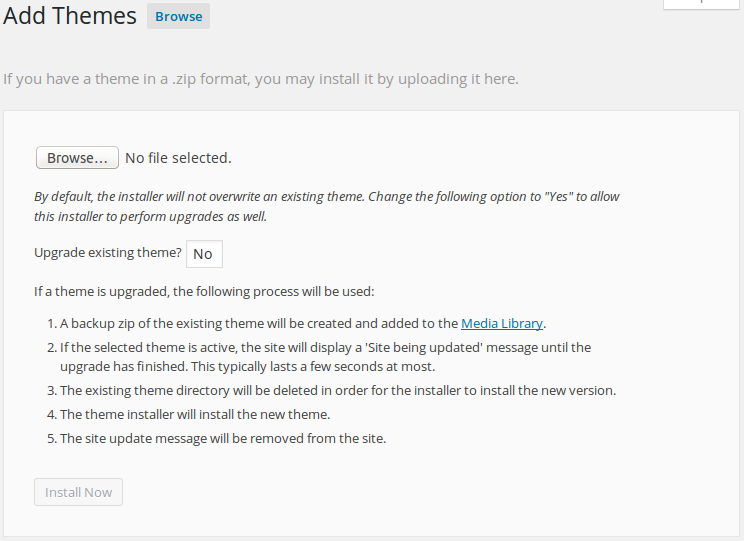
The primary thing that this plugin does is modify the page used to upload a theme or plugin file. You can see the modification in this screenshot (that page can be reached by going to Appearance > Themes, clicking the “Add New” button at the top of the page, and then clicking the “Upload Theme” button at the top of the page). To enable this plugin’s ability to replace an existing theme with a zip file containing a theme with the same name, use the “Browse…” button (or however that appears on your specific browser), select “Yes” from the “Upgrade existing theme” drop down, and click the “Install Now” button.
If this plugin is able to work with your site, you’ll see a confirmation page showing that the theme was installed and details about where you can download a backup of the old theme files.
Sorry, my apologies, the issue is with another plugin and not yours. I was going to use yours but there was a warning saying that your plugin hadn’t been tested with my version of WordPress, it also stated it was only compatible up to version 3.9.11. So I went searching for something else but obviously left your page open and didn’t pay enough attention when I wrote my note. Sorry again.
If your plugin works with WordPress 4.4.2, I’ll remove the other plugin and gladly use yours?
Thanks
It works well with the current version of WordPress. The only way to update the version compatibility reported on and by .org is to release a new version. It hasn’t required an update in a bit, so that number gets out-of-date.
Just tried your plugin and it seems to have worked fine. Thanks for your help.
Glad to hear that. Have a good day.
It works well with the current version of WordPress. The only way to update the version compatibility reported on and by .org is to release a new version. It hasn’t required an update in a bit, so that number gets out-of-date.
@chris Actually, you do not need to release a new version to update your plugin’s compatibility, just update compatibility in txt file and commit to svn, that is it.
@igor
People previously said that all that needed to be updated was trunk/readme.txt. I tested that, and it did not work. I tried again after seeing your message, and it still didn’t work.
Then I thought about updating the tags/1.0.4/readme.txt file. I did the update, and that worked. Thanks.