• After the last update I noticed that my bbpress forum toolbar was no longer working as before.

    I have WP edit, but suddenly the basic insert link button does not show up in the forums anymore.
    I have the buttons configured correctly:
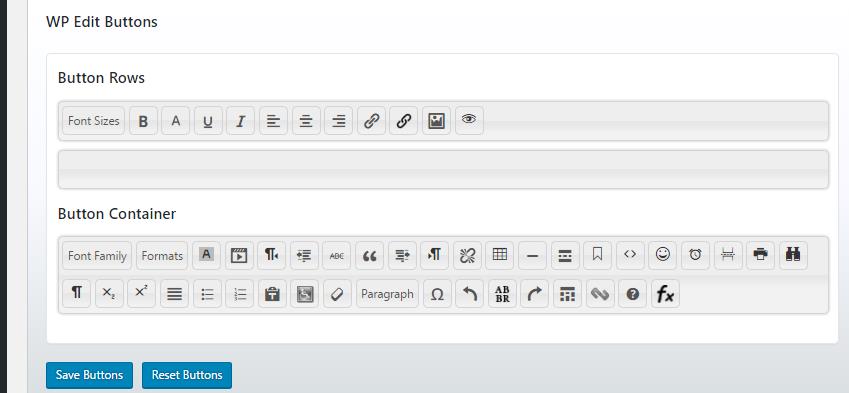
    However, on Firefox, Chrome and Edge the basic insert link simply does not appear on the toolbar.
    However, in IE it does.

    Any suggestions please?
    I am pretty confident it is a Wordfence issue as the previous WF update totally removed the toolbar for pretty much all browsers and did not get resovled until a patch came out, as it was reported that WF was slowing down some bigger sites.

    SITE

Viewing 5 replies - 1 through 5 (of 5 total)
  • Hi,
    if it was Wordfence I would have expected it to not be visible in any browser at all. That it’s visible in one browser indicates that it’s probably a front end issue, i.e. a CSS or JavaScript related issue. Unless of course you have the old page cached in IE and are not seeing what the actual page looks like now in there.

    If you think Wordfence is blocking the button you can try setting Wordfence to “Learning mode” and then refresh the page. If it was a block from Wordfence you should then see an entry being added to the whitelist at the bottom of the Firewall page. You could then set the Firewall back to “Enabled and protecting” as it will now remember not to block that particular thing.

    Hope that helps!

    Thread Starter Editor Mike

    (@editor-mike)

    Hi, already tried that.

    It is really odd as it only went wrong after the update, just as last time.
    Last time however it was across all browsers and the toolbar just totally vanished.

    This time, it works ok on IE and android browsers but not pc ones except IE.

    Interestingly it does work fine on the new post area, even on the browsers that fail in the forums.

    Could the Wordfence be clashing with BBpress?
    But then why only on some browsers?

    Same thing happened to me, seemed to have been caused by a WordPress update along with a premium theme that I did not update. When I updated the theme, all was well. Apparently the latest version of WordPress needs something more from the theme to work correctly in certain browsers. Frustrating, for sure. Typical “downgrade” from an “update.” Also try simply switching theme to 2016, then switching back.

    This was one of those “here I sit, all I want to do is write something, and look what I get to do…” situations. Was a real groaner as I was on a time crunch.

    Remember to do the basic trouble shooting step of disabling all plugins. Still could be a plugin conflict.

    MTN

    Hi editor-mike,
    Wordfence blocks are not browser dependent because they happen on the server site. If something is getting blocked in one browser it will get blocked in all browsers.

    Other possible explanations could be that you have the page cached in some browsers and not others or that you are logging in as a user with different privileges in one browser than the other. This could matter since admin users are not blocked by the Firewall.

    Thread Starter Editor Mike

    (@editor-mike)

    Thanks, the issue is site wide across all the users.
    So very odd.

    Alas WP Edit have failed to respond at all to any requests for help.
    So thank you for your time.

Viewing 5 replies - 1 through 5 (of 5 total)

The topic ‘Update Blocked Toolbar?’ is closed to new replies.
