Hello @pexel
Actually, the code you request is not related directly to our plugin.
However, you can edit your piece of code as follows:
if (jQuery(this.form).valid()) {
    my_counter = 3,
    my_interval = setInterval(function () {
        jQuery(".counter").html("Hesaplıyoruz : " + my_counter + " saniye"),
        (my_counter -= 1) < 0 && (clearInterval(my_interval), jQuery(".counter").html(""), EVALEQUATIONS(),jQuery('html, body').animate({
                    scrollTop: jQuery('[data-id="2787a58"]').offset().top
                }, 2000))
    }, 1e3);
}
Best regards.
Thread Starter
 pexel
pexel
(@pexel)
Thank you for your support. But the code did not work, so when we pressed the calculate button, the countdown did not work, the calculate button did not work at all.
Note: I cleared the cache.
Hello @pexel
I visited your web page once again, but you have not included the recommended modification in the onclick event of the fieldname10 field. I’ll illustrate how the code works by evaluating it directly in the browser’s developer console.
I replace the onclick event of the fieldname10 field at the runtime and click it. Pay attention to the smooth auto-scrolling after evaluating the equations.
Please, watch the video by visiting the following link:
https://resources.developers4web.com/cff/tmp/2023/08/13/video-autoscroll_o.mp4
Best regards.
Thread Starter
pexel
(@pexel)
Now I watched the video, do we add code in this fieldname10 event to make it work?
Could you please update the full code I will run?
along with the one with fieldname10?
Thank you for your support.
Hello @pexel
In the video, I updated the full code in the onclick event of fieldname10. Not only the piece of code for scrolling.
If you need a custom coding service to customize the onclick event on your form, please, do not hesitate to contact us via the plugin website:
https://cff.dwbooster.com/customization
Best regards.
Thread Starter
pexel
(@pexel)
Thank you, I wrote the code you added to the bottom part one by one. Our whole calculate button fieldname10
I guess all I need to change here is the [data-id=”2787a58″] field I guess right?
Instead of making each result sub data id different one by one Calculation Result :
<table class="table table-bordered table-striped">
         <tbody>
             <tr>
                 <td style="text-align: left;"><b class="criterion1-description mobile-description">Calculation Result :</b></td>
             </tr>
         </tbody>
     </table>
Is there a direct scrolling function to this area? If not, I will have to check the ids.
All we ask from you is the code is not correct?
jquery('[id*="fieldname10_"]').off('click');
e.<computed> [
input#fieldname10_1.field.eduvibe-contact-form-single-item,
prevObject: ce.fn.init(1)]
jquery('[id*="fieldname10_"]').off('click', function(){
if (jQuery(this.form).valid()) {
    my_counter = 3,
    my_interval = setInterval(function () {
        jQuery(".counter").html("Hesaplıyoruz : " + my_counter + " saniye"),
        (my_counter -= 1) < 0 && (clearInterval(my_interval), jQuery(".counter").html(""), EVALEQUATIONS(),jQuery('html, body').animate({
                    scrollTop: jQuery('[data-id="2787a58"]').offset().top
                }, 2000))
    }, 1e3);
}
});
e.<computed> [
input#fieldname10_1.field.eduvibe-contact-form-single-item,
prevObject: ce.fn.init(1)]
Hello @pexel
You are confused, the code with off in the video was only to remove the initial onclick event, you must use only the code:
if (jQuery(this.form).valid()) {
    my_counter = 3,
    my_interval = setInterval(function () {
        jQuery(".counter").html("Hesaplıyoruz : " + my_counter + " saniye"),
        (my_counter -= 1) < 0 && (clearInterval(my_interval), jQuery(".counter").html(""), EVALEQUATIONS(),jQuery('html, body').animate({
                    scrollTop: jQuery('[data-id="2787a58"]').offset().top
                }, 2000))
    }, 1e3);
}
Best regards.
Thread Starter
pexel
(@pexel)
Hm, now I’m adding this code to the “OnClick event”, is it true? I’m thoroughly confused. The code obviously works, but I think I’m posting it in the wrong place. I unintentionally bothered you too 🙁
Hello @pexel
I’m sorry. I don’t know where you are entering the code, but it is not in the onclick event attribute of the fieldname10 field of Form 91.
Best regards.
Hello @pexel
Note the form you use in the https://www.pexpe.com/dogum-tarihi-hesaplama/ page is the 91. Also, your website is loading the page’s content from cache.
Best regards.
Thread Starter
pexel
(@pexel)
Calculated Fields Form (Form 91 – Doğum Tarihi Hesaplama) Shortcode: [CP_CALCULATED_FIELDS id=”91″]
Even though I cleared the cache and the css used many times, it didn’t work. I’m checking again now.
I’m even leaving it active for a while for you to review, sir.
Error;
Uncaught SyntaxError: Unexpected token '&'
    at HTMLInputElement.<anonymous> (all.js?ver=1.2.20:988:9)
    at HTMLInputElement.dispatch (jquery.min.js?ver=3.7.0:2:39997)
    at v.handle (jquery.min.js?ver=3.7.0:2:37968)
-
This reply was modified 2 years, 10 months ago by
 pexel.
Hello @pexel
The issue is simple, you have entered apostrophe symbols instead of single quotes (or the plugin you use for caching or optimizing the website replaces them). You can use the (`) symbols instead of single quotes.
Sorry, I can’t include the onclick event code using the new symbols in the forum because the WordPress editor is terrible at formatting code.
Best regards.
Thread Starter
pexel
(@pexel)
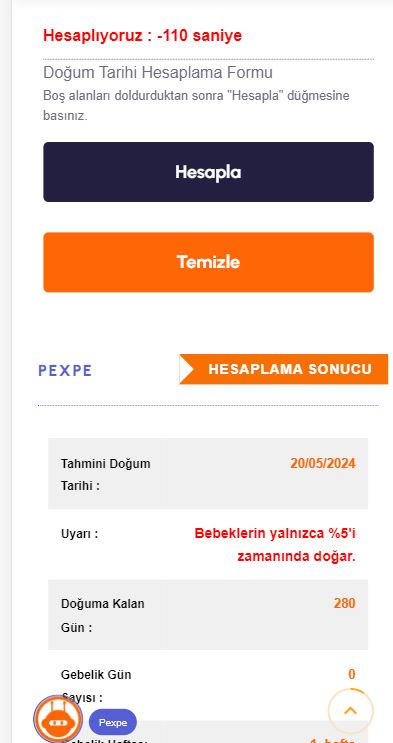
We solved the problem with this code, but now the countdown does not stop after this process, it continues as 3 2 1 0 -1 -2 -3.
Picture
How to run the code on mobile only?
if (jQuery(this.form).valid()) {
        my_counter = 3,
        my_interval = setInterval(function(){
            jQuery(".counter").html("Hesaplıyoruz : " + my_counter + " saniye");
            if(my_counter == 0){
                clearInterval(my_interval);
                jQuery(".counter").html("");
                EVALEQUATIONS();
                jQuery('html, body').animate({
                    scrollTop: jQuery('[data-id="3eb9b7f"]').offset().top
                }, 2000);
            }
            my_counter--;
        }, 1000);
  }
Hello @pexel
The issue is not happening from my side by testing your form. But you can edit the condition:
if(my_counter == 0){
as follows:
if(my_counter <= 0){
Best regards.