Hi,
You need to disable the option “Ability to move chat” in settings of a plugin.
It has to help. If nothing has changed, you need to clear “localStorage”:
1) Use the keyboard shortcut Command + Option + J (Mac) or Control + Shift + J (Windows/Linux).
2) Enter into a command line: localStorage.clear()
3) Press an enter and reboot the page.
Hi Yozeg,
Thank you so much for your help. I updated the settings to match your suggestion but it didn’t work for me. Any other suggestions or things I could try? I would be happy to send you any additional information you need.
Thank you so much!
John
Hi jdmcmah,
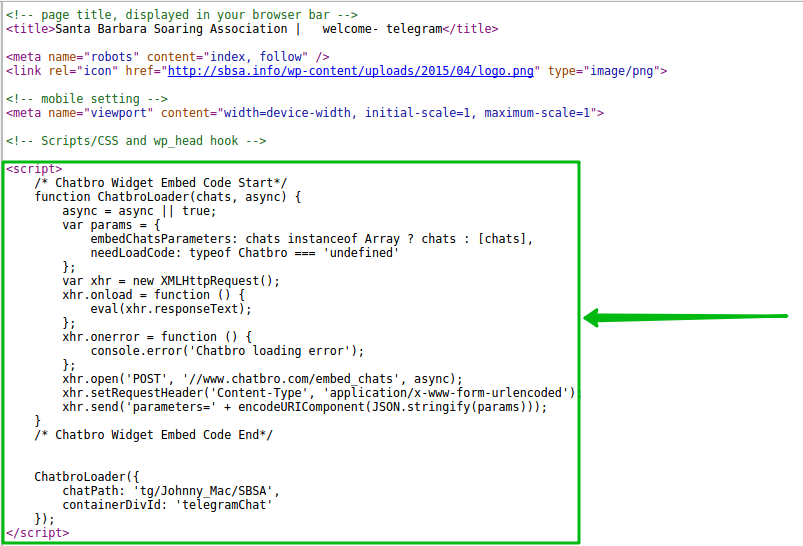
On your page: http://sbsa.info/welcome-telegram/ initialized 2 chats.
You have to clean a chat which is built in after “<!– – Scripts/CSS and wp_head hook—>”, (see img.). Don’t forget to clear ‘localStorage’ to see result.
If you want 2 chats, you shall create the unique container id for each chat.
Hi Yozeg,
I only wanted the one chat. 🙂 I removed the code from the header – but am still having the same issue. Here is a screen shot of where the div is compared to where the chat is showing up. http://sbsa.info/wp-content/uploads/2016/06/Screen-Shot-2016-06-20-at-7.29.01-PM.png.
I cleared local storage and did a hard reload on the page and confirmed that the code in the header has been removed.
Any other thoughts? Thanks!
Hi jdmcmah,
At me everything looks perfectly after I cleared localStorage (img.).
Try to look in other browser.
Awesome. It is up and running! Thank you so much. GREAT plugin!