Hi @prestonwordsworth ,
Thanks for the feedback!
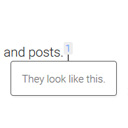
The CSS for Modern Footnotes doesn’t change the font families, so the serif style would come from one of the other stylesheets (themes or other plugins). You can add some custom CSS to modify the “x”. Specifically targeting the “x” requires a complicated CSS selector but I believe this should work:
/* change the font family */
.modern-footnotes-footnote:has(+ .modern-footnotes-footnote__note--expandable[style*="display: block"]) a {
    font-family: Arial, Helvetica, sans-serif;
}
 /* Or, use an icon instead of the "x" */
.modern-footnotes-footnote:has(+ .modern-footnotes-footnote__note--expandable[style*="display: block"]) a {
       color: transparent;
}
.modern-footnotes-footnote:has(+ .modern-footnotes-footnote__note--expandable[style*="display: block"]) a::before {
    background-image: url('image-url.png');
    content: ' ';
    display:inline-block;
    width: 20px;
    height: 20px;
}
Thread Starter
 p15h
p15h
(@prestonwordsworth)
Thank you very much!
After going with the first option, I also found the following adjustment necessary:
.modern-footnotes-footnote:has(+ .modern-footnotes-footnote__note--expandable[style*="display: block"]) a:hover {
    color: inherit;
}
For a future version of the plugin, how about substituting an SVG for the ‘x’? Such as
<svg xmlns="http://www.w3.org/2000/svg" width="24" height="24" viewBox="0 0 24 24" fill="none" stroke="currentColor" stroke-width="2" stroke-linecap="round" stroke-linejoin="round">
  <line x1="18" y1="6" x2="6" y2="18" />
  <line x1="6" y1="6" x2="18" y2="18" />
</svg>
Thank you for updating the CSS so it works! Good idea on making the “x” an SVG. I’ll add that in a future version of the plugin.