Using Site Kit on a Multisite
-
I have Site Kit successfully setup on a multisite setup. Each site uses the subfolder style URL. So site.com/site1 and site.com/site2 etc. My question has to do with how to combine these to see aggregated traffic information. I’m guessing they’d need to be added as data streams to the main site.com account? Is this correct?

-
Thanks for reaching out @sugarweb. Site Kit will display data based only on the site it’s installed on (or subdirectory sites, ie. site.com/site1 as per your example). The data shown will be independent of other subdirectory sites whether you use the same property and data stream on these sites.
If you’re looking to aggregate traffic you may be able to do so from the Google Analytics platform directly. While we’re limited to Site Kit queries here in the plugin support forums, you can following the below guide in order to aggregate data from different properties, after connecting Site Kit on each subdirectory using individual properties:
https://support.google.com/analytics/answer/6033415The product experts over at the Analytics Help Center should also be able to assist further with aggregating data.
Let me know if the above answers your query or if you have any further questions on this.
Hi James thank you. My follow-up question (given that I’m going down the right route here) would be about how to add the “Measurement ID” or tag ID in Site Kit. So if you add an additional site URL as a data stream Analytics gives you a new “G-123” type tag to use. I’m not quite sure how to alter the Site Kit setup to accomodate this. I’m assuming this needs to be added as an additional tag?
Great question @sugarweb! Site Kit will connect your site with a Google Analytics 4 (GA4) property, starting with a “G-” prefix which refers to your measurement ID. You may not see this directly when viewing your sites source code as Site Kit uses the new Google tag (with a “GT-” prefix) to connect your site with your preferred GA4 property and measurement ID. You’ll find out more this below:
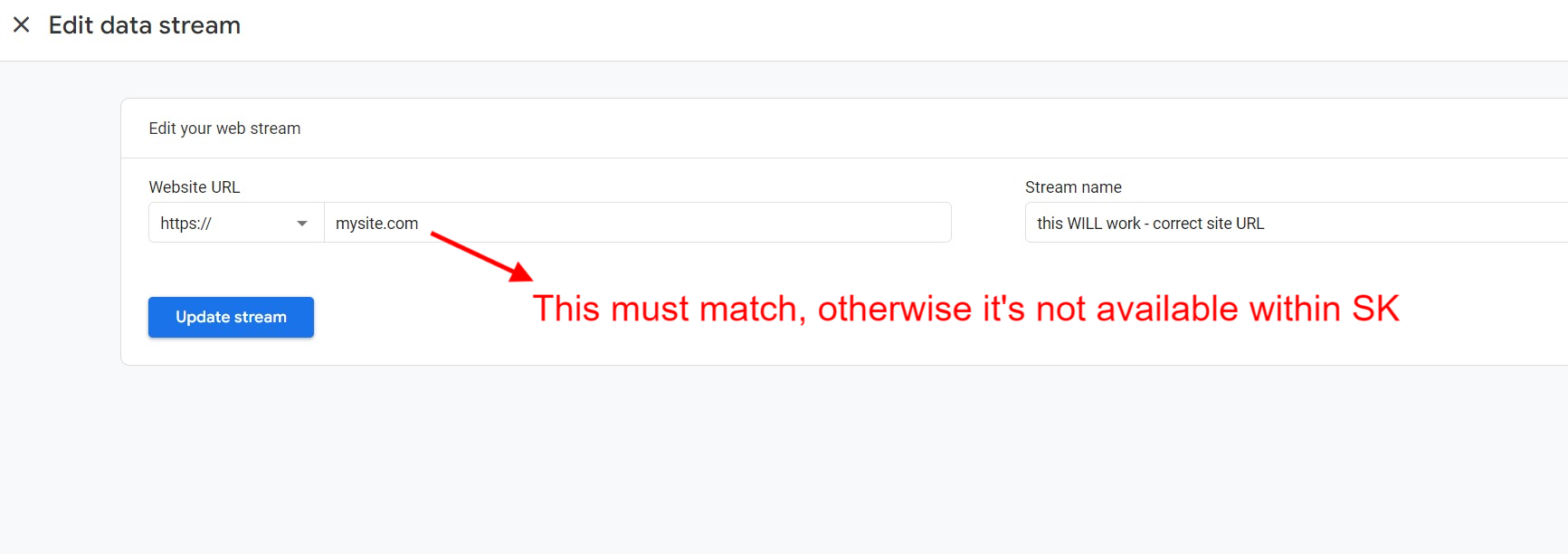
https://sitekit.withgoogle.com/documentation/using-site-kit/the-google-tag/So to summarize based on your question, Site Kit will add the measurement ID for you based on the property and data stream you select within your Analytics settings in Site Kit (Site Kit > Settings > Connected Services > Analytics > Edit). You can check what you’ve selected by visiting your Analytics settings within Site Kit (as per this screenshot). You can also check that your site is tracking visits from your selected measurement ID using the tagassistant.google.com service.
Let me know if you have any further questions on this.
James thanks for this. So I had added the site.com/site1 to Analytics before trying to add it as a data stream for site.com. i.e. there is an existing tag. So I was hoping Analytics would pick up the existing tag, but guessing for some reason it needs to issue a new one. Do I reset the connection for site.com/site1 or is it possible to give it the new tag? From the little bit of playing around I’ve done I don’t think you can give Site Kit two Measurement IDs?
Thanks for the links, I’m reading through them to try and find an answer. I have two multisites with this issue, so invested in finding the answer. Being able to see combined stats would be useful.
No problem, happy to assist.
Do I reset the connection for site.com/site1 or is it possible to give it the new tag?
You can change your Site Kit connected GA4 property anytime you wish, by visiting your Site Kit settings.
From the little bit of playing around I’ve done I don’t think you can give Site Kit two Measurement IDs?
You can insert one GA4 tag on your site via Site Kit (associated with one data stream/measurement ID). You can still manually insert your own property/measurement ID if you wish, independently of Site Kit.
Thanks for the links, I’m reading through them to try and find an answer. I have two multisites with this issue, so invested in finding the answer. Being able to see combined stats would be useful.
Great! Hopefully you’ll be able to configure your subdomain sites as you wish, using the link shared previously to aggregate data from analytics.google.com.
Let me know if you have any further questions on this.
Hi James thanks again for your help. Just a quick follow-up. It seems if you reset the site kit settings on a subfolder site it will then pick up the new Measurement ID. So took a little trial and error to figure this out. Be good to update the instructions on Analytics to reflect this, but this is an edge case, so not sure if that’s possible.
Thanks for the update @sugarweb. Based on your query I’ll do some testing on this. If we find anything that can be improved, certainly we will reflect any such changes over on the Site Kit plugin website. I’ll also keep you informed on my testing here.
While I am testing this, in order to recreate your issue, can you confirm that when you tried to connect Analytics within Site Kit to a data stream that has your subdirectory site defined within Analytics using the same as the site URL for this subdirectory site?
Note also that going forward users will be able to select all data streams within a selected property, regardless of whether the URL matches that defined within Analytics. See below for more information on this:
https://github.com/google/site-kit-wp/issues/7052I think on reflection the only change I’d make is to have a little section on the help/instructions file for anyone that has already connected their plugin to Analytics. So just to say to reset the connection, Analytics does pick up on the new Measurement ID.
Yes that’s correct so I was attempting to combine a number of subfolder sites to the central site. So making sure that the data for site.com/subfolder1 is collected into the main site.com stats. When you add the subfolder URL to Analytics it provides you with a new Measurement ID. So straight after that there are instructions on how to set up Site Kit, but nothing about the scenario where you’ve already set it up. Just needs a note saying reset the connection.
@sugarweb Thanks for the suggestion we will definitely take a look at this and see what can be done here. As mentioned above by James, we will continue to perform some testing on our side to recreate this and post any updates we have here.
Thanks for your patience on this @sugarweb. After performing some tests and discussing this with the team, data is filtered out for the WordPress site (or subdirectory site) based on the connected data stream only.
To aggregate data between sites, you can use the Analytics platform directly.
James thanks for the feedback. I got this working in the end. As I said, it’s just the instructions on Analytics that needs to be adjusted. As soon as you reset the connection on Site Kit the new Measurement ID is applied immediately.
Glad to hear it @sugarweb. If you have any further queries be sure to get in touch. If you’ve been a Site Kit user for some time be sure to also share your plugin feedback. Best of luck.


The topic ‘Using Site Kit on a Multisite’ is closed to new replies.