Hi @dwnl,
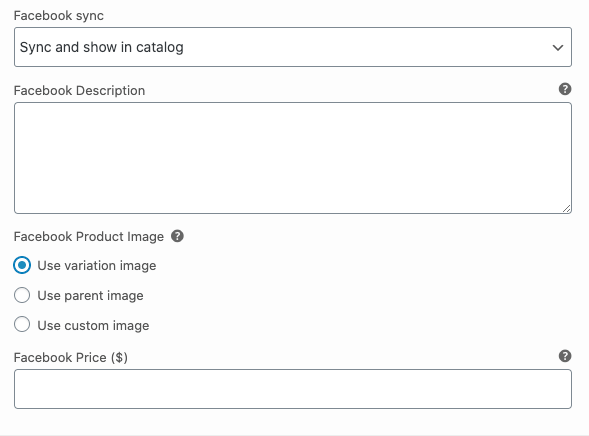
With regards to the settings, those allow you to choose which image is synced to FaceBook and will be used as the main product image on the FaceBook site.
If you were to choose the Parent image if that’s the image you have set to be a chair in WooCommerce that would be the image which is displayed on FaceBook.
If you were to choose the Variation Images and that was a fabric image it’s that which would be displayed on FaceBook.
Does this help clarify these settings for you and what image FaceBook will use for the product?
Thread Starter
 SLV
SLV
(@dwnl)
Hello,
Thanks for your reply.
The problem:
Variable Product: Chair 1
I go in Woocommerce to ‘Variations’
There are 80 variations of this 1 product
I click on a variation and I see at the ‘Facebook variant image ?’ section:
– Use variant image
– Use parent image
– Use custom image
By default, the setting is: Use variant image and this is right.
But on Facebook this image of this whole variable product is set to one of the variant images.
So Facebook randomly picked one of the variant images.
If I go to that variant that Facebook picked, in Woocommerce and set that specific variant image to:
– Use parent image
Facebook just picks another variant image.
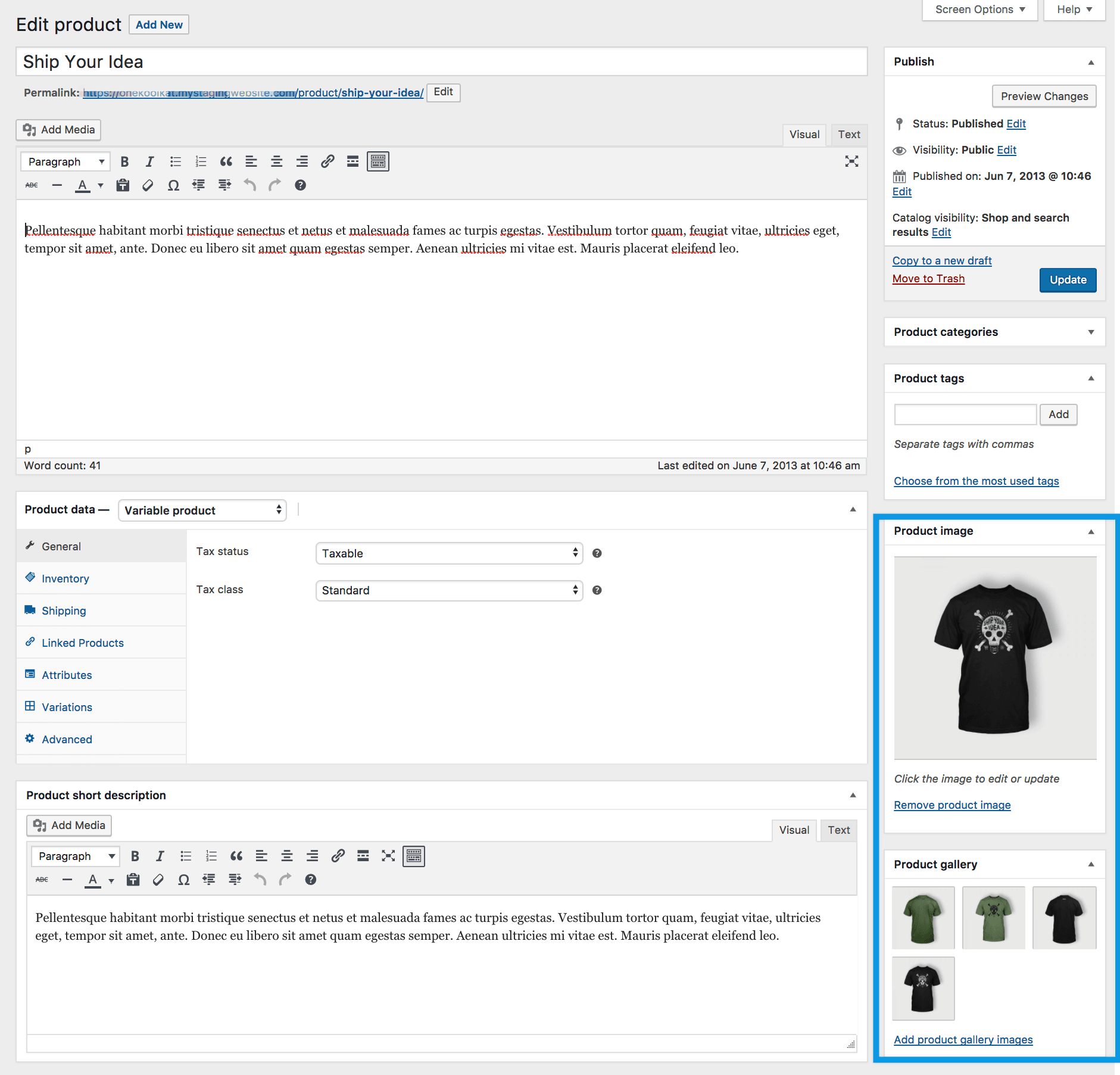
Facebook does not pic the main ‘Product image’ set in Woocommerce:
Product image
So where can I set this, so Facebook picks the ‘Product image’?
-
This reply was modified 5 years, 5 months ago by
 SLV.
SLV.
Hi @dwnl,
FaceBook will only use a single image for the product and would choose one of the variant images. It’s possibly best to set the image you’d like to display for the product as the main image in WooCommerce. Then set FaceBook to use the parent image of that product.
As a test, you could try deleting the synced Facebook product from the WooCommerce product admin in the Facebook metabox – then save the product to see if it syncs and the parent image then displays:

Image Link: https://cloudup.com/cinvVOhk3q6
Thread Starter
SLV
(@dwnl)
Hello thanks for your reply.
You say:
It’s possibly best to set the image you’d like to display for the product as the main image in WooCommerce.
I have
Then set Facebook to use the parent image of that product.
I have more than 700 products… and a lot of them have 80 variations…
I have to open them all, one by one, and set the Facebook images to parent…
This is way too time-consuming and just not an option.
Meanwhile, I uninstalled your plugin because of this and installed/bought the plugin:
WooCommerce Product Feed Manager PRO
With the free version you can make a feed of 50 products for multiple merchant shops, and it has the solution to my problem:
You can configure the feed attributes and their values.
So I can set:
– Add a variable parent product: Include/exclude an older variable product (YES)
– Include product variations: Include/exclude variants of products (NO)
– Main image (image link) to the main image of the product
– Product URL link to the parent product URL
– And add up to 10 additional images
With this feed I do get only the main images and not some random variation image
Maybe this is something you can add to your plugin.
But thanks for your help.
-
This reply was modified 5 years, 4 months ago by SLV.
Hi @dwnl
Glad to hear you were able to find a solution that works for you – thanks for letting us know!
I’ll mark this thread as resolved now. If you have any further questions, I recommend creating a new thread.
Hi @amandasjackson
I cant understand why are you selecting a random variation image for the main product image on variable products, this is nonsense. How can we set the main product image on facebook as the main product image on Woo and let the variations have their own image. This is how Woo is set up:
Variable Product: Has a main image called “product image” that is the image that appears on the “catalog”
– Variation 1 – Has its own image
– Variation 2 – Has its own image
– Variation 3 – Has its own image
I know there is an option to set up the variation image as the main product image but that’s not what a lot a people are complaining, they want the main product image on a variable product to be …. the main product image on Woo.
Image this, you have a necklace that comes in three colors, so you create a variable product on Woo with three variations: Yellow, Black and White. Then you take a picture of the three necklaces together that you set up as the product image, and then you take another three pics, one of the black, one of the white and one of the yellow and you set up each one of them to the corresponding variation.
Then the facebook plug-in syncs the product and you get your main product image as the yellow one. But why? why isnt the main product image used, the one that has the three options on the same pic?
Please help us out. Thanks
Hi @negapo,
It seems like this is more of an enhancement request. It would be great to have you add your ideas to the [Ideas Board](https://ideas.woocommerce.com/forums/133476-woocommerce?category_id=398356), which is where developers go to look for future plugin features and improvements. You can also vote for other ideas posted by users like you.
With that being said, I’ll mark this thread as “resolved” now. If you have any further questions, I recommend creating a new thread.
Best!
Thread Starter
SLV
(@dwnl)
I don’t think this is an enhancement request.
Variable products are standard in Woocommerce.
There the product has the standard product image. All variations have their own images. This is normal.
It’s your plugin that does not support this. There is no simple function/option to link to the standard product image instead of some variant image.
I am not the first with this problem. It has been asked a lot.
Hi @dwnl. If there is a feature that you would like to see in Facebook for WooCommerce that is not there yet, as is the case here, then the way to communicate this suggestion to our developers is through our Ideas Board. Our developers use that board to gauge community traction on what features to include in future versions.
Please create an issue there that other WooCommerce store owners can vote for.