Hello, dear lindsayedm.
Thank you for contacting us. Our team is always ready to help you.
Thank You. Now our team will try to solve your problem. Please wait for our reply.
Customer satisfaction is our priority and we do our best to make your experience even better.
Enjoy the plugin, but in the meantime, feel free to open a new topic if you have more questions.
Thank You very much.
Dear lindsayedm.
Sorry, you can’t use a plugin for .mov. Plugin is for video only (YouTube, Vimeo, Wistia & MP4). When you add mp4 format video, please add image as well.
You plugin can change the image, video and so on. The plugin has it all.
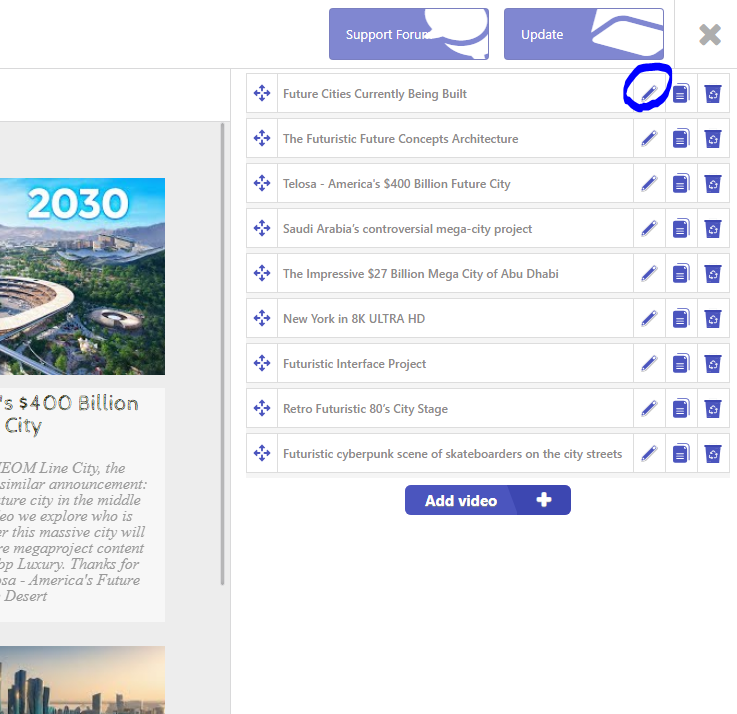
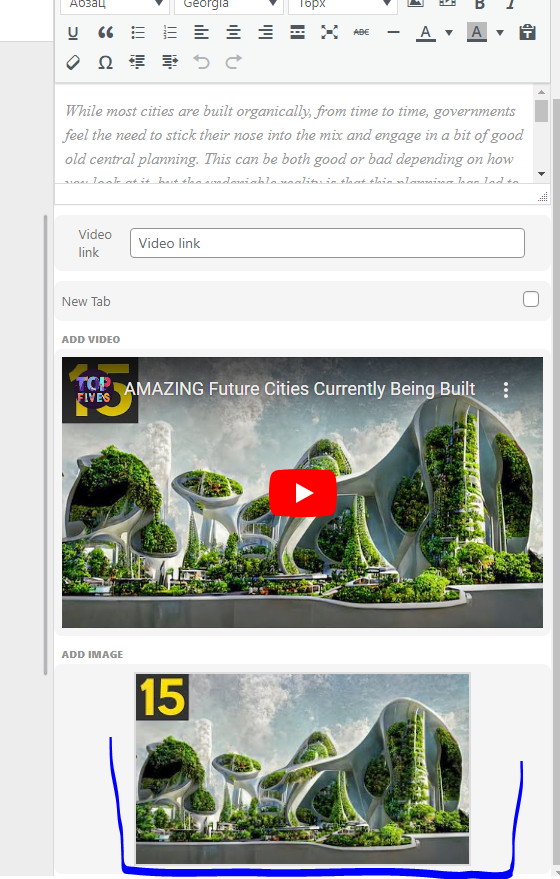
- If you want to change the image, you just need to edit the video. Then click on “Add vimage”. The Media Library will open there. You can choose an image from the library, add a new one or use a shortcode. Then save and you will change the image.
- If you want to add a video, you need to “Add video”. The media library will open. There is a link there. Copy the video link and paste. After that, save and your video will change.
We are always happy to hear from you and solve all problems. We will develop the plugin with you. For us, the most important thing is that the plugin should be used by the developers themselves.
Thanks for the good suggestion.
Have a good day!