web2PDF: only one page is converted
-
Before installing OceanWP (and the Child Theme) I was able to convert a whole website to PDF (online and Adobe Acrobat).
Since the installation of OceanWP only one page (home) is converted. I also tried different converting tools – always the same result: only 1 page gets converted.
My navigation is in a sidebar (not in the header) and I have a multisite (german/english).The page I need help with: [log in to see the link]
-
Hello @grac_grac,
What is the conversion tool you use? Please get in touch with your third-party plugin/tools author.
We don’t provide any converter tools.
Best Regards
Well, when you read my message carefully, you must understand, that whatever PDF converter I use, I only get the landing page converted.
This happens only since I use OceanWP – before, with another theme, the whole website was converted.
You understand, what I say? OceanWP is constructed in a way, that all other pages besides the landing page are not found.
This has to have to do with the navigation, of course. And since I put my navigation into the sidebar and not in the header, maybe that could explain why the other pages are not found by none of all PDF converter.
You understand now my problem?Hello @grac_grac,
Sorry for the inconvenience, but we don’t provide this tool.
If you think this issue only happens with our products, then we need more details about this issue.Unfortunately, the information provided in this thread in regards to the problems you are facing are insufficient for troubleshooting purposes and a possibility to understand the reason why this is happening on your end.
Kindly share the following info that could help us understand the issue you described better and hopefully help you resolve it:
1. Detailed explanation of the issue you are experiencing; when did you first notice the problem occurring (after a particular update, using a specific device, etc), as well as the steps of you take that trigger the issue in case the problem is not constantly present on your website, especially on the frontend. You can attach screenshots or a short video of the issue.
2. Explain to us step by step how we can reproduce the issue so we can recreate it somewhere other than your website.
You can upload your files using one of the following online services:
https://postimages.org
https://imgbb.com
https://loom.com
https://drive.google.com3. Kindly provide us with your system environment information. If you’re running Elementor, navigate to Elementor > System Info in your WP dashboard.
4. If all pages are imported and you can see a “not found” message, it is not related to our products. in this case, you need to update permalinks from dashboard > Settings > permalinks (update this page; even without changes – Postname is recommended for all permalinks on your website).
You can send the information as code here or upload them to http://pastebin.com/ and get an exclusive link.
Before sending these, please make sure that:
Everything on your website is running the latest versions (WP, theme, plugins). Perform a basic troubleshooting checkup method and make sure the issue is related to our theme or plugin(s). To do this, deactivate all other plugins then activate them one by one and check for this issue. Continue doing this until you find what product is causing a conflict with our product. Then provide the details as explained above.Note: if you have any cache plugin or server cache(CDN / Browser Cache and Cookies and …), you need to clear its cache contents or disable them to see your changes.
Please keep us posted.
Thank you,
Best RegardsAgain: if you are willing to read and understand what I want to tell the oceanWP developers, you should be able to grasp my feedback and bug-report.
Before I installed oceanWP, I was able to convert my whole website to PDF (with any tool).
Now, I only get the landing page as PDF – with the same tools as before.
I know that oceanWP wants the navigation placed only in the header. But the theme offers also the possibility to put the navigation in the sidebar-widget.
Therefore, I assume that the navigation is found anyhow – otherwise why would oceanWP offer the possibility to put the navigation in the sidebar?
BUT: it seems as if any PDF-converting tool could not find my sidebar-navigation, because oceanWP doesn’t offer the path to the navigation.
You understand now? If not, maybe a more competent one could comprehend my problem.
And please spare me with any further prefabricated text blocks.Hello @grac_grac,
Kindly share a short video of the issue you have raised on this topic.
Also, provide us with your system environment information.
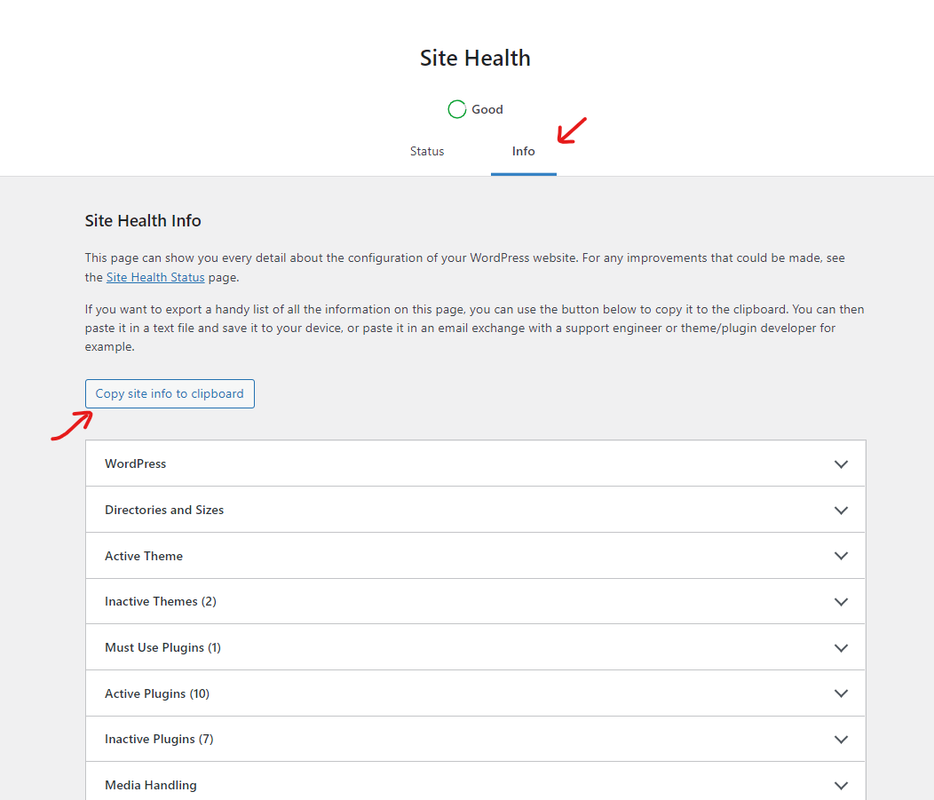
To do this, please go to WP Dashboard > Tools > Site Health > Info Tab and click on the button Copy site info to clipboard. Then you can send the information as code here or upload them to http://pastebin.com/ and get an exclusive link: https://i.postimg.cc/fbjtkFyJ/image.png.We need this information, and then I will forward it to our development team for further investigation.
Thank you for understanding,
Best Regards
The topic ‘web2PDF: only one page is converted’ is closed to new replies.