• Resolved dalelyles

    (@dalelyles)


    I’ve been reading back through some 20 years of blog posts and I’ve found some very odd glitches in the matrix: the underlying code might be scrambled, or a photo missing, that kind of thing. This one, though, was so odd I had to share with you.

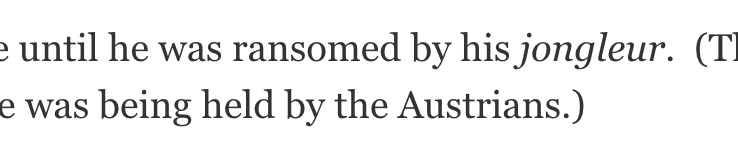
    Near the bottom of the linked post, the word ‘jongleur‘ was very strange:

    I check under the hood:

    Everything fine. I check the code, which I have found squirrelly things in here and there, presumably from updates of WP or the theme:
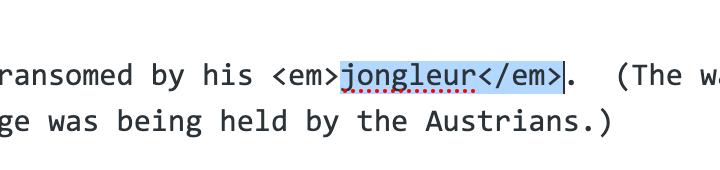
    I hope you’re able to see the first two images; your form sniped that something was wrong but provided no feedback on how to fix it.

    Anyway, it was bizarre enough for me to bring it to your attention in case there was something y’all need to fix or advise me about.

    Dale

    The page I need help with: [log in to see the link]

Viewing 7 replies - 1 through 7 (of 7 total)
  • Moderator Samuel Wood (Otto)

    (@otto42)

    ww.wp.xz.cn Admin

    What exactly was weird about it?

    The em, means emphasis. Basically, the word was in italics. Presumably you used a weird editor on the post at some point?

    Thread Starter dalelyles

    (@dalelyles)

    The problem has shown up in other posts; it seems to be an italicized ‘o‘ that’s causing the problem. Hope that’s a clue. I do notice that the first two images have not appeared. I will try again.

    It’s not working. Don’t know whyβ€”it’s the same file format as the third image.

    Moderator threadi

    (@threadi)

    I assume you have included screenshots in your forums postings. Unfortunately, you can’t see them to recognize the context of your description. Please proceed as described here to insert screenshots: https://ww.wp.xz.cn/support/forum-user-guide/block-editor/#adding-screenshots

    Thread Starter dalelyles

    (@dalelyles)

    I appreciate the assistance, everyone. Just to save us some time, I’m so old that I taught students how to code html sites, so I know what ’em’ means. πŸ™‚

    Here are the first two examples:

    https://dalelyles.com/images/1_front_appearing_text.png

    https://dalelyles.com/images/2_the_visual_backstage.png

    Moderator threadi

    (@threadi)

    That looks like a style problem to me. Does it only occur in the editor? Which one are you using? The classic editor or the block editor?

    To rule this out as the cause, I would recommend deactivating all plugins. If it still looks like this, it could also be caused by the theme. You are using an extremely outdated theme with Philips (https://ww.wp.xz.cn/themes/philips/). This may not be compatible with the current WordPress. You might want to change it.

    Thread Starter dalelyles

    (@dalelyles)

    The problem β€” of garbled font β€” presents only on the front end. Both the editor and code are absolutely as they should be, as illustrated in the second and third images.

    I’m using the classic editor; I prefer it.

    I’ll your suggestions a shot and report back.

    Thread Starter dalelyles

    (@dalelyles)

    And without my doing a single thing β€” it’s fixed.

    https://dalelyles.com/images/4_front_appearing_text_redux.png

    Technology is weird.

Viewing 7 replies - 1 through 7 (of 7 total)

The topic ‘Weird code issues in old posts’ is closed to new replies.