WooCommerce Database update fails
-
After moving a site from a local server (localhost) to webspace, I can’t update woocommerce database. The link to update the database still points to the localhost-site. How can this be fixed. Also, after updatein WooCommerce PLugin, I get a 500 Server Error. i guess this is due to the same issue.
The page I need help with: [log in to see the link]

-
Hi @elbersh,
Thank you for reaching out. I understand how confusing and frustrating this type of issue can be. The problem occurs because your database still contains references to your old localhost URLs.
To fix this, you can install and activate the Better Search Replace plugin. Once activated, search for your localhost URL and replace it with your live domain. For example, replace http://localhost/yoursite with https://asosafety.biz, then run the replacement.
Another option is to update the URLs directly in your database using phpMyAdmin. Simply go to the SQL section of your site and run the appropriate query, making sure to replace the localhost URL with your live site domain.
UPDATE wp_options SET option_value = replace(option_value, 'http://localhost/yoursite', 'https://yourdomain.com') WHERE option_name = 'home' OR option_name = 'siteurl';

UPDATE wp_posts SET guid = replace(guid, 'http://localhost/yoursite','https://yourdomain.com');

UPDATE wp_posts SET post_content = replace(post_content, 'http://localhost/yoursite', 'https://yourdomain.com');

UPDATE wp_postmeta SET meta_value = replace(meta_value,'http://localhost/yoursite','https://yourdomain.com');
You’ll need to run each line of code separately in order to fix the issue.
Thank you very much for your quick response. This worked so far, that the button to update the database is wokring again, but, hoever I now get a message saying that the link if have followed, has exipred.
Hi @elbersh,
I’m glad to hear my earlier response helped resolve the first issue. Regarding the new error message, “The link you followed has expired,” could you clarify where you’re encountering it? Is it happening when you try to log in to your site’s admin area, or while navigating around the dashboard?
Before replying, please try the following steps:
- Clear both your site cache and browser cache.
- Log out of your site, then log back in.
- Go to Settings > Permalinks, switch the structure to Plain, save the changes, then switch back to your original permalink structure and save again.
After doing this, let me know if the issue persists. I’ll be waiting for your clarification and update.
Hi,
I cleared wordpress cache by editing wp-config.php and emptying wp-conten/cache. Caching plugin is also disabled. Logged out and logged in again, changed permalink structure to plain, and after that back to preivous setting. The message still persists. It appears right after I click the button under WooCommerce –> Settings saying: Update Database. The URL is https://asosafety.biz/wp-admin/update.php?action=update-selectedWould it be an option to just reinstall WooCommerce again?
Thank you for the clarification @elbersh,
The error “The link you followed has expired” during a WooCommerce database update is usually caused by server-side PHP limitations, not the link itself expiring. This happens when the update process for a large database exceeds the default limits for upload size, memory, or execution time.
To resolve this, you’ll need to increase your resource limits:
- Set upload_max_filesize to at least 512M
- Match post_max_size to the same value
- Increase max_execution_time to 300
You can adjust these settings in your php.ini, .htaccess, or wp-config.php file, depending on your hosting environment. If you’re unsure how to make these changes, I recommend contacting your hosting provider for assistance.
When responding after the update please share your system status report from woocommerce > status > get system report > copy for support and share it using pastebin.
I changed the settings using php.ini and confirmed the setting by calling phpinfo(). The message still persists, here the report:
WordPress Environment<br><br>WordPress address (URL): https://asosafety.biz<br>Site address (URL): https://asosafety.biz<br>WC Version: 10.1.1<br>Legacy REST API Package Version: Auf dieser Website ist das alte REST-API-Plugin nicht installiert.<br>Action Scheduler Version: ✔ 3.9.3<br>Log Directory Writable: ✔<br>WP Version: 6.8.3<br>WP Multisite: –<br>WP Memory Limit: 768 MB<br>WP Debug Mode: –<br>WP Cron: ✔<br>Language: de_DE<br>External object cache: – Server Environment<br><br>Server Info: Apache<br>Server Architecture: Linux 4.4.400-icpu-104 x86_64<br>PHP Version: 8.2.29<br>PHP Post Max Size: 64 MB<br>PHP Time Limit: 600<br>PHP Max Input Vars: 5000<br>cURL Version: 7.74.0<br>OpenSSL/1.1.1w<br><br>SUHOSIN Installed: –<br>MySQL Version: 8.0.36<br>Max Upload Size: 64 MB<br>Default Timezone is UTC: ✔<br>fsockopen/cURL: ✔<br>SoapClient: ✔<br>DOMDocument: ✔<br>GZip: ✔<br>Multibyte String: ✔<br>Remote Post: ✔<br>Remote Get: ✔ Database<br><br>WC Database Version: 10.1.1<br>WC Database Prefix: wp_<br>Gesamtgröße der Datenbank: 92.63MB<br>Datenbank-Datengröße: 62.08MB<br>Datenbank-Indexgröße: 30.55MB<br>wp_woocommerce_sessions: Daten: 0.02MB + Index: 0.02MB + Engine InnoDB<br>wp_woocommerce_api_keys: Daten: 0.02MB + Index: 0.03MB + Engine InnoDB<br>wp_woocommerce_attribute_taxonomies: Daten: 0.02MB + Index: 0.02MB + Engine InnoDB<br>wp_woocommerce_downloadable_product_permissions: Daten: 0.02MB + Index: 0.06MB + Engine InnoDB<br>wp_woocommerce_order_items: Daten: 0.02MB + Index: 0.02MB + Engine InnoDB<br>wp_woocommerce_order_itemmeta: Daten: 0.02MB + Index: 0.03MB + Engine InnoDB<br>wp_woocommerce_tax_rates: Daten: 0.02MB + Index: 0.06MB + Engine InnoDB<br>wp_woocommerce_tax_rate_locations: Daten: 0.02MB + Index: 0.03MB + Engine InnoDB<br>wp_woocommerce_shipping_zones: Daten: 0.02MB + Index: 0.00MB + Engine InnoDB<br>wp_woocommerce_shipping_zone_locations: Daten: 0.02MB + Index: 0.03MB + Engine InnoDB<br>wp_woocommerce_shipping_zone_methods: Daten: 0.02MB + Index: 0.00MB + Engine InnoDB<br>wp_woocommerce_payment_tokens: Daten: 0.02MB + Index: 0.02MB + Engine InnoDB<br>wp_woocommerce_payment_tokenmeta: Daten: 0.02MB + Index: 0.03MB + Engine InnoDB<br>wp_woocommerce_log: Daten: 0.02MB + Index: 0.02MB + Engine InnoDB<br>wp_actionscheduler_actions: Daten: 1.52MB + Index: 1.44MB + Engine InnoDB<br>wp_actionscheduler_claims: Daten: 0.02MB + Index: 0.02MB + Engine InnoDB<br>wp_actionscheduler_groups: Daten: 0.02MB + Index: 0.02MB + Engine InnoDB<br>wp_actionscheduler_logs: Daten: 1.52MB + Index: 0.50MB + Engine InnoDB<br>wp_ahm_asset_links: Daten: 0.02MB + Index: 0.02MB + Engine InnoDB<br>wp_ahm_assets: Daten: 0.02MB + Index: 0.00MB + Engine InnoDB<br>wp_ahm_download_stats: Daten: 0.02MB + Index: 0.00MB + Engine InnoDB<br>wp_ahm_emails: Daten: 0.02MB + Index: 0.00MB + Engine InnoDB<br>wp_ahm_sessions: Daten: 0.02MB + Index: 0.00MB + Engine InnoDB<br>wp_ahm_social_conns: Daten: 0.02MB + Index: 0.00MB + Engine InnoDB<br>wp_ahm_user_download_counts: Daten: 0.02MB + Index: 0.00MB + Engine InnoDB<br>wp_commentmeta: Daten: 0.02MB + Index: 0.03MB + Engine InnoDB<br>wp_comments: Daten: 0.02MB + Index: 0.09MB + Engine InnoDB<br>wp_icl_background_task: Daten: 0.02MB + Index: 0.00MB + Engine InnoDB<br>wp_icl_content_status: Daten: 0.02MB + Index: 0.02MB + Engine InnoDB<br>wp_icl_core_status: Daten: 0.02MB + Index: 0.02MB + Engine InnoDB<br>wp_icl_flags: Daten: 0.02MB + Index: 0.02MB + Engine InnoDB<br>wp_icl_languages: Daten: 0.02MB + Index: 0.03MB + Engine InnoDB<br>wp_icl_languages_translations: Daten: 0.20MB + Index: 0.17MB + Engine InnoDB<br>wp_icl_links_post_to_post: Daten: 0.02MB + Index: 0.02MB + Engine InnoDB<br>wp_icl_links_post_to_term: Daten: 0.02MB + Index: 0.02MB + Engine InnoDB<br>wp_icl_locale_map: Daten: 0.02MB + Index: 0.00MB + Engine InnoDB<br>wp_icl_message_status: Daten: 0.02MB + Index: 0.03MB + Engine InnoDB<br>wp_icl_mo_files_domains: Daten: 0.06MB + Index: 0.02MB + Engine InnoDB<br>wp_icl_node: Daten: 0.02MB + Index: 0.00MB + Engine InnoDB<br>wp_icl_reminders: Daten: 0.02MB + Index: 0.00MB + Engine InnoDB<br>wp_icl_string_batches: Daten: 0.02MB + Index: 0.00MB + Engine InnoDB<br>wp_icl_string_packages: Daten: 0.02MB + Index: 0.00MB + Engine InnoDB<br>wp_icl_string_positions: Daten: 0.39MB + Index: 0.14MB + Engine InnoDB<br>wp_icl_string_status: Daten: 0.02MB + Index: 0.02MB + Engine InnoDB<br>wp_icl_string_translations: Daten: 4.52MB + Index: 4.03MB + Engine InnoDB<br>wp_icl_strings: Daten: 8.52MB + Index: 15.09MB + Engine InnoDB<br>wp_icl_translate: Daten: 6.52MB + Index: 0.08MB + Engine InnoDB<br>wp_icl_translate_job: Daten: 0.02MB + Index: 0.02MB + Engine InnoDB<br>wp_icl_translation_batches: Daten: 0.02MB + Index: 0.00MB + Engine InnoDB<br>wp_icl_translation_downloads: Daten: 0.02MB + Index: 0.00MB + Engine InnoDB<br>wp_icl_translation_status: Daten: 5.52MB + Index: 0.11MB + Engine InnoDB<br>wp_icl_translations: Daten: 0.22MB + Index: 0.56MB + Engine InnoDB<br>wp_imagify_files: Daten: 0.20MB + Index: 0.36MB + Engine InnoDB<br>wp_imagify_folders: Daten: 0.02MB + Index: 0.03MB + Engine InnoDB<br>wp_itsec_bans: Daten: 0.02MB + Index: 0.03MB + Engine InnoDB<br>wp_itsec_dashboard_events: Daten: 0.02MB + Index: 0.02MB + Engine InnoDB<br>wp_itsec_dashboard_lockouts: Daten: 0.02MB + Index: 0.02MB + Engine InnoDB<br>wp_itsec_distributed_storage: Daten: 0.02MB + Index: 0.02MB + Engine InnoDB<br>wp_itsec_fingerprints: Daten: 0.02MB + Index: 0.03MB + Engine InnoDB<br>wp_itsec_firewall_rules: Daten: 0.02MB + Index: 0.05MB + Engine InnoDB<br>wp_itsec_geolocation_cache: Daten: 0.02MB + Index: 0.03MB + Engine InnoDB<br>wp_itsec_lockouts: Daten: 0.02MB + Index: 0.08MB + Engine InnoDB<br>wp_itsec_logs: Daten: 0.02MB + Index: 0.11MB + Engine InnoDB<br>wp_itsec_mutexes: Daten: 0.02MB + Index: 0.02MB + Engine InnoDB<br>wp_itsec_opaque_tokens: Daten: 0.02MB + Index: 0.02MB + Engine InnoDB<br>wp_itsec_temp: Daten: 0.02MB + Index: 0.06MB + Engine InnoDB<br>wp_itsec_user_groups: Daten: 0.02MB + Index: 0.00MB + Engine InnoDB<br>wp_itsec_vulnerabilities: Daten: 0.02MB + Index: 0.05MB + Engine InnoDB<br>wp_kbp_countdown_entry: Daten: 0.02MB + Index: 0.02MB + Engine InnoDB<br>wp_kbp_form_entry: Daten: 0.02MB + Index: 0.02MB + Engine InnoDB<br>wp_kbp_form_entrymeta: Daten: 0.02MB + Index: 0.03MB + Engine InnoDB<br>wp_kbp_form_events: Daten: 0.02MB + Index: 0.02MB + Engine InnoDB<br>wp_kbp_query_index: Daten: 0.02MB + Index: 0.00MB + Engine InnoDB<br>wp_links: Daten: 0.02MB + Index: 0.02MB + Engine InnoDB<br>wp_litespeed_avatar: Daten: 0.02MB + Index: 0.03MB + Engine InnoDB<br>wp_litespeed_img_optming: Daten: 0.13MB + Index: 0.25MB + Engine InnoDB<br>wp_litespeed_url: Daten: 0.06MB + Index: 0.08MB + Engine InnoDB<br>wp_litespeed_url_file: Daten: 0.09MB + Index: 0.27MB + Engine InnoDB<br>wp_mgmlp_block_access: Daten: 0.02MB + Index: 0.00MB + Engine InnoDB<br>wp_mgmlp_blocked_ips: Daten: 0.02MB + Index: 0.00MB + Engine InnoDB<br>wp_mgmlp_folders: Daten: 0.08MB + Index: 0.00MB + Engine InnoDB<br>wp_options: Daten: 9.52MB + Index: 0.56MB + Engine InnoDB<br>wp_pmxi_files: Daten: 0.02MB + Index: 0.00MB + Engine InnoDB<br>wp_pmxi_geocoding: Daten: 0.02MB + Index: 0.03MB + Engine InnoDB<br>wp_pmxi_hash: Daten: 0.06MB + Index: 0.00MB + Engine InnoDB<br>wp_pmxi_history: Daten: 0.02MB + Index: 0.00MB + Engine InnoDB<br>wp_pmxi_images: Daten: 0.05MB + Index: 0.00MB + Engine InnoDB<br>wp_pmxi_imports: Daten: 1.52MB + Index: 0.00MB + Engine InnoDB<br>wp_pmxi_posts: Daten: 0.08MB + Index: 0.00MB + Engine InnoDB<br>wp_pmxi_templates: Daten: 0.08MB + Index: 0.00MB + Engine InnoDB<br>wp_postmeta: Daten: 5.52MB + Index: 3.03MB + Engine InnoDB<br>wp_posts: Daten: 12.52MB + Index: 0.63MB + Engine InnoDB<br>wp_shared_files_contacts: Daten: 0.02MB + Index: 0.00MB + Engine InnoDB<br>wp_shared_files_download_log: Daten: 0.09MB + Index: 0.00MB + Engine InnoDB<br>wp_shared_files_log: Daten: 0.02MB + Index: 0.00MB + Engine InnoDB<br>wp_shared_files_search_log: Daten: 0.02MB + Index: 0.00MB + Engine InnoDB<br>wp_shepherd_tec_tasks: Daten: 0.02MB + Index: 0.05MB + Engine InnoDB<br>wp_tec_events: Daten: 0.02MB + Index: 0.02MB + Engine InnoDB<br>wp_tec_kv_cache: Daten: 0.02MB + Index: 0.00MB + Engine InnoDB<br>wp_tec_occurrences: Daten: 0.02MB + Index: 0.06MB + Engine InnoDB<br>wp_term_relationships: Daten: 0.08MB + Index: 0.05MB + Engine InnoDB<br>wp_term_taxonomy: Daten: 0.02MB + Index: 0.03MB + Engine InnoDB<br>wp_termmeta: Daten: 0.02MB + Index: 0.03MB + Engine InnoDB<br>wp_terms: Daten: 0.02MB + Index: 0.03MB + Engine InnoDB<br>wp_tm_taskmeta: Daten: 0.02MB + Index: 0.03MB + Engine InnoDB<br>wp_tm_tasks: Daten: 0.02MB + Index: 0.02MB + Engine InnoDB<br>wp_usermeta: Daten: 0.08MB + Index: 0.03MB + Engine InnoDB<br>wp_users: Daten: 0.02MB + Index: 0.05MB + Engine InnoDB<br>wp_wc_admin_note_actions: Daten: 0.06MB + Index: 0.02MB + Engine InnoDB<br>wp_wc_admin_notes: Daten: 0.08MB + Index: 0.00MB + Engine InnoDB<br>wp_wc_category_lookup: Daten: 0.02MB + Index: 0.00MB + Engine InnoDB<br>wp_wc_customer_lookup: Daten: 0.02MB + Index: 0.03MB + Engine InnoDB<br>wp_wc_download_log: Daten: 0.02MB + Index: 0.03MB + Engine InnoDB<br>wp_wc_order_addresses: Daten: 0.02MB + Index: 0.06MB + Engine InnoDB<br>wp_wc_order_coupon_lookup: Daten: 0.02MB + Index: 0.03MB + Engine InnoDB<br>wp_wc_order_operational_data: Daten: 0.02MB + Index: 0.03MB + Engine InnoDB<br>wp_wc_order_product_lookup: Daten: 0.02MB + Index: 0.08MB + Engine InnoDB<br>wp_wc_order_stats: Daten: 0.02MB + Index: 0.05MB + Engine InnoDB<br>wp_wc_order_tax_lookup: Daten: 0.02MB + Index: 0.03MB + Engine InnoDB<br>wp_wc_orders: Daten: 0.02MB + Index: 0.11MB + Engine InnoDB<br>wp_wc_orders_meta: Daten: 0.02MB + Index: 0.03MB + Engine InnoDB<br>wp_wc_product_attributes_lookup: Daten: 0.02MB + Index: 0.02MB + Engine InnoDB<br>wp_wc_product_download_directories: Daten: 0.02MB + Index: 0.02MB + Engine InnoDB<br>wp_wc_product_meta_lookup: Daten: 0.05MB + Index: 0.11MB + Engine InnoDB<br>wp_wc_rate_limits: Daten: 0.02MB + Index: 0.02MB + Engine InnoDB<br>wp_wc_reserved_stock: Daten: 0.02MB + Index: 0.00MB + Engine InnoDB<br>wp_wc_tax_rate_classes: Daten: 0.02MB + Index: 0.02MB + Engine InnoDB<br>wp_wc_webhooks: Daten: 0.02MB + Index: 0.02MB + Engine InnoDB<br>wp_wpo_404_detector: Daten: 0.02MB + Index: 0.05MB + Engine InnoDB<br>wp_yoast_indexable: Daten: 0.25MB + Index: 0.13MB + Engine InnoDB<br>wp_yoast_indexable_hierarchy: Daten: 0.05MB + Index: 0.05MB + Engine InnoDB<br>wp_yoast_migrations: Daten: 0.02MB + Index: 0.02MB + Engine InnoDB<br>wp_yoast_primary_term: Daten: 0.02MB + Index: 0.03MB + Engine InnoDB<br>wp_yoast_prominent_words: Daten: 0.02MB + Index: 0.05MB + Engine InnoDB<br>wp_yoast_seo_links: Daten: 0.38MB + Index: 0.30MB + Engine InnoDB Post Type Counts<br><br>attachment: 2366<br>custom_css: 1<br>kadence_wootemplate: 4<br>mgmlp_media_folder: 36<br>nav_menu_item: 37<br>page: 97<br>post: 14<br>product: 182<br>revision: 258<br>tribe_venue: 1<br>wb-custom-tabs: 3<br>wp_block: 3<br>wp_font_face: 36<br>wp_font_family: 12<br>wp_global_styles: 1<br>wp_navigation: 1<br>wpdmpro: 1 Security<br><br>Secure connection (HTTPS): ✔<br>Hide errors from visitors: ✔ Active Plugins (28)<br><br>Better Search Replace: von WP Engine – 1.4.10<br>Solid Security Basic: von SolidWP – 9.4.1<br>Delete All Products for WooCommerce: von ThemeDyno – 1.5.0<br>Heartbeat Control by WP Rocket: von WP Rocket – 2.0.1<br>Imagify: von Imagify Image Optimizer – Optimize Images & Convert WebP & Avif – 2.2.6<br>Kadence Blocks - PRO Extension: von Kadence WP – 2.8.1<br>Kadence Blocks - Gutenberg Blöcke für Page Builder Features: von Kadence WP – 3.5.21<br>Kadence Creative Kit: von Kadence WP – 1.0.1<br>Kadence Pro - Premium addon for the Kadence Theme: von Kadence WP – 1.1.15<br>Starter Templates von Kadence WP: von Kadence WP – 2.2.13<br>Kadence Shop Kit: von Kadence WP – 2.4.10<br>Maintenance: von WebFactory Ltd – 4.18<br>Shared Files Pro: von Shared Files – File Upload Form – 1.7.53<br>WPML Multilingual CMS: von OnTheGoSystems – 4.7.6<br>The Events Calendar: von The Events Calendar – 6.15.4<br>UpdraftPlus - Backup/Restore: von TeamUpdraft<br>DavidAnderson – 2.25.7.26<br><br>weLaunch Framework: von weLaunch.io – 1.2.3<br>WooCommerce Multilingual & Multicurrency: von OnTheGoSystems – 5.5.1<br>WooCommerce Ultimate Tabs: von weLaunch – 1.3.11<br>WooCommerce: von Automattic – 10.1.1 (Update auf Version 10.2.2 ist verfügbar)<br>Yoast SEO Premium: von Team Yoast – 25.9<br>Yoast SEO: von Team Yoast – 26.0<br>WP All Import Pro: von Soflyy – 4.11.5<br>WPML SEO: von OnTheGoSystems – 2.2.3<br>WP All Import - WooCommerce Import Add-On Pro: von Soflyy – 4.0.5<br>WPML Export und Import: von OnTheGoSystems – 1.0.2<br>Wpml String Übersetzung: von Onthegosysteme – 3.3.3<br>Yoast SEO: WooCommerce: von Team Yoast – 16.6 Inactive Plugins (6)<br><br>Disable Bloat for WordPress & WooCommerce: von Disable Bloat – 3.5.0<br>Kadence Custom Fonts: von Kadence WP – 1.1.5<br>Kadence WooCommerce Elementor: von Kadence WP – 1.0.11<br>LiteSpeed Cache: von LiteSpeed Technologies – 7.5.0.1<br>OTGS Installer: von OnTheGoSystems – 3.1.13<br>WP-Optimize - Clean, Compress, Cache: von TeamUpdraft<br>DavidAnderson – 4.2.4 Settings<br><br>Legacy API Enabled: –<br>Force SSL: –<br>Currency: EUR (€)<br>Currency Position: right_space<br>Thousand Separator: .<br>Decimal Separator: ,<br>Number of Decimals: 2<br>Taxonomies: Product Types: external (external)<br>grouped (grouped)<br>simple (simple)<br>variable (variable)<br><br>Taxonomies: Product Visibility: exclude-from-catalog (exclude-from-catalog)<br>exclude-from-search (exclude-from-search)<br>featured (featured)<br>outofstock (outofstock)<br>rated-1 (rated-1)<br>rated-2 (rated-2)<br>rated-3 (rated-3)<br>rated-4 (rated-4)<br>rated-5 (rated-5)<br><br>Connected to WooCommerce.com: –<br>Enforce Approved Product Download Directories: ✔<br>HPOS feature enabled: ✔<br>Order datastore: Automattic\WooCommerce\Internal\DataStores\Orders\OrdersTableDataStore<br>HPOS data sync enabled: –<br>Enabled Features: analytics<br>marketplace<br>order_attribution<br>site_visibility_badge<br>remote_logging<br>email_improvements<br>blueprint<br>point_of_sale<br>custom_order_tables Logging<br><br>Enabled: ✔<br>Handler: Automattic\WooCommerce\Internal\Admin\Logging\LogHandlerFileV2<br>Retention period: 30 Tage<br>Level threshold: –<br>Log directory size: 11 kB WC Pages<br><br>Shop-Basis: ❌ Seiten-ID ist gesetzt<br>aber die Seite existiert nicht<br><br>Warenkorb: ❌ Seite nicht festgelegt<br>Kasse: ❌ Seite nicht festgelegt<br>Mein Konto: ❌ Seite nicht festgelegt<br>Allgemeine Geschäftsbedingungen: ❌ Seite nicht festgelegt Theme<br><br>Name: Kadence<br>Version: 1.3.1 (Update auf Version 1.3.6 ist verfügbar)<br>Author URL: https://www.kadencewp.com/<br>Child Theme: ❌ – Wenn du WooCommerce mit einem Theme<br>das du nicht selbst entwickelt hast<br>an eigene Bedürfnisse anpasst<br>dann empfehlen wir die Verwendung eines Child-Themes. Siehe Wie du ein Child-Theme erstellst (engl.)<br><br>Theme type: Classic-Theme<br>WooCommerce Support: ✔ Templates<br><br>Overrides: /homepages/37/d4298599921/htdocs/V3/wp-content/plugins/kadence-woo-extras/lib/gallery/product-image.php Admin<br><br>Enabled Features: activity-panels<br>analytics<br>product-block-editor<br>coupons<br>core-profiler<br>customize-store<br>customer-effort-score-tracks<br>import-products-task<br>experimental-fashion-sample-products<br>shipping-smart-defaults<br>shipping-setting-tour<br>homescreen<br>marketing<br>mobile-app-banner<br>onboarding<br>onboarding-tasks<br>pattern-toolkit-full-composability<br>product-custom-fields<br>remote-inbox-notifications<br>remote-free-extensions<br>payment-gateway-suggestions<br>printful<br>shipping-label-banner<br>subscriptions<br>store-alerts<br>transient-notices<br>woo-mobile-welcome<br>wc-pay-promotion<br>wc-pay-welcome-page<br>launch-your-store<br>add-to-cart-with-options-stepper-layout<br><br>Disabled Features: product-data-views<br>experimental-blocks<br>experimental-iapi-mini-cart<br>experimental-iapi-runtime<br>coming-soon-newsletter-template<br>minified-js<br>product-pre-publish-modal<br>settings<br>async-product-editor-category-field<br>product-editor-template-system<br>use-wp-horizon<br>experimental-wc-rest-api<br><br>Daily Cron: ✔ Next scheduled: 2025-10-01 12:59:29 +02:00<br>Options: ✔<br>Notes: 95<br>Onboarding: completed Action Scheduler<br><br>Abgeschlossen: 2.587<br>Oldest: 2025-08-31 12:44:21 +0200<br>Newest: 2025-10-01 10:31:42 +0200<br><br>Fehlgeschlagen: 10<br>Oldest: 2025-02-10 14:01:46 +0100<br>Newest: 2025-10-01 10:32:48 +0200<br><br>Ausstehend: 12<br>Oldest: 2025-10-01 21:12:08 +0200<br>Newest: 2025-10-09 11:47:52 +0200 Status report information<br><br>Generated at: 2025-10-01 10:48:46 +02:00<br>Hi @elbersh,
Thank you for getting back to me. I reviewed your report and noticed that your PHP Post Max Size is still set to 64M and your Max Upload Size is also 64M.
Your database is about 92.63MB, which is larger than these limits. Because of this, the process fails and triggers the “link you followed has expired” error.
I recommend increasing both values to at least 256M (ideally 512M) to ensure enough resources are available, especially since other resource-heavy plugins may also be running on your site.
This is strange. I when I check using phpinfo() (PHP 8.2.29 – phpinfo()) it tells me both values are 256, when I run WooCommerce status report it says that POST_MAX_SIZE is 64M still. What could be the cause here?
Hi there!
That does sound unusual. The values shown in WooCommerce → Status Report are pulled from the server configuration, but sometimes hosting providers apply overrides at different levels (for example, in
.htaccess,php.ini,wp-config.php, or server-level configurations). This can cause a mismatch between whatphpinfo()reports and what WooCommerce detects.I would suggest reaching out to your hosting provider and asking if there are any server-level limits or overrides in place for
post_max_size. They’ll be able to confirm which value is actually applied to your WordPress environment.
After that, please try updating the database by going to WooCommerce → Status → Tools and clicking the Update Database button.
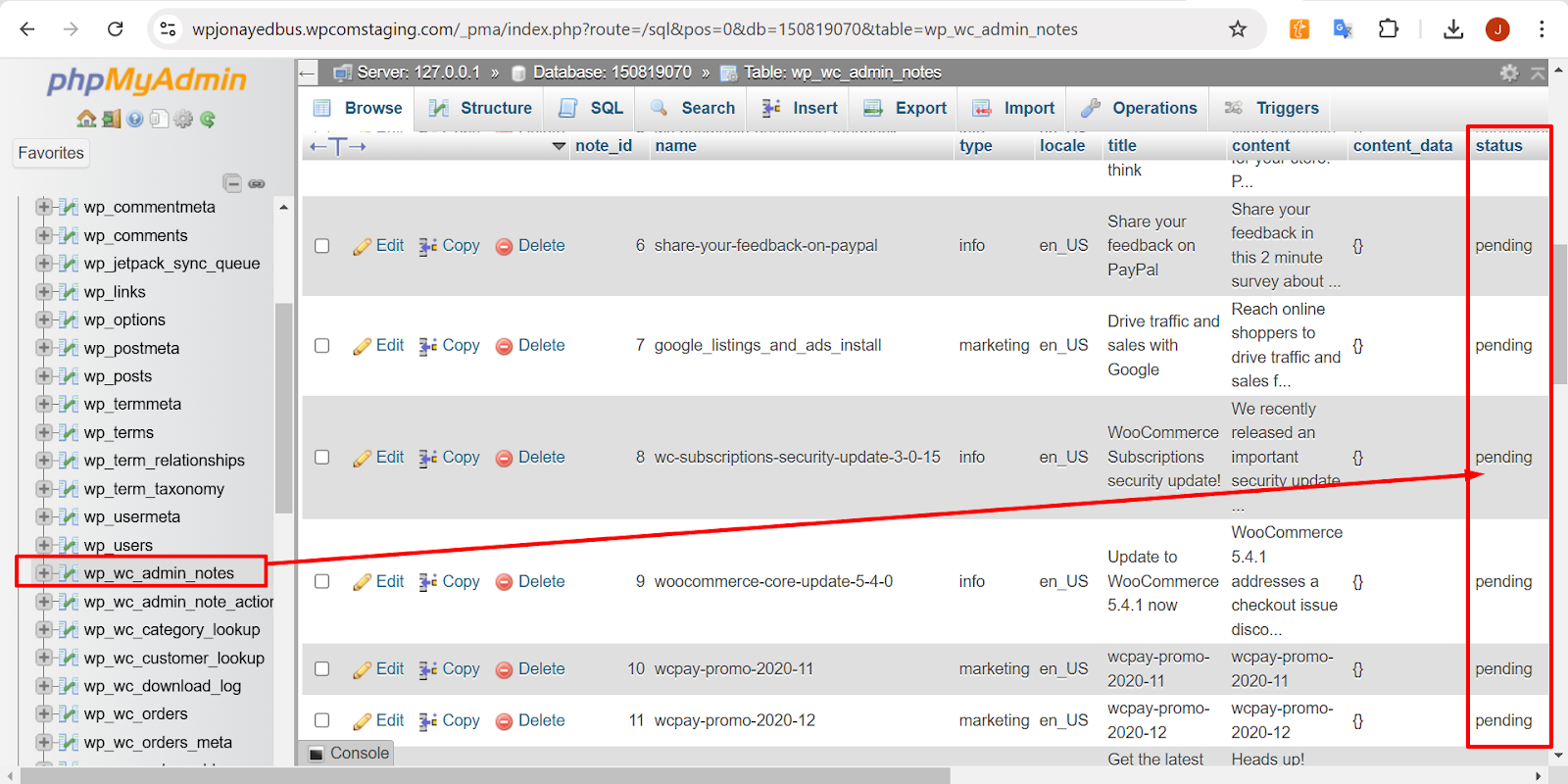
If that does not work, you can try accessing your database directly to check for any pending notifications. Here’s how:- Go to your WP database and locate the
wp_wc_admin_notestable. - Look for any entries related to the database update and check if the status is set to Pending.
- If so, you can manually change the status to Actioned to see if this resolves the issue.
The table structure should look something like this:
Please give this a try, and let me know if it makes a difference.
Hello,
the upload filesize was overwritten by the provider. That one is solved now:


Server Environment

Server Info: Apache
Server Architecture: Linux 4.4.400-icpu-104 x86_64
PHP Version: 8.2.29
PHP Post Max Size: 256 MB
PHP Time Limit: 300
PHP Max Input Vars: 1000
cURL Version: 7.74.0
OpenSSL/1.1.1w

SUHOSIN Installed: –
MySQL Version: 8.0.36
Max Upload Size: 256 MB
Default Timezone is UTC: ✔
fsockopen/cURL: ✔
SoapClient: ✔
DOMDocument: ✔
GZip: ✔
Multibyte String: ✔
Remote Post: ✔
Remote Get: ✔
unfortunately, I still get the message saying that the link has expired after clicking the Update Database Button.
The wp_ac_admin_notes table says ‘unactioned’ where name = ‘wc-update-db-reminder’. This is the only entry I can find regarding db-updatesHi @elbersh,
Thanks for the thorough updates — great job tracking down the host-level override. Now that post_max_size/upload_max_filesize are 256 MB, the “link you followed has expired” is most likely a nonce/caching or conflict issue rather than a size limit.
Here’s the fastest path to get the DB update through:
- Bypass the browser flow (recommended)
- If you have SSH/WP-CLI:
wp plugin update woocommerce --force wp wc update- The second command runs WooCommerce’s DB updater without the admin nonce.
- If WP-CLI isn’t available
- Temporarily disable all plugins except WooCommerce and switch to a default theme (Twenty Twenty-Four).
- Make sure no page caching touches /wp-admin/* (purge server/CDN cache; disable LiteSpeed/Optimize temporarily). Security plugins (e.g., Solid Security) can also block admin nonces — disable them during the update.
- Log out/in, then run: WooCommerce → Status → Tools → Update database.
- Check URL/nonce sources
- Confirm home and siteurl in wp_options are exactly https://asosafety.biz (no trailing slash, no mixed http/https).
- Ensure there’s no admin caching or reverse-proxy rule rewriting /wp-admin/update.php.
- Look for a failing hook
- Go to WooCommerce → Status → Scheduled Actions and search for woocommerce_run_db_update / wc_update_ actions. If any are Failed, click “Run” and note errors.
- Turn on debugging, trigger the update, then check /wp-content/debug.log for the stack trace:
define('WP_DEBUG', true); define('WP_DEBUG_LOG', true); define('WP_DEBUG_DISPLAY', false);- Tidy up the admin note (optional)
- In wp_wc_admin_notes, set the status for the wc-update-db-reminder note to actioned (or delete that row). Then reload WooCommerce → Status → Tools and try again.
Also, you’re on WooCommerce 10.1.1 with HPOS enabled. After the DB update succeeds, please update WooCommerce to 10.2.2 and Kadence to the latest to keep schema/tools in sync.
If any step throws a specific error, paste the exact message (or the last 30 lines of debug.log) and I’ll pinpoint the cause.
Hey @elbersh,
Looks like it’s been a while since we last heard from you, so we’ll go ahead and close this thread.
If WooCommerce has been valuable for your store, and you found our support helpful, it would mean a lot if you left us a short review here:
https://ww.wp.xz.cn/support/plugin/woocommerce/reviews/#new-postYou can open a new topic anytime if you need help in the future!




The topic ‘WooCommerce Database update fails’ is closed to new replies.
