Hi there!
I understand how frustrating it can be to receive repeated notices like WooCommerce database update required. You can update the site database by going to Woocommerce → Status → Tool and here find database update button and click update.
If that does not help, you can try accessing your database directly to check for any pending notifications. Here’s how:
- Go to your WP database and locate the
wp_wc_admin_notes table.
- Look for any entries related to the database update and check if the status is set to Pending.
- If so, you can manually change the status to Actioned to see if this resolves the issue.
The table structure should look something like this:
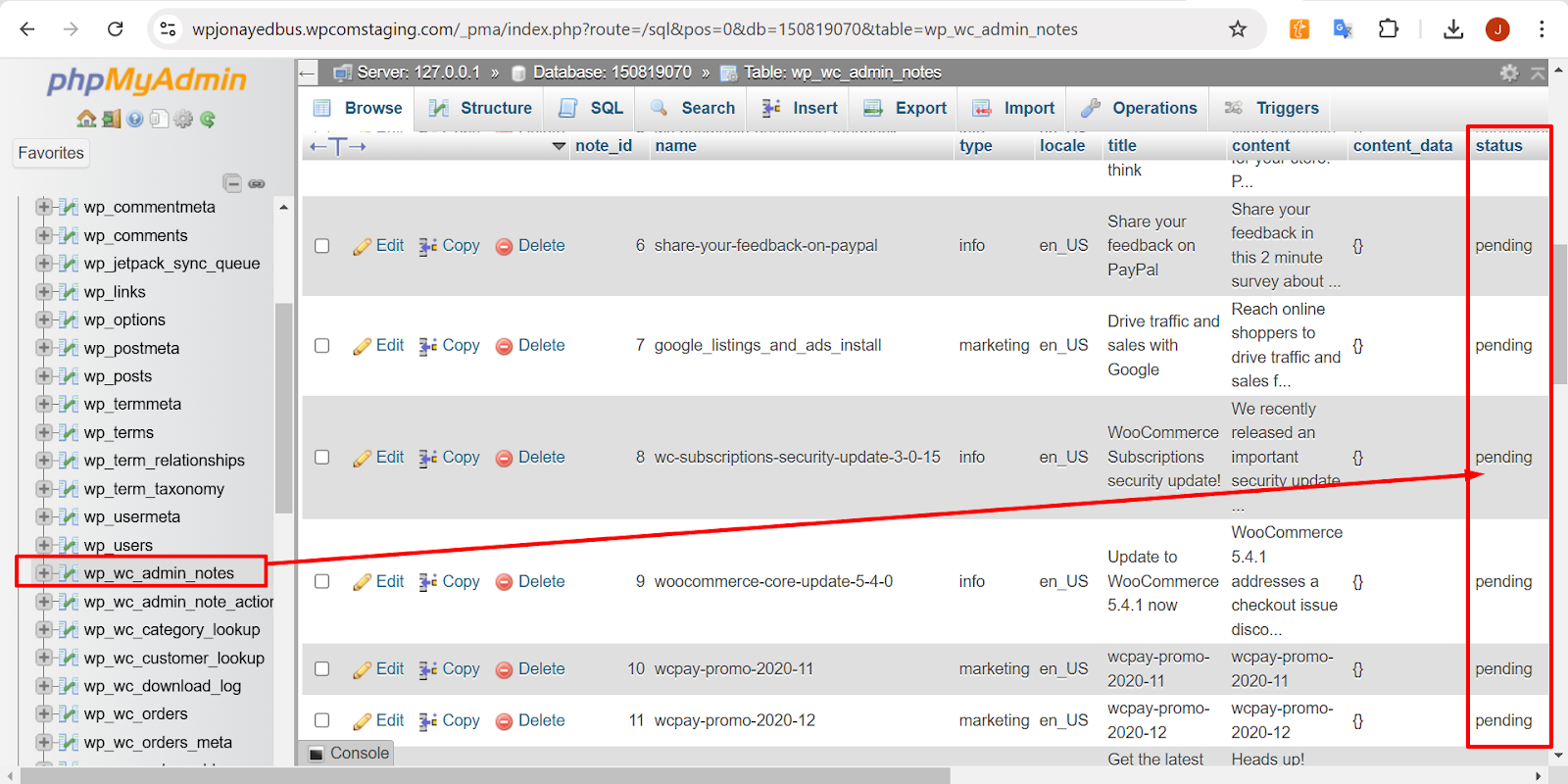
Please give this a try, and let me know if it makes a difference.
Thread Starter
 tayoso
(@tayoso)
Hi, same issue even after forcing a wp cli upgrade.
Hi @tayoso,
Just to clarify, the WooCommerce database upgrade runs in the background and can sometimes take a while to complete. To better understand the issue, are you saying that the upgrade isn’t running for the database at all? When you click on Upgrade Database, what exactly happens?
Have you also followed the instructions provided by @shahzeenfarooq on manually triggering the upgrade from WooCommerce → Status → Tools?
Hello! Since it’s been a while, I’ll mark this as closed for now. We’re always available to help when you’re ready to proceed.


