Woocommerce form broken
-
### wp-core ###

version: 6.0.3
site_language: de_DE
user_language: de_DE
timezone: +00:00
permalink: /%postname%/
https_status: true
multisite: false
user_registration: 1
blog_public: 1
default_comment_status: open
environment_type: production
user_count: 31
dotorg_communication: true

### wp-paths-sizes ###

wordpress_path: /homepages/27/d886880956/htdocs/clickandbuilds/xxx
wordpress_size: 241,27 MB (252993022 bytes)
uploads_path: /homepages/27/d886880956/htdocs/clickandbuilds/xxxx/wp-content/uploads
uploads_size: 773,85 MB (811440459 bytes)
themes_path: /homepages/27/d886880956/htdocs/clickandbuilds/xxx/wp-content/themes
themes_size: 14,43 MB (15127782 bytes)
plugins_path: /homepages/27/d886880956/htdocs/clickandbuilds/xxx/wp-content/plugins
plugins_size: 157,95 MB (165621304 bytes)
database_size: 14,69 MB (15400960 bytes)
total_size: 1,17 GB (1260583527 bytes)

### wp-active-theme ###

name: Fit (fit )
version: 3.5
author: the expertwebinfotech team
author_website: https://www.expertwebinfotech.com
parent_theme: none
theme_features: core-block-patterns, widgets-block-editor, post-thumbnails, post-formats, editor-style, editor-styles, wp-block-styles, responsive-embeds, editor-color-palette, automatic-feed-links, menus, custom-background, customize-selective-refresh-widgets, custom-header, widgets
theme_path: /homepages/27/d886880956/htdocs/clickandbuilds/xxx/wp-content/themes/fit
auto_update: Deaktiviert

### wp-themes-inactive (1) ###

Twenty Twenty-Two: version: 1.2, author: WordPress-Team, Automatische Aktualisierungen deaktiviert

### wp-plugins-active (28) ###

Admin Menu Editor: version: 1.10.3, author: Janis Elsts, Automatische Aktualisierungen deaktiviert
CB Change Mail Sender: version: 1.2.2, author: Md Abul Bashar, Automatische Aktualisierungen deaktiviert
Change WordPress Login Logo: version: 1.1.7, author: Boopathi Rajan, Automatische Aktualisierungen deaktiviert
Classic Editor: version: 1.6.2, author: WordPress Contributors, Automatische Aktualisierungen deaktiviert
Code Snippets: version: 3.2.1, author: Code Snippets Pro, Automatische Aktualisierungen deaktiviert
Contact Form 7: version: 5.6.4, author: Takayuki Miyoshi, Automatische Aktualisierungen deaktiviert
CookieYes | GDPR Cookie Consent: version: 3.0.4, author: CookieYes, Automatische Aktualisierungen deaktiviert
Custom Field Suite: version: 2.6.2.1, author: Matt Gibbs, Automatische Aktualisierungen deaktiviert
Design Upgrade for LearnDash: version: 2.12, author: Escape Creative, Automatische Aktualisierungen deaktiviert
Easy Dash for LearnDash: version: 2.2.0, author: Luis Rock, Automatische Aktualisierungen deaktiviert
Hide My WP Ghost Lite: version: 5.0.17, author: WPPlugins – WordPress Security Plugins, Automatische Aktualisierungen deaktiviert
Increase Maximum Upload File Size: version: 2.0.4, author: Imagify, Automatische Aktualisierungen deaktiviert
Kadence Blocks – Gutenberg Blocks for Page Builder Features: version: 2.4.17, author: Kadence WP, Automatische Aktualisierungen deaktiviert
Klarna Order Management for WooCommerce: version: 1.7.0, author: klarna, krokedil, Automatische Aktualisierungen deaktiviert
Klarna Payments for WooCommerce: version: 2.12.1, author: krokedil, klarna, automattic, Automatische Aktualisierungen deaktiviert
LearnDash LMS: version: 4.3.1.3, author: LearnDash, Automatische Aktualisierungen deaktiviert
LearnDash LMS – Course Grid: version: 2.0.6, author: LearnDash, Automatische Aktualisierungen deaktiviert
LearnDash LMS – Stripe Integration: version: 1.9.3, author: LearnDash, Automatische Aktualisierungen deaktiviert
LearnDash LMS – WooCommerce Integration: version: 1.9.5, author: LearnDash, Automatische Aktualisierungen deaktiviert
PDF Invoices & Packing Slips for WooCommerce: version: 3.2.2, author: WP Overnight, Automatische Aktualisierungen deaktiviert
Social Chat: version: 6.2.0, author: QuadLayers, Automatische Aktualisierungen deaktiviert
Theme options: version: 3.1, author: Vivek Songara, Automatische Aktualisierungen deaktiviert
WooCommerce: version: 7.0.0, author: Automattic, Automatische Aktualisierungen deaktiviert
WooCommerce Payments: version: 4.9.0, author: Automattic, Automatische Aktualisierungen deaktiviert
WooCommerce PayPal Payments: version: 1.9.4, author: WooCommerce, Automatische Aktualisierungen deaktiviert
WooCommerce Shipping & Tax: version: 1.26.3, author: WooCommerce, Automatische Aktualisierungen deaktiviert
WooCommerce Stripe Gateway: version: 6.9.0, author: WooCommerce, Automatische Aktualisierungen deaktiviert
WP Author, Date and Meta Remover: version: 1.0.6, author: Johnnie J. O’Dell Jr., Automatische Aktualisierungen deaktiviert

### code-snippets (6) ###

snippet-1: name: Ändere Upload-Dateinamen in Kleinbuchstaben, scope: global, modified: 2022-09-28 02:42:56, tags: [sample, media]
snippet-2: name: Admin-Leiste deaktivieren , scope: front-end, modified: 2022-09-28 02:42:56, tags: [sample, admin-bar]
snippet-3: name: Smileys zulassen, scope: global, modified: 2022-09-28 02:42:56, tags: [sample]
snippet-4: name: Aktuelles Jahr, scope: content, modified: 2022-09-28 02:42:56, tags: [sample, dates]
snippet-5: name: Hide Image on Course page, scope: global, modified: 2022-09-28 02:48:53
snippet-10: name: fitnesstrainer-b-lizenz, scope: global, modified: 2022-10-05 03:17:29

### wp-media ###

image_editor: WP_Image_Editor_GD
imagick_module_version: Nicht verfügbar
imagemagick_version: Nicht verfügbar
imagick_version: Nicht verfügbar
file_uploads: File uploads is turned off
post_max_size: 64M
upload_max_filesize: 64M
max_effective_size: 64 MB
max_file_uploads: 20
gd_version: 2.2.5
gd_formats: GIF, JPEG, PNG, WebP, BMP, XPM
ghostscript_version: 9.27

### wp-server ###

server_architecture: Linux 4.4.302-icpu-088 x86_64
httpd_software: Apache
php_version: 8.1.11 64bit
php_sapi: cgi-fcgi
max_input_variables: 5000
time_limit: 50000
memory_limit: -1
max_input_time: -1
upload_max_filesize: 64M
php_post_max_size: 64M
curl_version: 7.64.0 OpenSSL/1.1.1n
suhosin: false
imagick_availability: false
pretty_permalinks: true
htaccess_extra_rules: true

### wp-database ###

extension: mysqli
server_version: 5.7.38-log
client_version: mysqlnd 8.1.11
max_allowed_packet: 67108864
max_connections: 3000

### wp-constants ###

WP_HOME: undefined
WP_SITEURL: undefined
WP_CONTENT_DIR: /homepages/27/d886880956/htdocs/clickandbuilds/xxx/wp-content
WP_PLUGIN_DIR: /homepages/27/d886880956/htdocs/clickandbuilds/xxx/wp-content/plugins
WP_MEMORY_LIMIT: 40M
WP_MAX_MEMORY_LIMIT: -1
WP_DEBUG: false
WP_DEBUG_DISPLAY: true
WP_DEBUG_LOG: false
SCRIPT_DEBUG: false
WP_CACHE: false
CONCATENATE_SCRIPTS: undefined
COMPRESS_SCRIPTS: undefined
COMPRESS_CSS: undefined
WP_ENVIRONMENT_TYPE: Nicht definiert
DB_CHARSET: utf8mb4
DB_COLLATE: undefined

### wp-filesystem ###

wordpress: writable
wp-content: writable
uploads: writable
plugins: writable
themes: writable
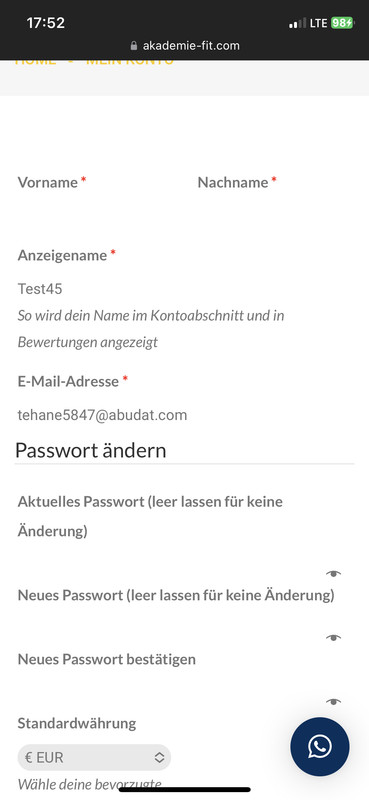
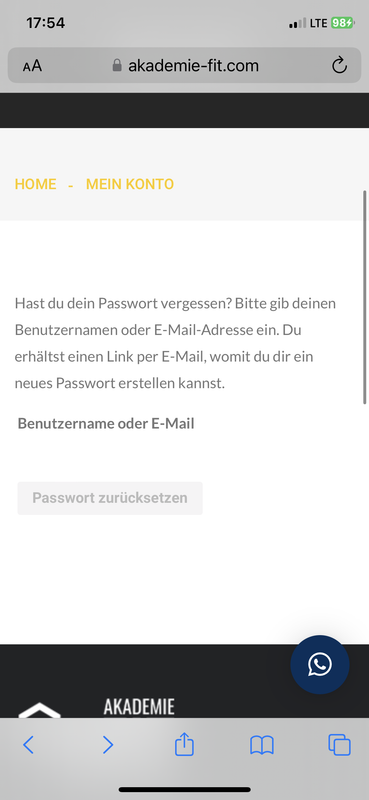
Hello, the line is missing in the form where we type the text. How can we fix this?
https://postimg.cc/tZ20fN74
https://postimg.cc/629JYmWPhttps://i.postimg.cc/WzKxDzrK/599-A2-FC6-BF2-B-4407-969-C-41991-B7-EAC14.jpg
https://i.postimg.cc/W4C96CtF/B06-A0677-9343-4876-AFF0-33-D968-C09-F03.png
Thank you very much.
-
This topic was modified 3 years, 7 months ago by
.
-
This topic was modified 3 years, 7 months ago by
The page I need help with: [log in to see the link]
-
This topic was modified 3 years, 7 months ago by

Viewing 5 replies - 1 through 5 (of 5 total)


Viewing 5 replies - 1 through 5 (of 5 total)
The topic ‘Woocommerce form broken’ is closed to new replies.