Hi @rkoekemoer,
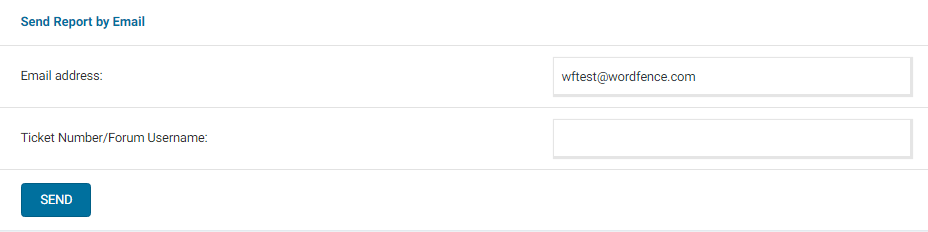
Thank you for reaching out. Can you send a diagnostic report to wftest @ wordfence . com? You can find the link to do so at the top of the Wordfence > Tools > Diagnostics page. Then click on “Send Report by Email”. Please add your forum username where indicated and respond here after you have sent it.
NOTE: It should look as follows – Screenshot of Tools > Diagnostic > Send by Email
Thanks,
Margaret
Hi Margaret, thanks for your response.
I’ve sent the diagnostic report as requested.
Hey @rkoekemoer,
It doesn’t look like we received any diagnostics from the site. Can you send those manually, please? Click Export at the top of the Diagnostics page, and then email us the text file as an attachment. Please add your forum username to the subject and respond here after you have sent it.
Thanks,
Margaret
Hi Margaret.
I’ve sent the diagnostics (as well as the email diagnostics) to wftest @ wordfence . com
The subject line reads: rkoekemoer – Fw: [Wordfence Security – Firewall, Malware Scan, and Login Security] Wordfence blocking firewall updates
Hi @rkoekemoer,
Perfect, thank you for sending that over! From your diagnostics, your site can communicate with our servers normally. Can you please send me any evidence your hosting sent that showed there was a connection error during the firewall rules update? You can paste that here or send it to wftest @ wordfence . com.
It is possible that some configuration files may be missing or corrupt. Try deactivating and reactivating Wordfence from the WordPress> Plugins page, choosing the option to keep all Wordfence tables and data. Then, manually update the firewall rules again.
If the rules update fails, please check the timestamp for the /wp-content/wflogs/rules.php file. If the timestamp on that file isn’t current, try deleting (or renaming, so you have a backup) wp-content/wflogs/rules.php and letting Wordfence rebuild the file.
Let me know how it goes!
Thanks,
Margaret
Hi Margaret.
Apologies for the late response, I’ve tried disabling and re-enabling the addon and replacing the rules.php file. Unfortunately neither of those solutions resolved the issue.
Is the rules.php file the only place the rules are stored? (just asking so I could perhaps move a copy of it from one of our dev environments to the live, as a short term solution just to get the latest rules applied).
I’ve asked for a picture of what my hosting provider sees on their firewalls when I try run a manual update, The error they’ve provided previously is that the connection is that the connection is reset from noc1.wordfence.com
Hi @rkoekemoer,
Thank you for checking! For now, you can copy the rules.php file to have the updated rules on your production server.
On our end, we see some hits for scans and the firewall data, so your server IP hasn’t been blocked. We don’t see any requests to fetch updated firewall rules. In the past when we’ve seen this, it’s typically been related to issues with cURL or OpenSSL. From your diagnostics, your server is using versions from 2022 of both, however, they may include later patches from the Linux distro on the server. Please check with your host to see if they can update cURL and OpenSSL to the latest version.
If they can’t update those, or if they’re already up-to-date on the distro, it might help to try a different PHP version. Sometimes different PHP versions use different versions of cURL. If your site is compatible, please try changing it to PHP 8.1 or 8.3 and try updating the rules again.
Let me know how it goes!
Thanks,
Margaret