Hi,
The message is only intended to show if the file contained commas (which yours does not), have you tried clearing your browsers cache to make sure there’s nothing funky going on there?
Thread Starter
 wp_kc
wp_kc
(@wp_kc)
Thanks for your rely Marius. Since I do web app coding for a living, I have all my browsers set to clear their caches on exit. And I ran CCleaner as a sanity check. Same result.
I don’t have much loaded in the way of plug-ins, but I will go through the routine of disabling them to see if anything changes.
After that, I guess I’ll have to start doing some file diffs between the current and previous versions of WP and Twentyseventeen to see if I can track down why it is happening. Or maybe single-stepping through the code as it loads the editor will be a faster approach.
Please do let us know if disabling plugins and using a base theme works, if not I’d be happy to debug it some more with you.
Just ran into the same error when updating to 4.8
In my case the error also said:
Failed to load content css: https://mydomain.com/wp-content/themes/mytheme/assets/css/editor-style.css
but when I looked at the network errors, the file that was failing to load was:
https://mydomain.com/wp-content/themes/mytheme/assets/css/font.css
This file was being called from editor-style.css via
@import url(../assets/css/font.css);
-
This reply was modified 9 years ago by
 Nagmay.
Thread Starter
wp_kc
(@wp_kc)
Thanks Nagmay! That was the problem.
I had this at the top of my editor-style.css file…
@import url(../twentyseventeen/assets/css/editor-style.css);
In my case, that was redundant since my code just adds to the editor style already set up by the twentyseventeen theme. I removed that line and the error message went away.
Strange that it worked without an error before, but now it produces an error.
Thank you both for the discovery, we’ve included it in our master list for the 4.8 release in case others stumble upon the same warning!
Hello,
How I solved it:
From network I’ve got error 200 blocked for fonts. Set a secure https and it worked.
before
@import url(http://fonts.googleapis.com/css?family=PT+Sans:400,700,400italic,700italic);
@import url(http://fonts.googleapis.com/css?family=Vollkorn:400italic,700italic,400,700);
after
@import url(https://fonts.googleapis.com/css?family=PT+Sans:400,700,400italic,700italic);
@import url(https://fonts.googleapis.com/css?family=Vollkorn:400italic,700italic,400,700);
-
This reply was modified 9 years ago by
 i0n1ca.
Hi, my error doesn’t make reference to fonts, only below “Failed to load content css: https://shippingandfreightresource.com/wp-content/themes/Safres-Theme-2017/css/editor-style.css”
But i have checked the file manager and this file is present.. This only started after updating to 4.8
Same problem here: Failed to load content css: http://peicurling.com/wp-content/themes/weaver-ii-pro/editor-style-css.php
I have another site, Cornwallcurling.com, running the same theme, and it is fine.
Yes, also had this problem appear after updating to 4.8
Failed to load content css: https://fonts.googleapis.com/css?family=Allura%2C
Running Tempura Theme
When I have time (which I really don’t), I’ll disable plugins and start there.
Until then, I’ll watch this thread.
I have the same issue too and have opened my own ticket!
@manaadiar It’s because your file uses @import() calls to files that don’t exist in that location, contact your theme developer.
@derekmacewen Sucuri is blocking that file as a potential backdoor, which might be related as the error comes up when something in the file, or the file it self, can’t be loaded properly. Contact Sucuri about the possible false positive, or check your security settings if you are confident the file is fine.
@raysmerlin That’s a non-existing font URL, likely your theme adds a reference to it in a file that is wrong and that’s the root of your issues, contact your theme developer.
@clorith, pls see this screenshot.. 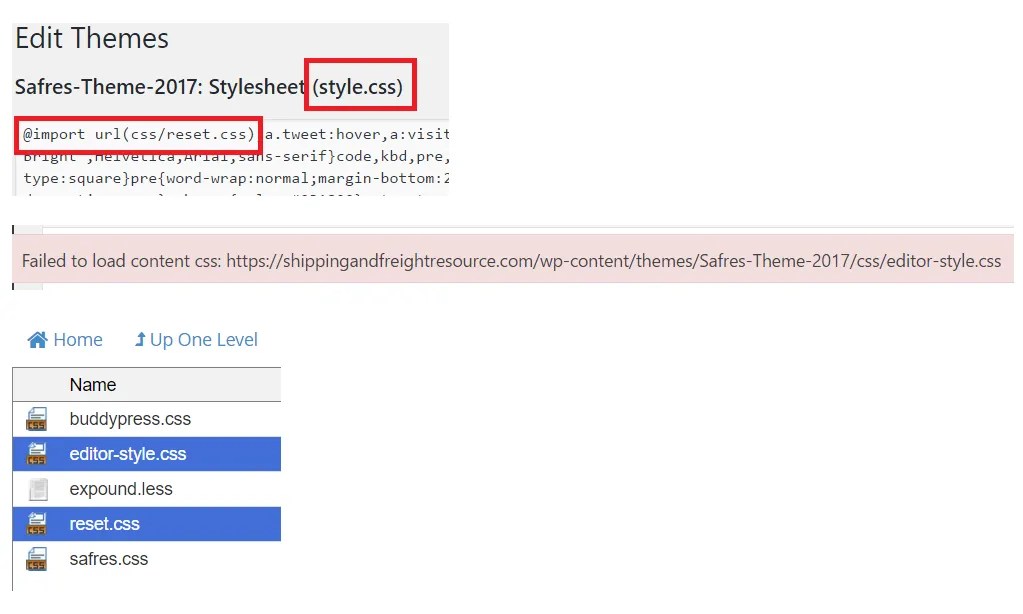
The CSS file starts with @import url(css/reset.css) and this reset.css and style.css and editor-style.css which is shown in the error “Failed to load content css: https://shippingandfreightresource.com/wp-content/themes/Safres-Theme-2017/css/editor-style.css” are ALL present in the host File Manager..
So not sure what else to do.. Pls assist, thanks..
@manaadiar Neither style.css or Safres.css are in the /css directory (your editor-style.css files is referencing both of these, neither exist, that’s the file you want to be looking at for the editor styles, not the generic style.css file in your theme directory).
Please not that these are case-sensitive names as well, so safres.css is not the same file as Safres.css.
Same problem as the rest I’m afraid, talk to your theme developer 🙂


