Hello @alfredino,
Thank you for reaching out.
I fully examined the issue you have raised on this topic and was unable to replicate it on my end, and no similar issues have been reported by other users to this moment.
Unfortunately, the information provided in this thread in regards to the issue you are facing are insufficient for troubleshooting purposes and a possibility to understand the reason why this is happening on your end.
Kindly share the following info that could help us understand the issue you described better and hopefully help you resolve it:
1. Share the live URL from the issue.
2. Explain to us step by step how we can reproduce the issue so we can recreate it somewhere other than your website (on a brand new WP). You can upload your files using one of the following online services:
https://postimages.org
https://loom.com
https://drive.google.com
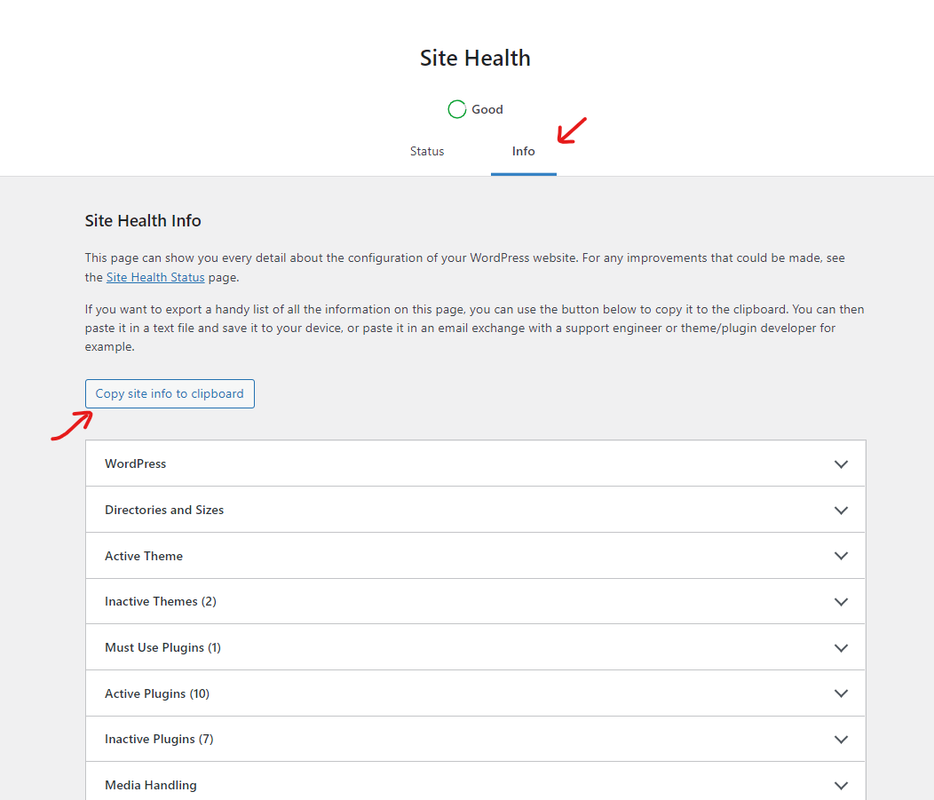
3. To better understand the condition of your website and the issue you are encountering, kindly provide us with your system environment information. To do this, please go to WP Dashboard > Tools > Site Health > Info Tab and click on the button Copy site info to clipboard. You can send the information as code here or upload them to http://pastebin.com/ or https://gist.github.com/ and get an exclusive link: https://i.postimg.cc/fbjtkFyJ/image.png (you can remove your email address from the content).
Before sending these, please make sure that:
Everything on your website is running the latest versions (WP, theme, plugins). If possible, perform a basic troubleshooting checkup method and make sure the issue is related to our theme or plugin(s). To do this, deactivate all other plugins then activate them one by one and check for this issue. Continue doing this until you find what product is causing a conflict with our product. Then provide the details as explained above.
Note 1: if you have any cache plugin or server cache(CDN / Browser Cache and Cookies and …), you need to clear its cache contents or disable them to see your changes.
Note 2: This issue it could be a host configuration issue, so make sure the server configurations be compatible with WordPress and have suitable config, like the following.
Please recheck your issue and keep us posted.
Thank you.
Best Regards