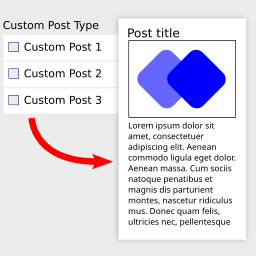
WordPress Custom Fields Not Showing
-
Hello, when using the WordPress Custom Fields, the Value does not appear when viewing the webpage. Please help us ensure this happens. Thank you!

-
Hi, you have to be a bit more specific how your setup is. E.g. what is “the WordPress Custom Fields” in your case? I’ve just tested it again with an ACF Custom Post Type with a custom text field called “field1” and in the template I’ve added the “Post ACF Value” widget, set the name to “field1” and typ “text” and it is working fine.
My plugin only supports ACF fields. So if you want to use other fields then it won’t work, sorry.
@pvainternal Please do not post email addresses on these forums again. Your reply was archived.
Email support is not an offering on these volunteer support forums.
Okay, I will use the Advanced Custom Fields plugin. Please let me know the shortcode or value to add the ACF Field Group Value into the template for the posts. Thank you.
As mentioned before: there is only on Widget you can use and that is the “Post ACF Value” widget. There is nothing else in the plugin you can use for it and its for simple text values.
The idea of this plugin is to let people without Elementor Pro create a simple way to make a custom Post template to display e.g. news without the need of Pro. But it is not advanced or complete as Pro.
Do you have a tutorial on how to use your Post ACF Value?
Also, the ‘post’ type is not working on my end. Please provide some tools I can use to fix.
file:///Users/design2/Documents/Screenshot%202025-03-10%20at%208.19.05%E2%80%AFAM.pngYou add the “Post ACF Value” widget and set the name of the field in the field “ACF field name”. As type select text, image or link. So if you created an ACF text field called “field1” you set it to “field1” and “text”. That’s all it can do.
You’ve linked a local image, can’t see that. In case you’ve used “post” as the post type in the “Custom post pages” section: please use a custom post type and assign it.
The Custom Post Page is working “project,” but the “post” is not connecting to the “Posts” blog items pages. Please provide some tools I can troubleshoot and use to fix it.
https://snipboard.io/ygVzGr.jpgTools: Text editor and then look at the plugin files. There are no dedicated tools to debug this plugin, it’s a normal WordPress plugin.
The plugin is called “Custom post type templates for Elementor” so you should use it with custom post types 😉 “Post” is not one, it’s a default post type.
Otherwise please buy Elementor Pro and use their templates instead of this workaround plugin. It also doesn’t generate any SEO fields in the generated pages in case you’ll need that, then this plugin is not what you want to use.
Unfortunately, your response does not address my concern. This plugin only allows me to select “post” as the operable option for Posts. Please refer to the screenshot below for the available options I’m seeing.
https://snipboard.io/xtBQ9n.jpg
Please also note that the plugin version for “Custom post type templates for Elementor” is 2.0.1. And if I should be using something else (not Elementor Pro).It lists all available post types but my plugin (this one you are using) only works for custom post types. It is called “Custom post type templates for Elementor”. You can’t use it for posts, please understand that. I can’t tell you any other plugin to use, I just can tell you that my plugin is not working for your use-case. It has one purpose and you are not using it for that, sorry.
Hello, and thank you for the clarification. I did not see that issue in the documentation.
Do you know why I consistently receive the “Server (500 error)” when making changes to the “Custom Post Type Templates for Elementor” in the Elementor Page template?no


The topic ‘WordPress Custom Fields Not Showing’ is closed to new replies.