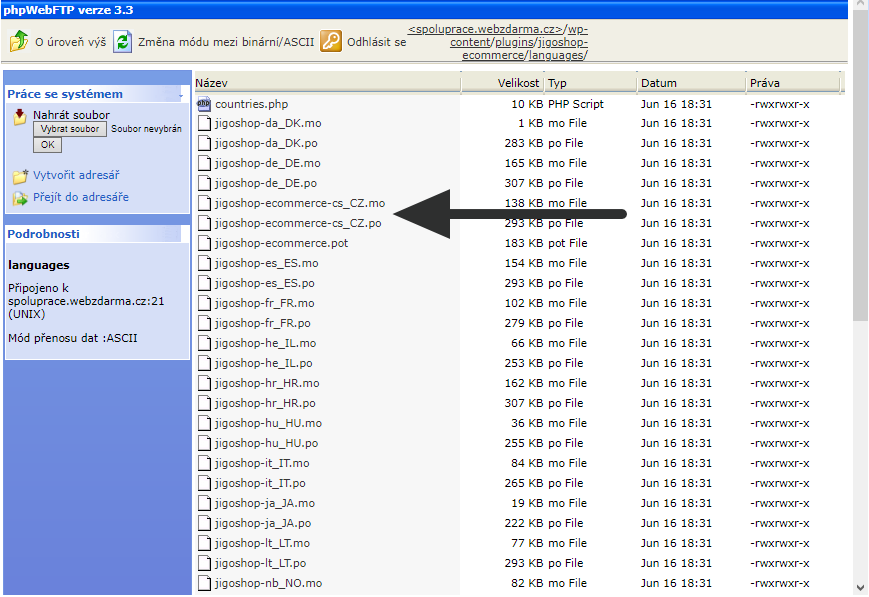
That’s how I did, but only the 1 (less important) problem.
To change the language to Czech, it is necessary to rename the two files. picture (It will not work if you do not set wordpress on cz)
Unfortunately, I did not come to shortcode. Finally, I decided not to add the individual product (s), but the entire product category.
That’s why I created the category, set it “slug” (the same as the sku product) and to the page where to view it, wrote
[jigoshop_category slug = “my_category_slug”]
But it does not work again.
Please be advised, I’m really nervous about it.
Thank you.
The file names are being corrected in the next release.
Jigoshop eCommerce does not have built-in shortcodes. Try the shortcodes plugin https://www.jigoshop.com/product/jigoshop-1-x-shortcodes-add/
Hello,
I successfully purchased the plugin. Now I can download and install it into my project and shortcodes are already working.
However, in my account on your server, the LICENSES window is at the end
(under MY DOWNLOADS). There are 4 items: Product, License Email, License Key and Activations. Just 0/1 is displayed for Activation. What does it mean, please?
Thank you
This is a free plugin, so you don’t need an activation key, and thus you won’t have any activations (0) out of 1 product 😉
Hello,
I understand. I thought so, but I was not sure.
Shortcodes work, but the products are very small on the page. (only 150×150)
In the plug-in settings on the products tab, you can set up four image sizes (Tiny, Thumbnail, Small, Large). However, the change in values has no effect at all.
I did not understand the picture settings.
Please be advised,
Thank you.
PS. This is my last problem, everything else works.
Hi
Please contact us at [email protected], since the issue you’re experiencing should not happen.
Hello,
So the problem was not in your plugin.
The change worked, but it only changed the resolution and not the dimensions of the image. It’s not bad, it can be easily solved using css.
Anyway, unfortunately, there were two more problems.
1. I would like to set two payment options – bank transfer or cash.
I have the option of 5 types of payments, but payment in cash is not there.
Did I wonder if one of the first two options (CHEQUE, ON DELIVERY) would be used as a cash payment?
2. How to export orders after a change is made?
The WP All Export allows you to export orders on a given day and time, but not in a free version.
I was looking for a different plugin, but all of them are for woocommerce only.
Please advise
Thank you
1. Well – it depends – how is the “cash” payment handled by you?
2. We had a plugin for order exports/imports for Jigoshop 1.x that is currently being redeveloped to be compatible with Jigoshop eCommerce – I’ll inform you on the progress tomorrow.
Hello,
Yes. It is also possible to use it in cash payment.
I’m sorry, but since I’m using wordpress, I’m still having problems.
The price with the tax is not always calculated correctly.
Tax I have 15%
I have prices without tax:
1. 104.35
2. 147.83
3. 86.96
4. 139.14
5. 93.92
6. 52.18
And when the tax is added:
1. 120,00
2. 170,00
3. 100,00
4. 160,01
5. 108,01
6. 60,01
There is probably no rounding set, so calculation is sometimes wrong.
Please repair.
I would also like to ask how to view the category of products to be sorted in alphabetical order? This does not work.
[jigoshop_category slug=”my_category_slug” order_by=”name”]
Please advice.
Thank you.
PS. How does it look like export / import?
-
This reply was modified 7 years, 11 months ago by
 michalrama.
-
This reply was modified 7 years, 11 months ago by michalrama.
Hello,
I already remembered what I had done with the previous plugin, which showed only the price without a tax on the product card.
I had to add the price with the tax using the jquery.
But first I had to calculate it. But the calculation was not perfect, so I had to round it up.
And that’s why I think the same problem is here.
The above prices are correct – if you calculate them yourself you’ll end up with the same prices (including tax).
Which prices are incorrect in the set above?
Yes you are right.
All calculations come out at 3 or 4 decimal places
In the first case it is 120.0025
In the sixth case it is 60,007
But the prices have only two decimal places, so it is necessary to round off.
It’s just mathematical. Therefore, the result is 120.00 and 60.01.
But 60.01 is no such price (in my case). The second decimal must always be 0.
All bad calculations just end 1 (for example, 160.01, 81.31, 48.81)
It is necessary to change them to 160.00, 81.30, 48.80
The only versatile solution that would correct bad prices without damaging the right prices is rounding to the first decimal place.
-
This reply was modified 7 years, 11 months ago by michalrama.
You mean “round down”, correct? In most EU countries you round up if the next decimal is greater than five, ie. 120.0025 is 120.00, but 120.005 is 120.01. As far as I know, this is the correct rounding of the prices, but I might be mistaken. Please clarify
Hello,
I’m sorry, a bad translation.
Yes, I meant rounding down.
CZK does not use a currency of less than 1 CZK. Therefore, it always rounds to the integer
I mean, the prices are added together and the result is mathematically rounded.
20.90 + 30.40 = 51,30 = 51,00;
However, only the first decimal place is added (the second is always 0)
That’s why I need to mathematically rounded to one decimal place.
-
This reply was modified 7 years, 11 months ago by michalrama.
Hello,
I use the jquery to solve the problem with the price calculation.
However, I need to advise on shortcode sorting of product categories (this does not work – [jigoshop_category slug = “my_category_slug” order_by = “name”]) and the product export plugin.
I’m sorry, I did not expect such kind communication, but I have little time, so I would need advice.
Thank you