• Resolved blongso

    (@blongso)


    Hello community!

    I am at a loss and need help ….
    Explanation:
    I can log into the dashboard on my laptop with my user and passport without any problems.
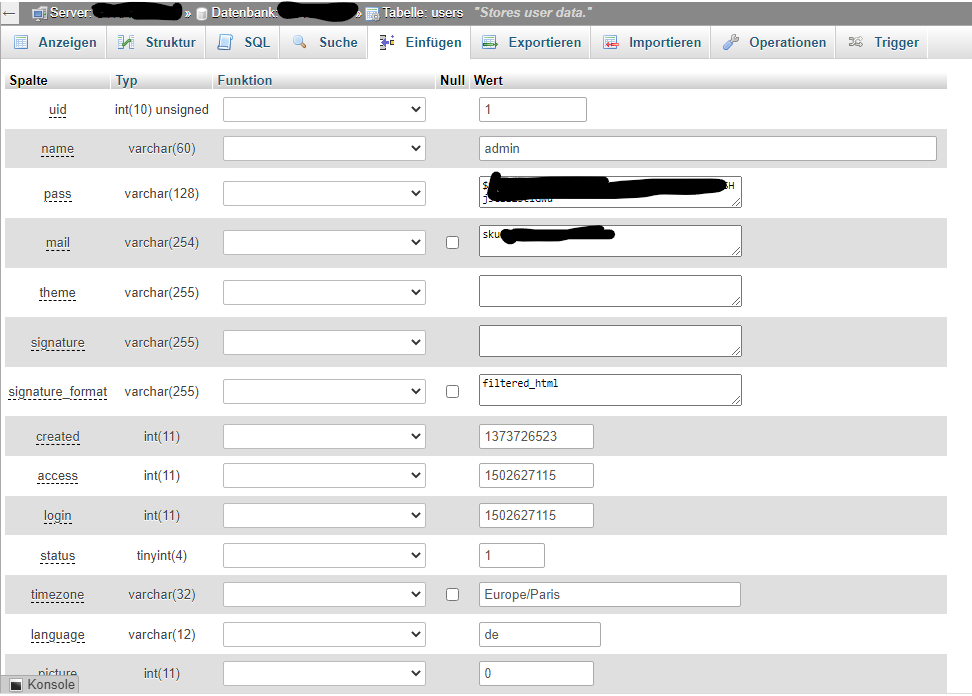
    However, on my PC, I get the error message that the password is wrong! I don’t have a typing command. Now I looked in PHPMyAdmin, in the user file and found that an email address unknown to me as well as user+ password are entered. See screenshot:

    https://i.goopics.net/u7smfs.png


    I also do not have “admin” as name.
    I have installed and activated Wordfence.
    On the PC I am also constantly blocked, or my IP. Not on my laptop.
    Have these entries been entered by Wordfence? Is it a security feature of Wordfence?
    I need urgent help on how to proceed now.
    Can I just change the user file in PhpMyAdmin with my data? Also the name? (admin]

    THX in advance for your help!

Viewing 1 replies (of 1 total)
  • lisa

    (@contentiskey)

    • a user with ID of 1 was *possibly* created when the site was set up. is there any possibility that the user is related to your webhost?
    • if you see a completely unknown user in your database USERS TABLE — reduce the user’s role to the lowest. (guide to user roles: https://ww.wp.xz.cn/documentation/article/roles-and-capabilities/)
    • make a backup of your files and database
    • change all passwords related to your webhosting, database (this will also need to be updated in WP-admin file) and WP-admin
    • get your site checked for malware (https://sucuri.net/)
    • if you need more details about WordFence plugin, please use this link to get in touch with the team most familiar: https://ww.wp.xz.cn/support/plugin/wordfence/
    • remove completely unknown user and review any content created by unknown user incase it needs to be reassigned to another user.
Viewing 1 replies (of 1 total)

The topic ‘WordPress login failed ….’ is closed to new replies.