Hi @nio87 hope I can help:
1. You will need to add posts to the WP Knowledgebase area in the backend of your site in order for anything to show up. Did you do that?
2. Please check that the page where you have your shortcode has the correct page template set, and that the permalink in WP Knowledgebase settings matches the permalink of the page. Once you’ve checked that, go to Settings > Permalinks and resave your permalink structure. (all this is in the official installation instructions and FAQs)
Let me know if you’ve done all that and it’s still not working. It would also be helpful if you provide a link to the page in question.
Thanks
Maeve
Thread Starter
 nio87
nio87
(@nio87)
Hi @enigmaweb
thank you for your fast replay.
I already wrote an article and the categories are also placed.
So the Knowledgebase should have some material stored to show on the page.
It’s not possible for me to show you the link for the website because I am working on an intranet right now. This is not reachable over web.
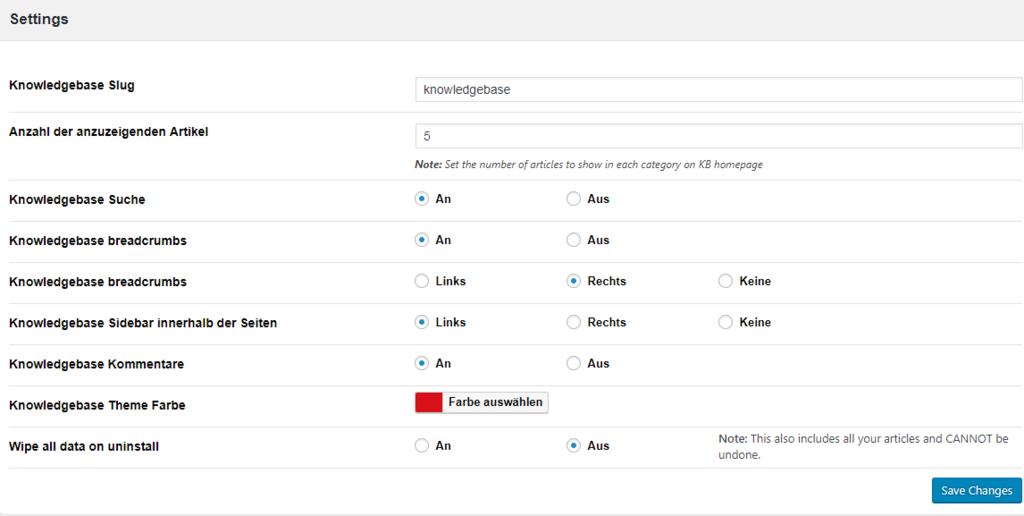
Below you find the configurations I made so far maybe you see a mistake I made.
Knowledgebase_Settings:
http://up.picr.de/33922761lt.jpg
Shortlink:
http://up.picr.de/33922765ll.png
Categories:
http://up.picr.de/33922766ok.jpg
Article:
http://up.picr.de/33922769jm.jpg
Permalink Options:
http://up.picr.de/33922771hm.png
The result what is shown on my webpage:
http://up.picr.de/33922793cs.jpg
Thank you for your help.
-
This reply was modified 7 years, 8 months ago by
 nio87.
-
This reply was modified 7 years, 8 months ago by nio87.
-
This reply was modified 7 years, 8 months ago by nio87.
No worries, glad to help 🙂
I do see a few things it could be:
1.) In this screenshot – http://up.picr.de/33922766ok.jpg – I don’t see any page using the slug knowledgebase which is the slug you are telling it to use in the WP Knowledgebase settings per this screenshot – http://up.picr.de/33922761lt.jpg
As a first step, please correct this, then re-save permalink structure and visit the page.
If that doesn’t fix it, move to (2)
2.) A long shot… can you try changing the permalink structure to use the postname /%postname%/ (it’s the last one on the list before ‘custom’). Even if you don’t intend to use that structure this is just a test… because I have a vague memory of one user reporting this as a problem in the past (although I couldn’t replicate myself at the time)
Let me know how you go.
Thread Starter
nio87
(@nio87)
Good morning @enigmaweb,
the screenshot you mentioned in 1) http://up.picr.de/33922766ok.jpg are the categories in wordpress which I had created yesterday. These are not websites. Is it possible to integrate the slug in the categories aswell? In the FAQ it says that I should use the kbe_knowledgebase as slug which I have done so on the website http://up.picr.de/33922765ll.png. Should I create sites with the name of the categories so I can link them?
http://up.picr.de/33922765ll.png shows a shortcode on the page. This is correct.
The slug (also known as permalink) of that page needs to be set as /knowledgebase in order to match the setting shown on this screen http://up.picr.de/33922761lt.jpg
Thread Starter
nio87
(@nio87)
Thank you for the patience with me :-).
I am a bloody beginner with wordpress.
How do I define the correct slug in the categories?
I tried the following:
http://up.picr.de/33930138ik.jpg
Also I updated the permalink settings but this doesn’t help neither.
If I only can use the slug “knowledgebase” I can totally set the slug only on one category. Is it possible to concatenate them?
Thank you alot 🙂
No worries at all, we all start somewhere! I am talking about the slug/permalink of the PAGE with the knowledgebase, nothing to do with categories.
Step by step instructions:
1. In your WP Admin go to “Pages”
2. Find the page where you have the Knowledgebase shortcode. Open that page for editing.
3. At the top of that page you will see the slug/permalink just below the title field. It will look something like this:
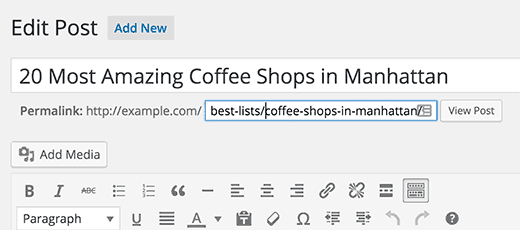
You need to change this to knowledgebase.
4. Go to Settings > Permalink > and resave your permalink structure.
Test…report back 🙂
Thread Starter
nio87
(@nio87)
I followed your instructions but I have the same problem as before.
At first I changed the permalink to knowledgebase:
http://up.picr.de/33930916nl.png
In the next step I resaved the permalink structure in the settings and after this I viewed the result on my webpage:
http://up.picr.de/33922793cs.jpg
The problem is that I can only see the searchbar from the knowledgebase and not the categories or the articles I wrote before. When I search for a text which was written in my knowledgebase articles I can find them and view them. It is actually not possible to click trough the categories.
Hope we can find a solution for the view of the categories and articles 🙂
Thread Starter
nio87
(@nio87)
Good Morning @enigmaweb,
it is possible that I have found the problem on my website.
I created a categorie and mapped a new article on it.
I have read that the categorie I created should be listed in the order tab.
But the categorie order is empty with the information that no content was found.
How can I fill the categorie order with content? Is the plugin damaged?
Thank you for your help.