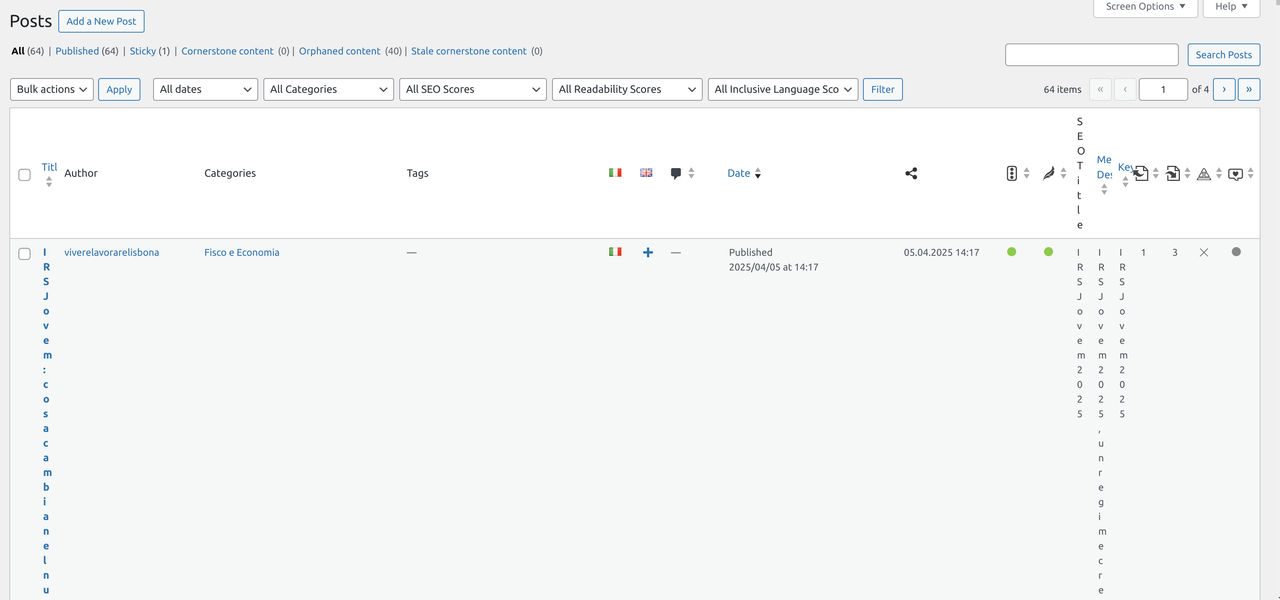
Yoast + Polylang = mess backend posts page
-
Hi, as title, I’m fighting for a couple of days. In the backend posts page, all is wrote vertical as example. I’m posting same msg on polylang support, cause not sure who is responsible.
https://i.postimg.cc/HxtW28PF/Screenshot-from-2025-04-07-01-13-10.png
Already troubleshoot and this happens only when both plugin are enabled. In the meantime I disabled the internal links counter, to save space and have 2 vertical lines instead one only :S
The page I need help with: [log in to see the link]

Viewing 2 replies - 1 through 2 (of 2 total)


Viewing 2 replies - 1 through 2 (of 2 total)
The topic ‘Yoast + Polylang = mess backend posts page’ is closed to new replies.