No, there is not a significant difference in the help files in the premium version of Yoast SEO versus the free version.
As for the warning you are receiving, we checked on your site https://www.stbees.org.uk/ and do see it is being indexed in a Google search here. Also, we reviewed your robots.txt at https://www.stbees.org.uk/robots.txt and there is nothing in it preventing the site from being indexed, nor did we find any robots meta tags in the source code set to ‘noindex.’
We ask that you please check your site in Google Mobile tester and use the Fetch the Current Status to see whether there are any indexing issue reported. This guide explains more: https://kb.yoast.com/kb/your-site-isnt-indexable/.
If the Google Mobile Tester is able to find the site but Fetch the Current Status does not resolve the issue, then the issue is with Ryte. We suggest either ignoring it or contacting Ryte for more information as to why they are unable to find the site. We use Ryte to provide a courtesy check, however sometimes they report false positives. If you wish to contact Ryte you can do so here: https://support.ryte.com/hc/en-us. Additionally, if you have concluded that the warning is a false positive and wish to disable the Ryte check we have instructions on how to do this here: https://kb.yoast.com/kb/disable-indexability-check/
Thank you for your prompt and comprehensive reply, as well as the tests you conducted.
The Mobile Tester was able to find the site.
I had been unable to find the Fetch the Current status tab indicated in the link you provided – hence my question about Help file differences. In the help file link there is a box SEO Posts overview. I have looked everywhere and can’t find a screen that looks like that.
No doubt I am missing something obvious … but I am a newby!
Ian
Hi,
If you go to your Dashboard (in the top-left) of your site and find the Yost SEO Post Overview there should be a Fetch the Current Status option. See image: https://pasteboard.co/IYsNfsu.jpg
Can you confirm you are able to locate this in your dashboard?
I’m afraid I can’t see the Posts Overview you show in your image.
On the WordPress Dashboard I see
SEO
General
Search appearance
Social
Tools
Premium#
Under General I see
Problems (0)
Good job! We could detect no serious SEO problems.
You have one hidden problem
(A link ) – Your homepage cannot be indexed by search engines. This is very bad for SEO and should be fixed
Selecting the link I go to https://yoast.com/yoast-seo-ryte/
That suggests, as you do, that I “can find the Ryte indexability check on your site’s dashboard inside the Yoast SEO Posts Overview box.
Unfortunately nowhere can I find this.
I should add that my site is all Pages, no Posts.
Thanks for the help.
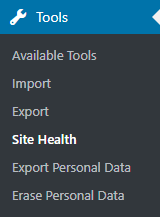
We moved that check in the recent version so you’re likely using a newer version. Please go to Admin > Tools > Site Health. Notice this is not within the SEO settings as we are now integrating some of our site checks with the new built-in WordPress health check section.
Do you see an SEO critical issue like shown in this screenshot? If yes, expanding it will show the ‘Re-analyze’ button that previously appeared in a dashboard widget.
If not, it would be very helpful for us to see exactly where you see the error. Please take a screenshot of the error (you can blur information you don’t want visible). You can use any image sharing service like https://pasteboard.co/, https://snag.gy/, https://imgur.com/, or even upload the screenshot to your own website. Drop a link to the image so we can better understand the place where you see this error because where you see it helps us narrow down how to help you fix the issue.
If I understand you correctly, I should have an option in WordPress (latest version installed) labelled Admin from which I can get to Tools – Site Health.
The only options I can see under Dashboard are Home and Updates.
The links to the screen dumps are
https://pasteboard.co/IYArz8K.jpg
https://pasteboard.co/IYAgl4N.jpg
https://pasteboard.co/IYAgZH5.jpg
It appears that I don’t have the new WordPress health check section.
Thanks for the ongoing help.
Oh dear – how embarrassing! Put it down to aged brain.
Many thanks for your patience.