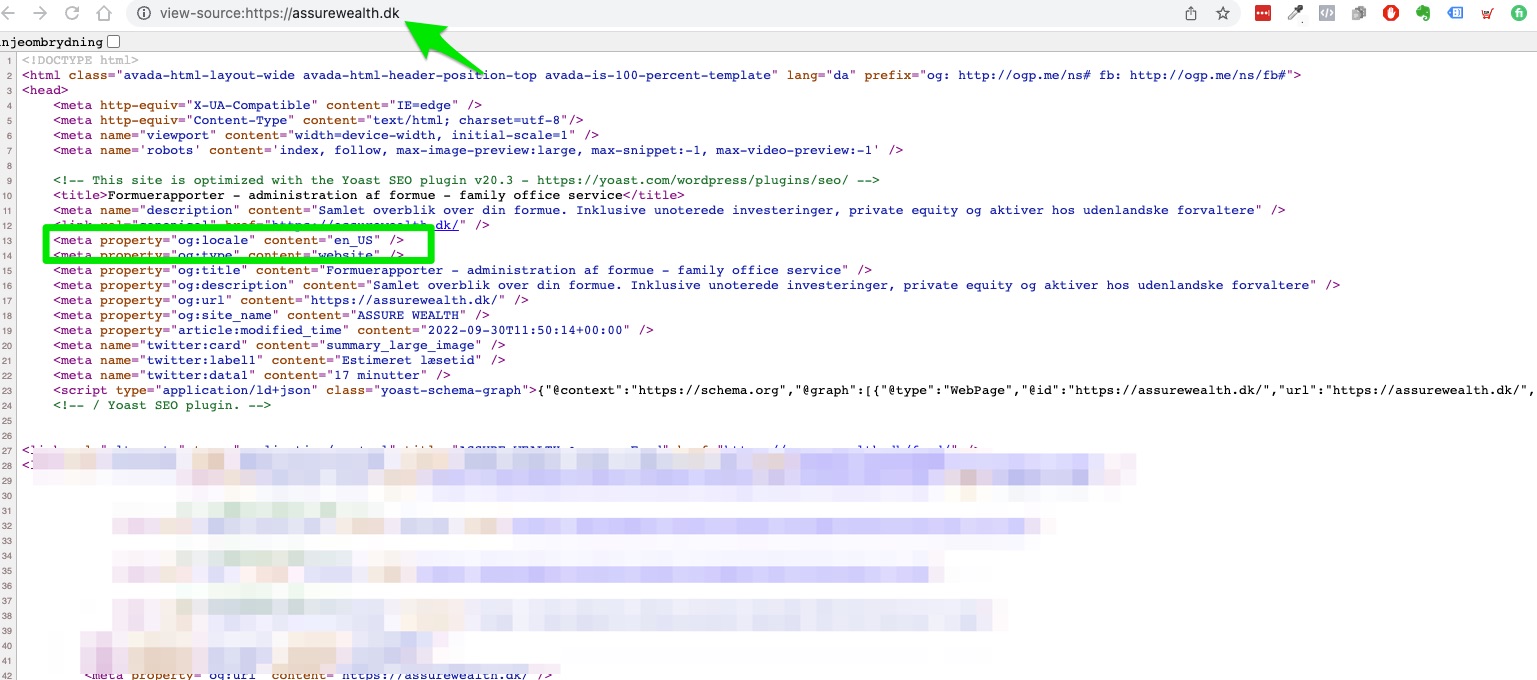
Hello Dennis,
Thanks for reaching out about the og:locale. When you enable Open Graph settings in Yoast SEO, it’ll output an og:locale meta tag. This og:locale is based on the language settings for your WordPress install.
I assume the Weglot Translate plugin handles translations on your site so I tried to replicate the issue but to no avail. The hreflang and og:locale are correct for the main language and secondary language.
Often, we see problems occur in combination with another plugin or theme. The fastest way to rule out any conflict is to deactivate all non-Yoast plugins and switch to a standard theme like Twenty Twenty-Two.
Please test this on your development or staging site if you have one. If not, we recommend using the Health Check & Troubleshooting plugin. This plugin has a troubleshooting mode, which does not affect normal visitors to your site.
If you’re unfamiliar with checking for conflicts, we’d like to point you to a step-by-step guide that will walk you through the process: How to check for plugin conflicts
If you feel uncomfortable doing this yourself or if this does not solve your issue, our Yoast SEO Premium plugin comes with one year of (technical) support.
Thread Starter
 denkro
(@denkro)
Hello,
Thanks for answering. I tried in Firefox, incognito, all cache and cookies emptied. As far as I understand, in your end you have content=da”? Correct?
For the Danish page Yoast shows : content:”en_US” here. (Which should be da for danish.)
For the english page Yoast shows : content:”en”. (which is correct)
WP language is set to Danish.
Pls. see video. by clicking here
I dont think its a plugin conflict, unless of course another plugin can overwrite source in Yoast?
Thanking you in advance
Dennis
-
This reply was modified 3 years, 3 months ago by
 denkro.
Thanks for the screencast.
In my previous reply, I meant that when I tried to reproduce the behaviour on my test site (with Yoast SEO 20.3, WordPress 6.1.1 and Weglot Translate 3.9.2), the hreflang and og:locale are correct; the Danish version shows me “da” as expected. But for your website, I see it’s not the case as og:locale is set to “en_US” though you’ve set the site language correctly.
Can you please inform us of the conflict check results, so we can help you figure out the problem?
Thread Starter
denkro
(@denkro)
Hi again,
Thank you for the guide. I have done as suggested, going in troubleshooting mode and disabling / enabling plugins and themes. No conflict was found.
I turned off open graph in Yoast.
However, the problem still persists, that in a name search on “assure wealth” performed in Denmark, the meta in Google is still in english.
Any suggestions / recommendations?
Thanking you in advance
Dennis
Hello Dennis,
I see that you’ve turned OFF the Open Graph feature in the plugin and use another plugin for the output. The og:localetag is now missing.
Furthermore, search results are based on many factors – location, time, language, device etc. You can read about why your Google Search results might differ from other people here.
-
This reply was modified 3 years, 2 months ago by
 Maybellyne.
Thread Starter
denkro
(@denkro)
Hello,
No the problem still persists.
When doing a search in google for assure wealth in denmark with browser language danish, – english meta is shown as default and url is assurewealth.dk/en/. In WP url is set tp assurewealth.dk and language Danish. (If a search for assure wealth danmark is done, danish meta shows.)
Tested across Safari, Firefox and Chrome, also in incognito mode, and on pc, mac, ipad and phone.
I initially suspected a hreflang issue, but that does not seem to be the case?
The theory now is that translation plugin somehow, redirects regardless of country / language.
Any other test you can recommend to check if hreflang and indexing is accurate?
Thanks
Dennis
Hello Dennis, I’m out of ideas. Due to the nature of the issue, we’ll need to take a look at your specific setup. However, we are unable to do it here as this is a public forum. So, if you have an active Yoast SEO Premium subscription or if you can consider buying one, we can investigate the issue further directly on your setup privately through email.
Thread Starter
denkro
(@denkro)
Thank you for your kind assistance. I will get back toy you.
-
This reply was modified 3 years, 2 months ago by denkro.