Zip Does Not Match State
-
When local pickup zone is activated during checkout, sales tax is no longer calculated and error “zip does not match state” will not allow user to complete checkout.
The page I need help with: [log in to see the link]

-
Hello @tastefullykatie,
I’d be happy to look at that for you. Could you let me know a ZIP code and state that is giving you trouble?
Thanks!
Indiana zipcodes so 46356 would be an example.
Thank you for sending that over. Here’s what I’ve found in looking at other’s that have had this same error message.
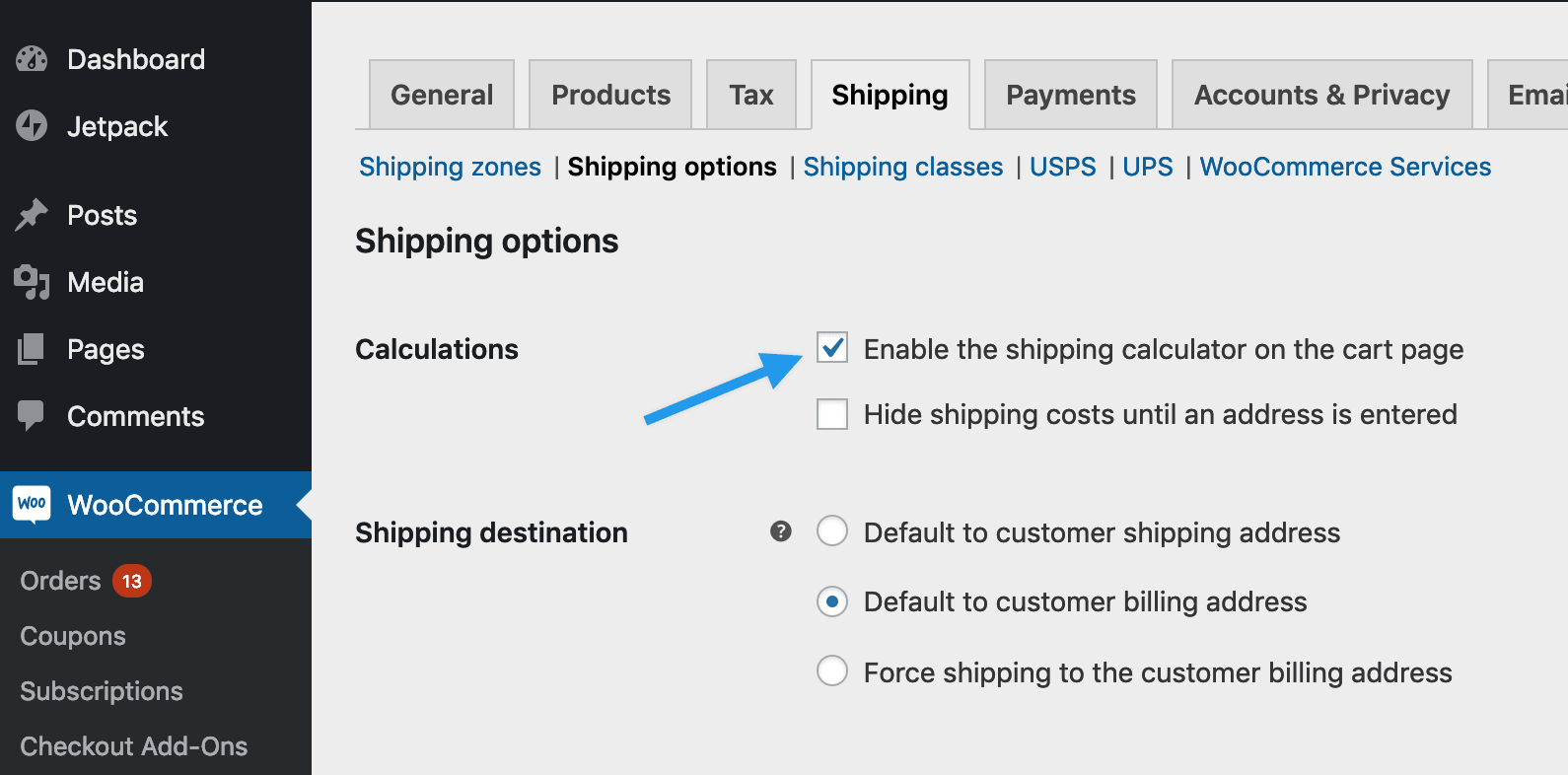
Some of them have been able to correct this by switching the shipping calculator off and on again. You can do that by going to WooCommerce > Settings and selecting the “Shipping” tab at the top. Click on Shipping Options under that and you’ll see the option for the calculator.
You’ll want to change that and save the settings. Visit the front end of your site, then switch the setting back like it was originally. That may fix this for you.
It could also be another plugin hooking into the shipping. To test that you would need to temporarily disable all of your plugins except for WooCommerce and test again. Then turn them back on, one by one until the issue comes back. That would point to where the trouble is.
Let us know how it goes,
-
This reply was modified 7 years, 2 months ago by
3 Sons Development.
I tried disabling this shipping calculator with no luck. I have also tested all of the plugins and determined that the error is happening with Woocommerce Services enabled specifically Local Pickup. My shipping zones are correct, my taxes are also correct. I’m not sure where else to go with it. If I disable local pickup, everything works fine but that’s simply not an option as a large portion of customers pick up their orders.
Thank you for checking those things. Could I get you to make screenshots of your tax options screen and the shipping settings for the local shipping method and then post them here? You can use https://snag.gy/ to take the shots and then post the URLs they give you here?
Thanks!
Tax Options: https://snag.gy/hw5l2y.jpg
I only have to charge state sales tax in Indiana so I only have one tax rule set which is the state sales tax. I’ve tried setting it up with the wildcard search for zip and city as well as with individual zipcodes both with no luck. Screen shot: https://snag.gy/unMxgt.jpg
Local shipping settings: I have tried with and without having flat rate as an option. No luck. I do need the local pick up area to be able to receive flat rate as well. Both show in the cart but still receive the zip does not match state error. I have also tried with and without having “Indiana” as a region with individual zipcodes identified. No luck. Screen shot:
https://snag.gy/NWYVCn.jpg
https://snag.gy/QIkLH6.jpgthis is the error in the cart:
https://snag.gy/PYg49R.jpg@3sonsdevelopment Any ideas or recommendations on what I should do or who I should contact?
@dynamiczach Would you mind looking at this, please?-
This reply was modified 7 years, 2 months ago by
tastefullykatie.
Hello @tastefullykatie,
Thank you for sending over the screenshots. This is most unusual. I found two other instances of people running into this, but in both cases, the users never responded so I don’t know if they were able to get this resolved and if so, how.
You mentioned testing plugins. Just to make sure we mean the same thing there. You disabled all plugins except for WooCommerce, WooCommerce Services and Jetpack and switched on one of the default themes (Twenty Nineteen or Twentyseventeen) and the issue was still present.
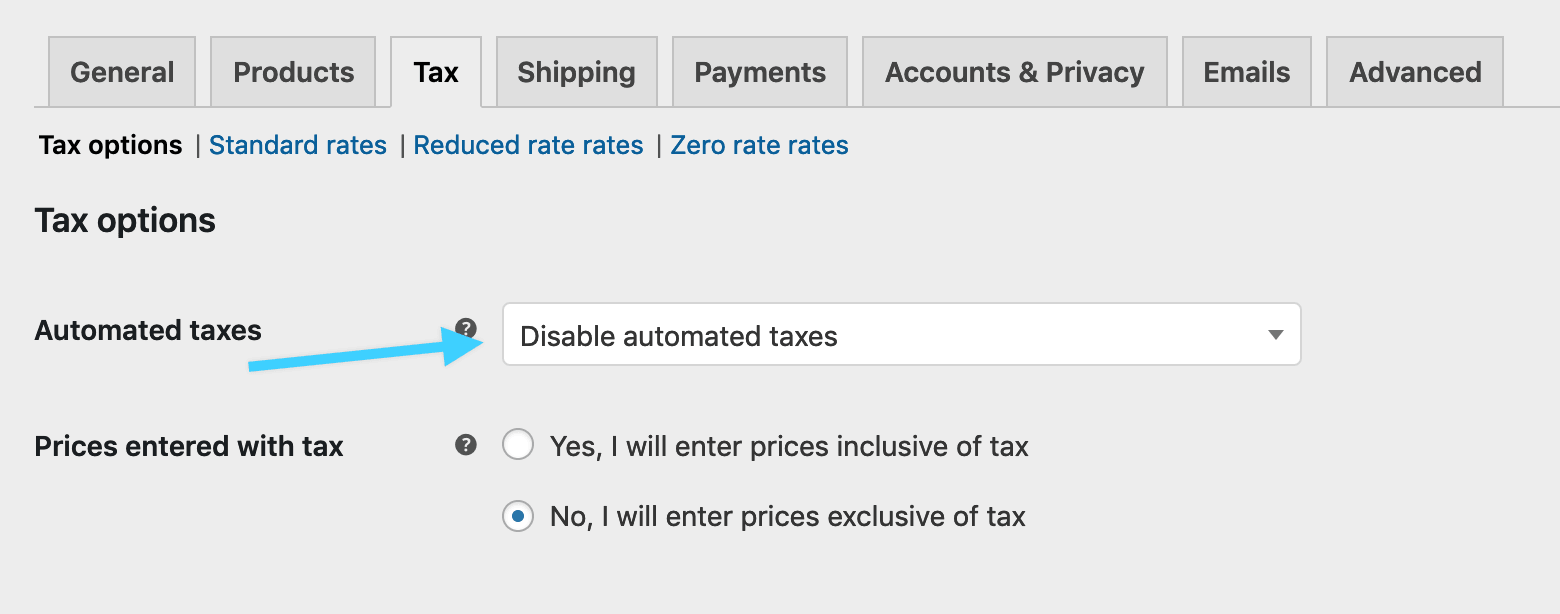
Could I get you to temporarily turn off automated taxes? You can do that at WooCommerce > Settings > Taxes. Then test again.
So far I haven’t been able to reproduce this on my development site so I especially appreciate your assistance in getting to the bottom of this.
disabling the automatic taxes fixes the zipcode error on shipping, but I have to collect sales tax on all Indiana orders so I’m not sure that solves anything. I have to figure out having both work.
In answer to your question, I have deactivated all plugins and reverted to theme twenty nineteen to ensure it wasn’t the theme.
I fixed it! I used the code given in this doc and added it to the end of my functions.php file. So if anyone else every has this issue, try that.
That’s fantastic! Thank you for letting me know what solved it for you too!
thanks for all of your time. It was keeping me up at night!
We’re always happy to help out. Now you can rest easy 🙂
-
This reply was modified 7 years, 2 months ago by

The topic ‘Zip Does Not Match State’ is closed to new replies.



