actino

Forum Replies Created
-
Hi @uxl
thank you for reporting the bug.
Shall I close this issue with “resolved” – and add a final comment (workaround)?Sorry – and THANK YOU
@uxl Thank for your answer – i just saw it now.
WHAT SHALL WE / I DO?
– it concerns both theme: twenty twenty-two and three, they are from WordPress…
so, does we have to report a bug, because its from core..=== CONCLUSION / WORKAROUND / SOLUTION ===
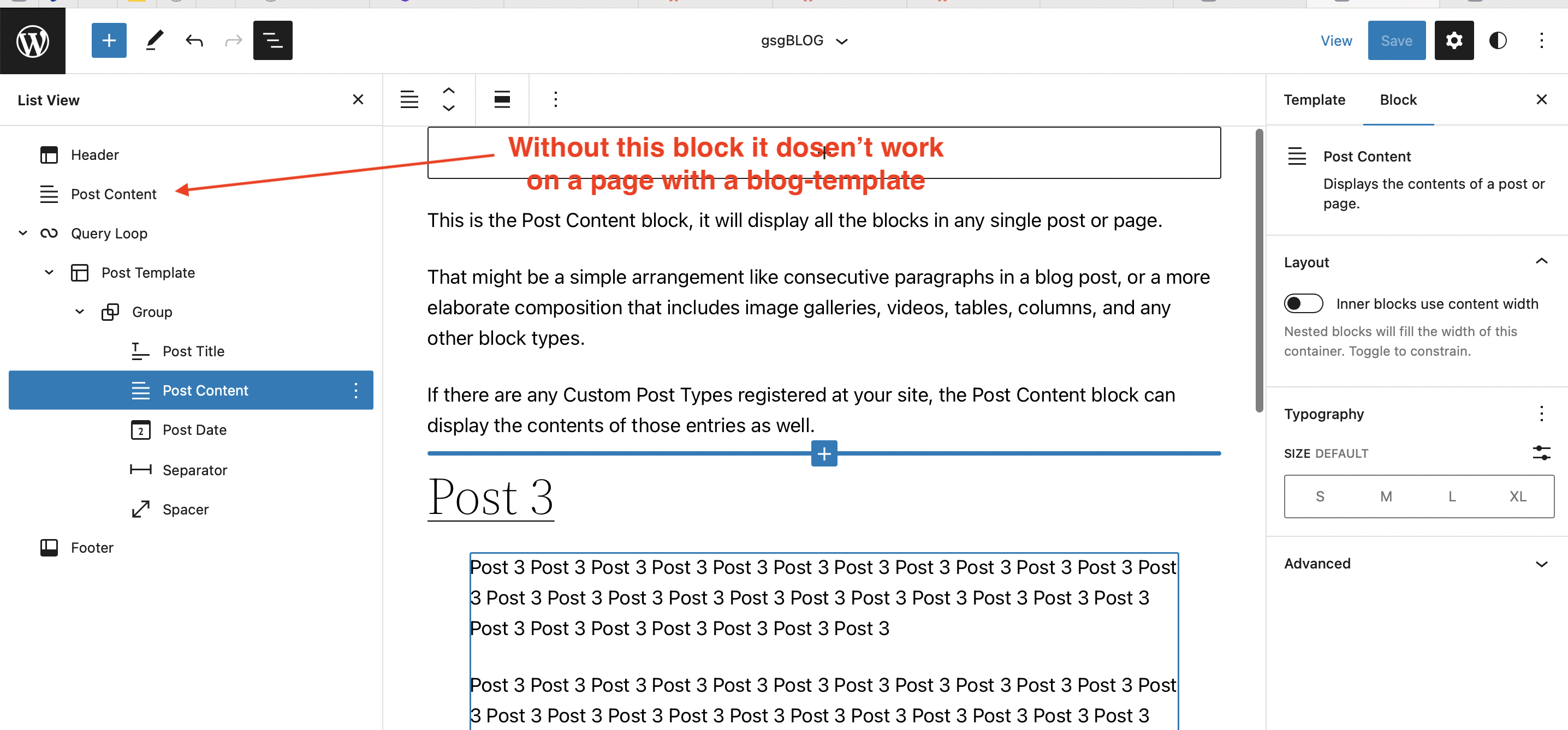
– add a POST CONTENT outside of the POST TEMPLATE or QUERY LOOPHi thelmachido
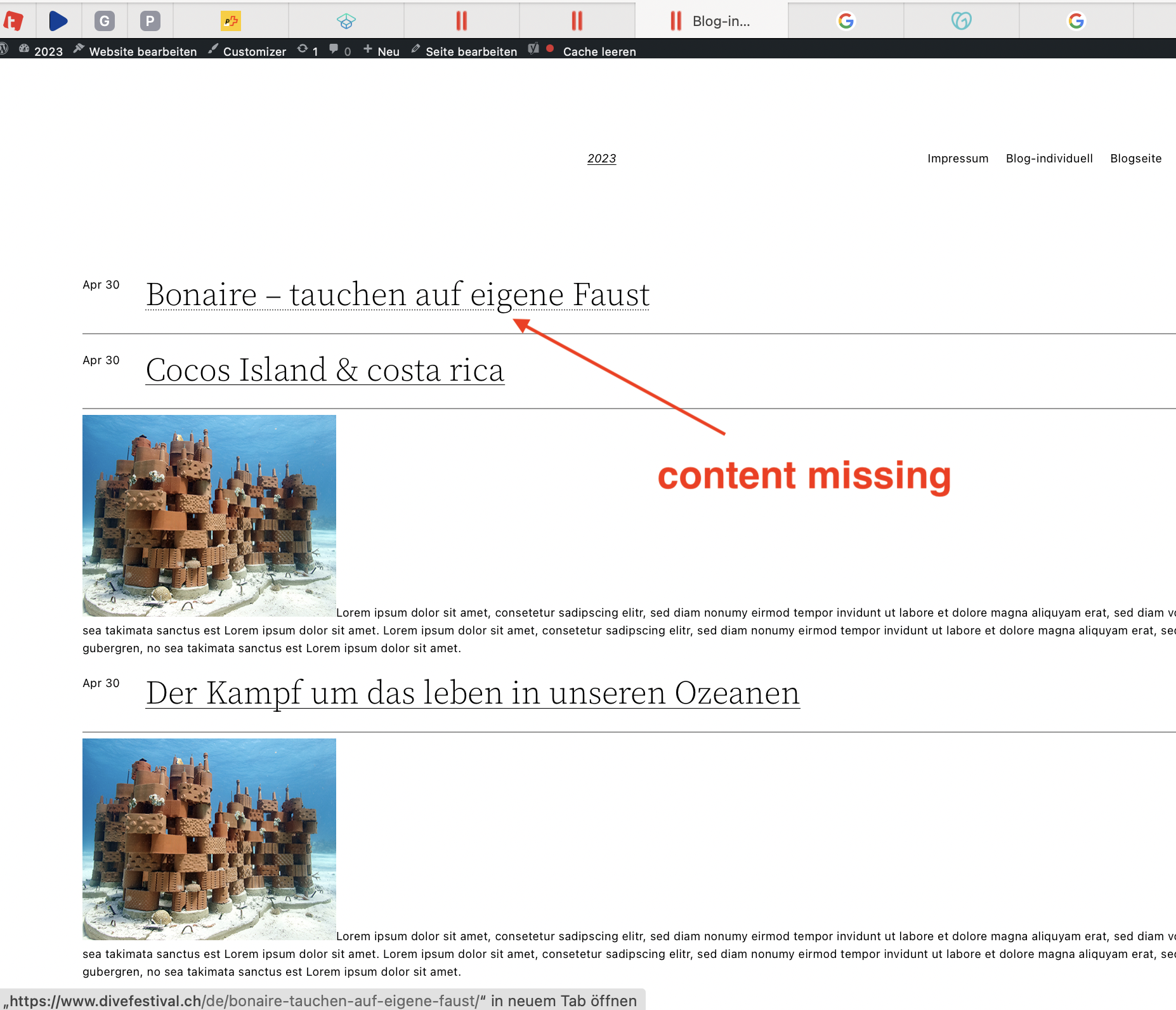
Thanky for reply! – on the (backend) template it always displayed all content of every post >> but not on the website/page (see post 1 or picture: https://www.divefestival.ch/Frontend.png
Again, I tried a lot and finally found the bug:
On your video you have:
HEADER
GROUP
FOOTER
QUERY-LOOP
>>> If you remove at the section GROUP the Element «POST CONTENT» , it will not working anymore on your website: The content of the top post will not be displayed! Respectively, Post 1 shows the page content.SOLUTION:
So, the solution is always to have a second «POST CONTENT» outside of the QUERY LOOP or POST TEMPLATE
( example: https://www.divefestival.ch/solution.png )
So, this is really a bug.
because its working without outside-Post content if you have just activated the POST EXCERPT inside the query loopTHANK YOU FOR ALL YOUR HELP THAT I RETESTS AGAIN AGAIN 🙂
Hi thelmachido
thanks for answer & sorry for my late reply – but I testet a lot an did a lot of reinstall WordPress/Database et cetra
and… there must be a bug…
I found a easy way to replicate – do absolute minimum install:
– Install(ed) WordPress 6.1.1
– PHP 7.4
– Theme Twenty-Twenty Two (or Thre)) (as this supoort theme?!)
– no Plugins (just aksimed)
– Added a Site & Posts
– created by APPREARANCE > EDITOR BETA a custom template, and choosen by the query-loop a pattern (e.g one with three columns)RESULT:
– it display all three posts! PERFECT – but, it shows only the EXCERPT of each blog – because the Object uses POST EXCERPT.BUG:
– so, i changed the “POST EXCERPT” into “POST CONTENT” to see all of the Content: THEN IT CRASHES: It shows all Post, but not the first Content of the first post (the order doesent matter.. always the top entry…)Because its a fresh WP-Install, all updated an did just the minimum – i guess there must be a bug?
(event tough I created a template/pattern by my self…)Thank you for your approach!
greez Actino+++ UPDATE +++: on the first post, it displays the content of the page instead of the post … hmmm… did I have misunderstood something…?..
- This reply was modified 3 years, 6 months ago by actino.
- This reply was modified 3 years, 6 months ago by actino.
- This reply was modified 3 years, 6 months ago by actino.
- This reply was modified 3 years, 6 months ago by actino.
- This reply was modified 3 years, 6 months ago by actino.
- This reply was modified 3 years, 6 months ago by actino.
- This reply was modified 3 years, 6 months ago by actino.
- This reply was modified 3 years, 6 months ago by actino.
Forum: Plugins
In reply to: [WPS Hide Login] WPS Hide Login plugin on fresh WP installation doesn’t worki have the same problem, similar config, incl. WPS hide 1.8.5
my db-entry is ok at > wp_options > option_name = ‘whl_page’.
any other idea?
Thx, ActinoForum: Plugins
In reply to: [YOP Poll] User Weights for a pollHey YOP
thanks for answer – I am familar with php – 5Y ago.. but i think I would like to try. Maybe you can give me just some hints about the logic of the files how you would do that
It can be hardcoded (if user == name1, then…) – not perfect.i dont expect exacte code, just your mind how and where you would do it
(may just an idea of code)models/polls.php on “public static function update” you can do….
many many thanks
best regards
ActinoForum: Plugins
In reply to: [Events Made Easy] use own #_ATTENDFIELD{xx}OMG – what a shame on me… sure it works
[eme_bookings] and #_RESP*, or #_FIELD{<ID>|<NAME>} for custom formfields.Big sorry for bothering you Franky!
i have to learn carefully reading/undestand documentationMANY THANKS TO YOU!
shameful greetings
ActinoForum: Plugins
In reply to: [Events Made Easy] use own #_ATTENDFIELD{xx}Hi Franky
many many thanks for your answer/time!i checked it – maybe not understand:
i like to show my own formfield of a event-registration on a website, not on a Email (by #_RESP*)it works well with #_ATTENDFIRSTNAME, #_ATTENDMAIL, but not with #_ATTEND{myOwnField}
eg. http://www.dienstagstaucher.ch/testseite/many thanks for your help – or repeating my missunderstood!
best regards
actinoForum: Plugins
In reply to: [Easy Forms for Mailchimp] Missing Translation Option for Update-ProfileThank you for updates – I think would be better than a gettext-filter 🙂
Forum: Plugins
In reply to: [Easy Forms for Mailchimp] Missing Translation Option for Update-ProfileHi Kevin – sorry i still changed my last post – but you’re so fast.
i found a solution:
add_filter( ‘gettext’, function( $translated_text, $text, $domain ) {
if ( ‘%s Update email successfully sent. Please check your inbox for the message.’ === $text ) { return ‘My new text’; }
return $translated_text;
} , 20, 3 );
Thank you!
Forum: Plugins
In reply to: [Easy Forms for Mailchimp] Missing Translation Option for Update-ProfileHi Kevin – sorry i still changed my last post – but you’re so fast.
i found a solution:
add_filter( ‘gettext’, function( $translated_text, $text, $domain ) {
if ( ‘%s Update email successfully sent. Please check your inbox for the message.’ === $text ) { return ‘My new text’; }
return $translated_text;
} , 20, 3 );
Forum: Plugins
In reply to: [Easy Forms for Mailchimp] Missing Translation Option for Update-ProfileHi Kevin
thanks for answering!I’ve checked the opt-in settings again – but the update-message is still missing.
e.g – its the message “Update email successfully sent. Please….” i like to change, on file: /public/partials/ajax/class.public_ajax.phpBut know i found a common SOLUTION:
add_filter( ‘gettext’, function( $translated_text, $text, $domain ) {
if ( ‘%s Update email successfully sent. Please check your inbox for the message.’ === $text ) { return ‘My new text’; }
return $translated_text;
} , 20, 3 );
so it works fine – its ok like this method?!I’m very sorry – im a newbie in wp-child functionsl…
many thanks – greets
best greetings actinoHi Pascal
many many thanks for your support!
it works fine with the header.php – and I have to say sorry about my question – I didn’t realize it on the header.php, but its soooo logic.
(i was fixed to thinking about to change the lang.file…)many thanx!
greeets actinoHi Phpbits
it works – its solved!
Many thanks. Im sorry that I answer late – i had to change the hole page to another widget plugin to represent the page. So the testing takes time.
but now, i switched back to your plugin while testing – and it works fine. 🙂thanks, greets