Birendra Maharjan

Forum Replies Created
-
Forum: Plugins
In reply to: [EU/UK VAT Validation Manager for WooCommerce] Show/hide by billing companyHi @bramvds,
You’re welcome! Happy to help. If you have a moment, we’d really appreciate your feedback:https://ww.wp.xz.cn/support/plugin/eu-vat-for-woocommerce/reviews/#new-post or https://www.trustpilot.com/evaluate/wpfactory.com
Thank you!
Forum: Plugins
In reply to: [EU/UK VAT Validation Manager for WooCommerce] Show/hide by billing companyHello @bramvds,
Thank you for your patience.This issue has been resolved in the latest version (4.6.1), released recently. Please update the plugin and let us know if everything works as expected.
Best regards,Hi @joe16,
Thanks a lot for your kind words and for leaving another review. Really glad to hear the plugin is helpful to you.If you ever need anything, feel free to reach out.
Have a great day!
Best regards,Hi @joe16,
Thank you for the confirmation and your feedback.
If you liked the plugin/support, we’d really appreciate a quick review — it helps us a lot:
https://ww.wp.xz.cn/support/plugin/eu-vat-for-woocommerce/reviews/#new-post
or
https://www.trustpilot.com/evaluate/wpfactory.comHave a nice day!
Best regards,
Hi @joe16,
We’ve released v4.6.0 of the plugin, which includes the option “Add CSS selector(s) for extra payment buttons“. You can find it under: WPFactory > EU VAT General > Confirmation noticeFor your PayPal plugin (WooCommerce PayPal Payments), set the selector to:
#ppc-button-ppcp-gatewayScreenshot for reference: https://prnt.sc/yG7eJ36eCX8C
Please update to the latest version and check if the confirmation notice now works. Let us know if you need any further assistance.
Best regards,Hi @feri6,
You’re welcome! I’m glad to hear everything is working well now.
If you like the plugin, we’d really appreciate a quick review:
https://ww.wp.xz.cn/support/plugin/product-quantity-for-woocommerce/reviews/#new-post
or
https://www.trustpilot.com/evaluate/wpfactory.comThanks!
Hi @feri6,
We’ve released v5.2.5, which should fix the cache issue. Please update to the latest version and let us know if everything is working fine.
Thank you!
Best regards,
Hi @kuebk,
Thank you for letting us know.
We’ve released version 4.5.4 of the plugin, which fixes the cart page loading issue. Could you please update to the latest version and check if the issue is resolved?
If the problem still exists after the update, please let us know, and we’ll look into it further.Best regards!
Hi @kuebk,
Thanks for getting in touch, and I hope you’re doing well.
Could you please try enabling the following option to see if it resolves the issue?
WPFactory → EU VAT → Advanced → Checkout block field → “Add script dependency”
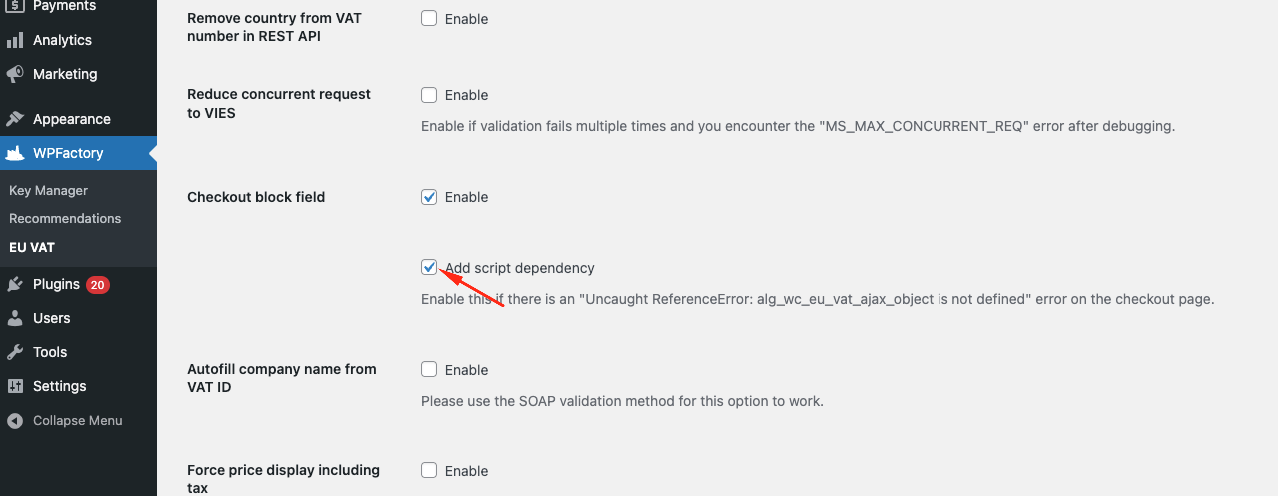
If this option is already enabled or the issue persists, please let us know.
Best regards,Hi @contextquestion,
Thanks for reaching out! I hope you’re doing well.
It appears that the issue is occurring with a specific Dutch VAT number, as all other VAT IDs are validating correctly and the VIES check passes. To investigate further, we kindly request that you share the exact VAT number with us via our support email at [email protected]. Once we receive it, we will be able to replicate the issue and work on it.Thanks for your understanding!
Hi @nadya-well,
I’ve reviewed your code and noticed a couple of things that might be causing the issue:
1. Meta mismatch: You mentioned that the date is saved in the product meta, but your code is trying to fetch it from the order item meta. This mismatch can cause unexpected results. If you want to check the date directly from the product, you should retrieve it from the product meta. Otherwise, if the date is saved in the order item when the order is created, your current approach using$item->get_meta()will work.
2. Missing false return: Your code doesn’t explicitly returnfalsewhen the date check is not valid. Because of this, it falls back to$do_apply, which always follows the plugin’s default rule setting. This could be why the rule is applied earlier than expected.
I’ve adjusted your code based on these points. Please try the following snippet and let us know if it resolves the issue:add_filter( 'alg_wc_order_status_rules_do_apply_rule', function ( $do_apply, $order, $rule_id, $args ) {
if ( 1 == $rule_id && $do_apply ) {
// Use the London timezone (which automatically adjusts for BST/GMT)
$timezone = new DateTimeZone( 'Europe/London' );
// Get the current time in the London timezone
$current_time = new DateTime( "now", $timezone );
$current_timestamp = $current_time->getTimestamp();
// Loop through order items and check the 'Date Of Visit' meta field
foreach ( $order->get_items() as $item_id => $item ) {
// Get the 'Date Of Visit' meta field for the current product
//$product_date = $item->get_meta( 'Date Of Visit' );
$product_id = $item->get_product_id();
$product_date = get_post_meta( $product_id, 'Date Of Visit', true ); // Please ensure that the meta key 'Date Of Visit' is correct
// Check if the 'Date Of Visit' exists
if ( $product_date ) {
// Convert the 'Date Of Visit' from dd/mm/yyyy to yyyy-mm-dd format
$product_date = str_replace( '/', '-', $product_date );
// Convert the 'Date Of Visit' to a timestamp in London timezone (BST/GMT)
$datetime = DateTime::createFromFormat( 'd-m-Y', $product_date, $timezone );
$product_timestamp = $datetime ? $datetime->getTimestamp() : false;
// Check if the date is valid and is in the past (or today)
if ( $product_timestamp !== false && $current_timestamp >= $product_timestamp ) {
return true; // Apply the rule as soon as we find one valid date
}
}
}
return false;
}
return $do_apply; // If no valid date is found, return the original decision
}, 10, 4 );If this doesn’t resolve the issue, please consider reaching out to us via a support ticket at [email protected] so we can review your exact configuration in more detail and provide direct assistance.
Best regards,Hi @ehong33234,
To display the barcode on the frontend, please follow these steps:
- Go to WPFactory → EAN → Barcodes.
- Enable “Enable Barcode” and “Single Product Page” options.
This will show the barcode on the product’s single page. I have also attached screenshots to help you with the setup.
Please let us know if it works correctly or if you need any further help.
Thank you,

Hi @klin23,
Thanks for reaching out!
It seems that the “Other cart discounts” option might be enabled in WPFactory → Product Price by Quantity → General settings. Could you please try disabling this option and see if it resolves the issue?
Let us know how it goes.
Best regards,
Hi @marketingphenom,
Thank you for the clarification, and I apologise for the confusion in Step 3. Based on your setup, it seems that everything has been implemented correctly.
After making these changes, is everything working as expected? Please let us know if the issue has been resolved, or if there’s anything else we can assist you with.
Thank you!
Hi @marketingphenom,
Thank you for using our plugin! As you described, the order status will change from ‘Processing‘ to ‘On Hold‘ immediately, and the order will then be manually set back to ‘Processing‘. This can be achieved without automation. Please follow the steps below:
1. Go to the Advanced tab.
2. Set the Save status change on value to Order status changed.
3. Set the Save status change on value to “Thank You” (i.e., “Order received”) page.
4. Disable both the Use WP Cron and Use Action Scheduler options.
Please try these steps and let us know if they work for you. If they don’t meet your requirements or you encounter any issues, please inform us.
Thank you!
Best regards,