ameliabooking

Forum Replies Created
-
Hello,
Thank you for the clarification.
To better understand the issue, could you please provide a screen recording of the entire process leading up to the error? Additionally, if possible, open the browser’s console (F12 or right-click > Inspect > Console tab) and check for any error messages. If there are errors, please share a screenshot or copy the details.
This will help us identify the cause and suggest the best solution.
Forum: Plugins
In reply to: [Booking for Appointments and Events Calendar - Amelia] Two questions..Hello,
1.Does Amelia allow customers to select certain dates like a hotel booking system? Amelia does not have a direct feature that allows customers to select a range of dates (e.g., May 5 to May 13, 2025) for booking. The booking system is designed to handle appointments one at a time, with a maximum of 24 hours per booking.
2.For your request about selecting specific dates with the same time, recurring appointments in Amelia could be a helpful workaround. Amelia’s recurring appointments feature allows customers to book appointments for a set schedule, such as every Monday or specific intervals.
Here’s how you can use it to approximate your needs:
Set Up Recurring Appointments:
- You can create a recurring appointment where the customer selects the same time slot across multiple dates. While Amelia doesn’t support specific dates like May 5, 8, and 13 directly, you can set the appointments on a weekly or custom interval basis, which could fit the dates you want.
- How It Works:
- The recurring appointment will repeat based on a selected frequency, such as weekly, bi-weekly, or on custom days of the week. Customers will be able to choose their recurring appointment and then modify individual dates if needed, but it’s more about selecting a fixed pattern.
For more detailed instructions on setting up recurring appointments, you can refer to the official Amelia guide.
Hello, thank you for reaching out to us.
Since you’re using the Premium version of the plugin, please open a ticket on our official support platform, and we’ll gladly help you there.
Premium products are not supported in these forums.
Thank you for understanding.
Hello, Thank you for reaching out to us.
Please try the following CSS for this purpose:
amelia-container > div > div.am-els__wrapper > div{
box-shadow: none !important;}
Let us know if that works for you.
Hello,
Thank you for reaching out!
Booking multiple events at once is possible when using Amelia with WooCommerce. This integration allows customers to add multiple events to their cart and complete the booking process in a single checkout.
For a detailed explanation and demonstration, please check out this video: Loom Video.
If you have further questions or need assistance setting it up, feel free to ask!
Hello, thank you for reaching out to us.
Since you’re using the Premium version of the plugin, please open a ticket on our official support platform, and we’ll gladly help you there.
Premium products are not supported in these forums.
Thank you for understanding.
Forum: Plugins
In reply to: [Booking for Appointments and Events Calendar - Amelia] moving to new domainHello, thank you for reaching out to us.
Since you’re using the Premium version of the plugin, please open a ticket on our official support platform, and we’ll gladly help you there.
Premium products are not supported in these forums.
Thank you for understanding.
Hello, thank you for reaching out to us.
Since you’re using the Premium version of the plugin, please open a ticket on our official support platform, and we’ll gladly help you there.
Premium products are not supported in these forums.
Thank you for understanding.
It sounds like the issue you’re encountering is related to Amelia’s limitations on overlapping work hours for a single provider on the same day. Currently, the plugin does not allow you to assign overlapping work hours within the same day.
In your case, you already have a provider’s work hours set from 08:00 to 17:00 and another from 17:30 to 24:00.
Unfortunately, you can’t assign a second set of working hours for 08:00-17:00 (on weekdays) while keeping the first set active in Amelia, as it doesn’t support multiple overlapping work hours for the same day.
Hello,
We tested it out and the booking form is displayed just fine.
Can you please test it out from your end and let us know if it works now or not?
Looking forward to your reply.
Please check if you can see the booking form on page when you are logged in?
If this is the case then this can be 1 of 3 issues
1. The reason why the form is not visible for non-logged-in users is not in Amelia, but instead in your security settings. They’re either configured in a Security plugin (if you have any), or they’re on your server’s side.
The best option would be to reach out to your hosting provider, send them the link of the booking page and tell them exactly what you told us – you can see the page when you’re logged in as an admin, but you can’t see it from an incognito window (or when you’re logged out). They should be able to lift the block, so admin-ajax calls are sent for non-logged-in users also.
2. You have some page optimizers so turned them off and purge the cache and see if you can see the booking form then
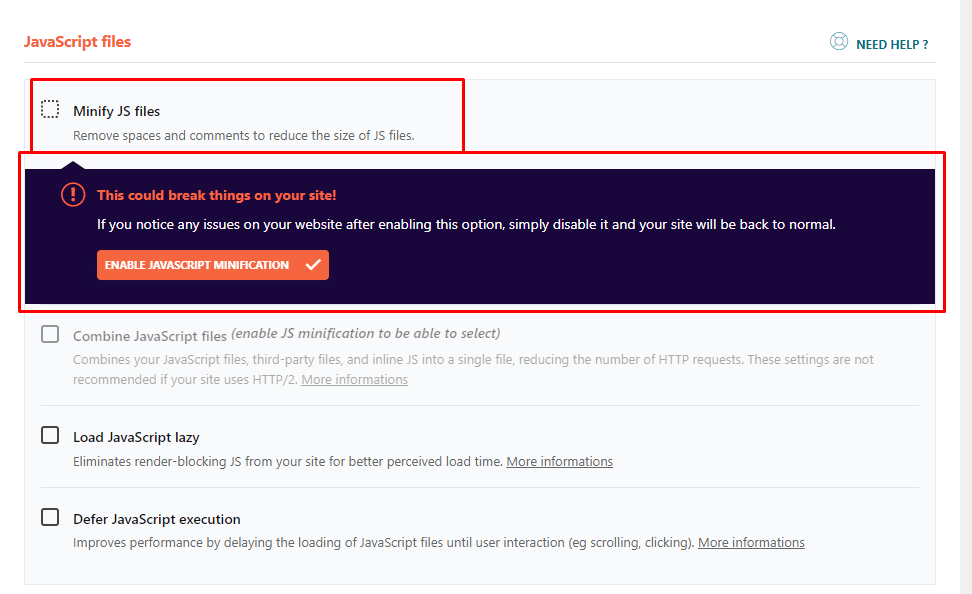
3. The new booking form should be displayed when you clear the cache, if you have a caching plugin or optimize plugin, please disable the minify js files option.
For example, if you have WP Rocket, and you have enabled these JS optimizations, which have a negative effect on our New Step Form, which is based on Vue 3 Framework, the booking form won’t show.
The old Form is based on Vue Framework 2, but the New Form is based on Vue Framework 3;
Once you disable the “minify JS” option in the Optimisations on WP Rocket, or similar, and purge the cache the form should appear.
Also, the issue could be with the Page Optimize plugin. You have these settings

and they should be added to this first input amelia_booking_script_index like this

and then everything will work with the new form.
Hope this helps.
Please check if you can see the booking form on page when you are logged in?
If this is the case then this can be 1 of 3 issues
1. The reason why the form is not visible for non-logged-in users is not in Amelia, but instead in your security settings. They’re either configured in a Security plugin (if you have any), or they’re on your server’s side.
The best option would be to reach out to your hosting provider, send them the link of the booking page and tell them exactly what you told us – you can see the page when you’re logged in as an admin, but you can’t see it from an incognito window (or when you’re logged out). They should be able to lift the block, so admin-ajax calls are sent for non-logged-in users also.
2. You have some page optimizers so turned them off and purge the cache and see if you can see the booking form then
3. The new booking form should be displayed when you clear the cache, if you have a caching plugin or optimize plugin, please disable the minify js files option.
For example, if you have WP Rocket, and you have enabled these JS optimizations, which have a negative effect on our New Step Form, which is based on Vue 3 Framework, the booking form won’t show.
The old Form is based on Vue Framework 2, but the New Form is based on Vue Framework 3;
Once you disable the “minify JS” option in the Optimisations on WP Rocket, or similar, and purge the cache the form should appear.
Also, the issue could be with the Page Optimize plugin. You have these settings
and they should be added to this first input amelia_booking_script_index like this
and then everything will work with the new form.
Hope this helps.
Hello Alexandre,
Thank you for reaching out and for providing detailed information about the issue.
From the error you shared, it seems the problem might be related to the SiteGround Optimizer plugin. Sometimes, optimization or caching plugins can interfere with how JavaScript is executed on the front end, causing such display issues.
Could you please try disabling the SiteGround Optimizer plugin temporarily, clear your cache, and check if the issue persists?
Let us know how it goes, and we’ll be here to assist further if needed.
Hello, thank you for reaching out to us.
Since you’re using the Premium version of the plugin, please open a ticket on our official support platform, and we’ll gladly help you there.
Premium products are not supported in these forums.
Thank you for understanding.
Forum: Plugins
In reply to: [Booking for Appointments and Events Calendar - Amelia] Pre-sale questionHello Alex,
Thank you for your inquiry!
- Currently, there is no built-in option in Amelia to allow users to indicate whether they will attend an event. However, you can create events with specific booking settings, including setting a minimum and maximum booking window.
- Amelia does not have a built-in RSVP feature or toggle for marking events as “Fully Booked” or “Sold Out.” However, you can manage event bookings directly within the system.
- Amelia provides the ability to set up event tickets, and each customer can see which tickets have been purchased and how many times, which could meet your needs for attendance tracking.
- Amelia also supports exporting attendee data, including CSV format, so you can easily generate reports of attendees for each event.
Let me know if you need further assistance!