amicalmant

Forum Replies Created
-
Forum: Themes and Templates
In reply to: [Hello Elementor] Any way to hide HELLO from the menu?Did you mean the admin menu below? If so, removing it would hide the settings page and also the “What’s New” link as explained in a recent forum thread:
From the
Admindashboard, navigate toHello>Settingsand click on thechangeloglink which is right next to theAdvanced theme settingstitle.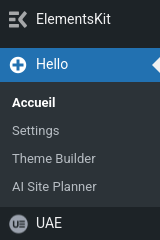 Forum: Themes and Templates
In reply to: [Hello Elementor] What’s New information would be appreciatedOK, that’s perfect. Thanks for the tip!
Forum: Themes and Templates
In reply to: [Hello Elementor] What’s New information would be appreciatedHi Nurit, thanks for the feedback. Actually, I was not aware of this [almost] hidden link. It’s good to know!I wonder, however, if these notes list the next version that is available for download but not installed yet (this is what I am looking for) or just the current and past versions. I’ll check that next time.
Going a little further, IMHO it would be more appropriate to get this information:
- Right in front of your eyes before the update, e.g. in the
/wp-content/themes/page or the/wp-admin/update-core.phppage but I realize that this is not a WordPress standards. - Alternatively, you could publish human-readable release notes in a dedicated blog posts category and add a permanent link to it in the “Resources” section of your website. That’s what Brainstorm Force has chosen to do for its Astra theme and I find this clear and convenient.
But thank you anyway 👍 for making me aware of this:
From the Admin dashboard, navigate to Hello > Settings and click on the
changeloglink.Forum: Plugins
In reply to: [Multisite Language Switcher] How to change current languageThanks for following up. This thread should be marked as resolved, BTW.
Forum: Plugins
In reply to: [Multisite Language Switcher] Change text in language selectThis thread should be marked as resolved.
The issue appears to be resolved, right? @thomlander could you please explained what happened, how you fixed it, and mark it as resolved? Thanks.
Forum: Themes and Templates
In reply to: [Ashe] Features not working & headers missing from WebsiteThis comment may be considered out of context but I believe it is not.
IMHO, this is a prefect illustration of the danger of using non-standard themes along with page builders such as Elementor or Divi. These elements introduce two layers of complexity on top of the WordPress Core and its plugin ecosystem. They may not always play along well and I am not surprised that they occasionally breaks websites.
Forum: Plugins
In reply to: [Co-Authors Plus] Seperating Multiple Writers with CommaThis string is defined in file template-tags.php (line 154). It should also be translated with the language files but this string’s translation does not work (at least in French), surprisingly. So what you can do is modify this line, i.e. replace ‘ and ‘ by ‘, ‘ and save + upload this file. It will work as you wish until a new version of the plugin overwrites your edit. Then you’ll have to do it again.
https://ww.wp.xz.cn/support/topic/option-for-with-instead-of-and/
Maybe someone will be able to debug this issue which as not been fixed yet…
In template-tags.php, find this line:
The problem is that this edit of line 153 in the plugin file will be erased by the next version. I wonder why the language files don’t work here. Any clue, @marcusanthony?
Forum: Plugins
In reply to: [Multisite Language Switcher] Cannot update custom URL for flag imagesI am also interested.
Forum: Themes and Templates
In reply to: [Responsive] Where is the Breadcrumb Code?@crimay71 In the meantime, I have implemented an alternative breadcrumbs function proposed by the Yoast SEO plugin. It is a matter of ten minutes and it works well. Also, on top of the visible breadcrumbs aimed at humans, it injects clean JSON-LD code in the header that is the preferred format for search engines.
Forum: Themes and Templates
In reply to: [Responsive] Where is the Breadcrumb Code?Thank you for this follow-up @prajakti. This will be an awaited release. 🙂
In the meantime, I have de-activated the breadcrumbs in “Customizing” > “Extras (Theme Options)” > “Theme Elements” > “Disable Breadcrumb List” in order to protect my SEO ranking.
Forum: Themes and Templates
In reply to: [Responsive] Where is the Breadcrumb Code?Same here:
Search Console has identified that your site is affected by 1 Fils d’Ariane issues:
Top Warnings
Warnings are suggestions for improvement. Some warnings can affect your appearance on Search; some might be reclassified as errors in the future. The following warnings were found on your site:
data-vocabulary.org schema deprecatedWe recommend that you fix these issues when possible to enable the best experience and coverage in Google Search.
The breadcrumb code should comply with the Schema.org list item type and not the old, deprecated data-vocabulary, according to the Google Console. How can we fix this? Is it only possible with this theme?
Forum: Reviews
In reply to: [Responsive] Free theme doesn’t support child themes very wellI have upgraded to version 4 (free edition) and re-styled the themes without the child theme. However, I still have issues with the Google Console (breadcrumb code deprecated and logo issues).
Forum: Themes and Templates
In reply to: [Responsive] Theme update broke my websiteBesides that, it is impossible to know what was changed from the dashboard — the web frame for that is blank! This is not very professional.
this is the third time I experience such upgrade issues with this theme. I have downgraded my review from 5 to 3 accordingly and I will be looking for another theme ASAP, I guess.
- This reply was modified 6 years, 7 months ago by amicalmant.
- Right in front of your eyes before the update, e.g. in the