andresramirezduque

Forum Replies Created
-
Hi there,
Any news about it?
Hello,
I hope you’re all well. I followed the instructions, but it didn’t work. The postal code appears on some pages, but not on others (for example, the home page or the contact page).
My client is very upset about this situation, and I don’t know how to handle it.
How can you help me?
Hi @reponwp
I followed the instructions and send the information you requested.
Hope upu can help me with this issue.
Thanks a lot!!
Hi @reponwp
Please.. Help me with this… My client is a little bit stressed with this situation.
Hi @reponwp
I’m using WP-Optimize 3.5.0
Hi @reponwp
I hope you are fine… Please, help me with this… crisaltec.com
The plugin is asking twice for the zip code in the home page.. And when you try to navigate to other page, this call again for the plugin but it’s not working. The page does not load.
My hosting support help me tracking this behaivor and that was the conclution… We have the situation from last week. Please!!!
Hi @reponwp,
I hope you are doing well.
Any answer about it? My customer is asking about this and I have no idea what I need to do.
Please help me with this issue.
Thanks in advanced.
Hi @reponwp,
I hope you are fine.
My friend… I moved the crisaltec site to a subdomain (test.crisaltec.com) and the plugin can not update de ZIP code when you enter the number in the pop up Window. In some pages (not home neither blog), looks like as right behaivor but, have no idea what data uses as ZIP Code.
Should I do anything in the parameters in order to save the zip code?Could you please check this behaivor?
Thanks a lot!!
- This reply was modified 1 year, 11 months ago by andresramirezduque.
Hi @reponwp,
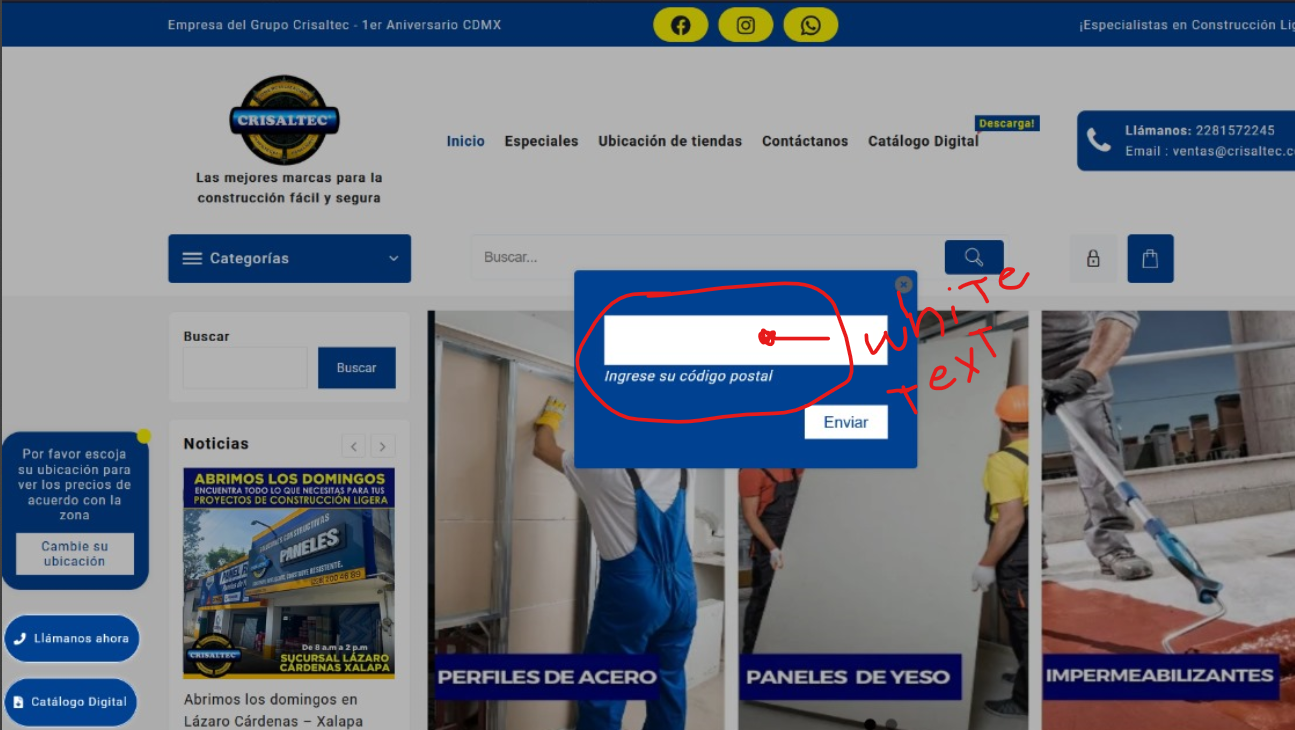
I hope you are well. Just following up the issue with the text inside the ZIP Code field:
I don’t know if this help: The issue is present in OPERA, FIREFOX Y CHROME browsers… .The Edge browser works fine.
Could you please check this behaivor?
https://crisaltec.com/docus/ZIP_Code_Plugin_Error.png
Thanks a lot!!
Hi @reponwp,
I hope you are well. Thanks for thr update. Please check this:
Once you get the popup window and try to write the ZIP code, you can not see the cursor in the field niether the numbers you type….. however, once you click the button (after type the number), the plugin register the ZIP code in the right way. It’s weird.
Could you please check this behaivor?
Thanks a lot!!
Hi @reponwp,
I hope you are well. Thanks for your answer…
- Can you please tell me the option that I need to adjust in order to launch the pop up if there is not a zip code registered? I can not find It
- Regarding the country by default… Great!!! My client is going to love that.
Thank you so much for your great assitance and support.
Have a nice day.
Hi @reponwp.
I hope you are well…. Question:
Is there any chance to modify the plugin with this behaivor?
- Once the user enter to the site, and the ZIP code is not registered, show up the window with the fields in order to ask that info to the user
- Right now, this site is for Mexican Customers… so my client ask if is possible to keep that country by default… in thar way, won’t be necessary to select the country
What do you think?
Plaease let me know.
As always.. Thanks for your great assistance and support.
Hi @reponwp,
That looks fine… As always, your assistance is excelent!!! I appreciate that.
Thank you so much!
HI @reponwp…
Sorry for answer to late.
Yes… We constantly update WP, Themes and Plugins. The site is using the laste version.
Please let me know if you needo more information.Thanks for your time.