avi sato

Forum Replies Created
-
Forum: Plugins
In reply to: [Fix Alt Text] alt text lengthi took a look at what it’s doing and you’re only encoding it once but it’s doing it again inside the dom conversion — only for &, though. even if you manually disable double-encoding, it still does it. but if you disable the encoding line altogether it doesn’t do it even once. very odd behavior but not unexpected, given how weird the mess of how wordpress stores html content. i don’t have a quick fix for you but i hope that helps.
Forum: Plugins
In reply to: [Fix Alt Text] alt text lengththanks so much for all that work! i’ve been using it and it’s wonderful. there is one bug with one of the fixes i figure i should point out. when using a special character like an apostrophe, it edits and saves it correctly without all the backslashes but it gets the html version messed up when it actually displays on the wordpress end. i’ll attach a couple of screenshots.
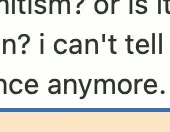
this is what it looks like in the inline editor.
and this is what it looks like in the generated code on the site.
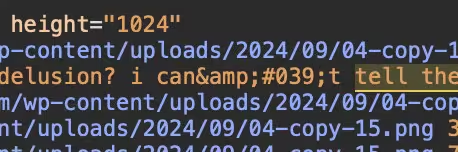
so, instead of turning it into “'” or “@apos;”, it’s turning the & escape character and calling that “&” inside the “'”.
Forum: Plugins
In reply to: [Fix Alt Text] alt text lengthas for jquery, i even expanded the result set to 500 and it worked fine on my server but i admit it is running on a pretty powerful machine with lots of memory so that’s not necessarily a guideline. doing it with jquery should be series rather than parallel requests to the server so not all at once but definitely one right after another. there is a setting for allowing parallel jquery requests but as far as i can tell it’s done sequentially in the wordpress installation by default. it’s definitely inefficient but doing it on the backend that doesn’t worry me too much. if thousands of users were doing something inefficient at once, that would be a big issue. me doing it from time to time i can handle. so far, batches of 100 haven’t slowed anything down at all and i’ve been watching server performance while doing it just out of curiosity.
might be a good thing to have it as like an advanced setting in the settings menu with a warning. some plugins have expert features where they say use at your own risk for things like “may overload server” or “may exceed memory requirements”. if it’s all in a single table, you could batch-grab the whole output of 25 or 100 results into the table as a single json request. even in a result set of 100 records with 1000 characters each, that’s still only 100kb so not a huge amount of overhead. if you’re grabbing the content into the table already, editing might not even need to to an ajax request to start, only to save. just a thought, though.
the issue with the escaping is about the difference between html escape characters and sql escape characters. they only need to be escaped if they’re problematic for sql (single quotes, double quotes) and you can avoid that problem completely by converting them to their html equivalents and back. then you never get a sql error on mismatched escapes. if you swap ” to " and ‘ to ' when storing to the table and the reverse when loading, pretty much everything else can just remain. there would be issues with other special characters like \ but those aren’t even functional for most alt-text purposes so they could probably be stripped just like linefeeds.
Forum: Plugins
In reply to: [Fix Alt Text] alt text lengthoh, i wasn’t trying to display them in a non-paginated table, just in the table the way it is. the memory issues would kill me on a single table for sure. i didn’t realize you could already do exactly what i was looking for by clearing the filters. that’s absolutely perfect!
yes, many of the images being displayed in this site in particular are well into the thousands-of-characters range because of the nature of what they are. definitely not a perfect solution but that’s what an image-only social media world looks like when you’re publishing directly into platforms like instagram that don’t support text content. the site is realistically just a searchable and linkable archive of thousands of images, most full of text. not perfect for seo but having the text content in the alt tags means it works perfectly for accessibility and that’s really the target for me in this case – pretty much all the traffic is coming from social media links because it’s easier to browse on the site than through instagram/tiktok, etc. especially when the alt tags allow the content to be searchable, something that can’t be done on the social media platforms because they’re not really meant for text publication.
it probably wouldn’t be worth the effort to implement batch ajax requests to build the table. you can avoid all the coding headache and pass the workload to the browser by adding a link to a javascript command to open all the edit blocks at once.
jQuery(".edit-inline a").click();i looked at the code and disabled the truncation in the sql query and it had no problem loading 100 records ranging between 300 and 5000 characters per alt text block for me with no memory or timeout issues but that certainly doesn’t mean it couldn’t be a problem for other people. for me, i can just change the few lines in the table and ajax files for my personal needs rather than you needing to worry about it and do lots of testing to make sure it’s safe for everyone.
Forum: Plugins
In reply to: [Fix Alt Text] alt text lengthwhile it’s on my mind, i was wondering if you had thought about adding an option that lets you load all alt text, not just the ones with errors, into the editing table. at the moment, you can only edit the ones that are missing it or triggering a length error but it would be great to be able to skim through all the alt text to proof them for issues in the same way. that would really only be functional if there was a way not to truncate it in the table, i guess — at the moment, it truncates the table display to 255.
i’m working on a way to batch-ocr content into the textareas but i haven’t found a way to successfully do that yet. being able to do them all on one screen thanks to this plugin, though, is fantastic!
thanks for putting this all together.
Forum: Plugins
In reply to: [Fix Alt Text] alt text lengthlooks great. thanks for fixing that up. one other thing that’s popped up. not sure if this was happening before because i didn’t look. escape characters aren’t being filtered out when it loads the alt tag back into the editor. i’ll give an example. let’s say i type in this…
she’s going to the movies to see “star wars” tomorrow.
it saves that as…
she\’s going to the movies to see \”star wars\” tomorrow.
so far so good. when it grabs that back into the table, it doesn’t filter the escape out so it appears in the textarea as…
she\’s going to the movies to see \”star wars\” tomorrow.
then, when it’s saved again, it saves it as…
she\\\’s going to the movies to see \\\”star wars\\\” tomorrow.
and this loop would continue.
not a massive disaster for my purposes because the point is to try to enter the data, not to go back and edit it over and over. but i thought i’d point it out while i was noticing it.
Forum: Plugins
In reply to: [Fix Alt Text] alt text lengththat sounds fantastic! i’ll update it on that site and give it a shot.
Forum: Plugins
In reply to: [Fix Alt Text] alt text lengththat makes sense. i hadn’t looked at the table structure when i was searching for the source of the truncation.
because of the nature of a lot of social media content, all the text ends up as graphics. would be so much nicer if you could upload pdf files to instagram but alas…
i haven’t found an ocr extension that allows me to batch the process so the way i’ve been doing it has been to use the builtin safari ocr, which is quite good. the worst part is actually that wordpress doesn’t allow for automatic stripping of newline characters so you end up with a bunch of linebreaks in the html it generates instead of changing those newlines to spaces. yes, the alt tag theoretically allows linebreaks but lots of stuff in wordpress breaks if there are any in there, i’ve discovered.
Forum: Plugins
In reply to: [Fix Alt Text] alt text lengththanks. the site i’m using it on is storing a lot of social media posts with text in them and it’s useful for screen readers to have the whole text in the alt tag for accessibility. in some cases, definitely more than a thousand characters. i looked through all the code after posting and couldn’t find any truncation so i’m confused where that’s happening. when it gets it back from the ajax, it seems to be truncated in the table even before it goes to a textarea. if i set it in the page editor, it can be very long but, if i set it in the plugin, it isn’t storing the whole text even the first time, though looking through what’s happening i can’t see where it’s getting chopped off. i have tens of thousands of images to get through so my use-case is just having an ocr extension, open the graphic, select the text, paste it into the box and save. i wish there was an automated fix but that’s the best i can come up with. but i can’t seem to make it save the whole thing yet.
Forum: Everything else WordPress
In reply to: Image with Text to Alt Tagthanks. i have taken a look at those two and neither manages to extract the text in a way that’s useful to accessibility or seo in bulk but thanks for sending them over.
Forum: Fixing WordPress
In reply to: Segmented Voiceover?looks good to me. i was wondering if there was a way to include an option for a link to a file rather than using something in the media library.
Forum: Fixing WordPress
In reply to: Segmented Voiceover?wow. that’s fantastic. i haven’t even begun on the project yet and it’s probably at least six or eight months away from being approved by the client so i have lots of time. i’m going to play with it on my own personal site, though, so i’ll let you know how it goes.
Forum: Fixing WordPress
In reply to: Segmented Voiceover?gutenberg. i was hoping there might be an already-existing solution. sadly, it does appear i will have to build something.
Forum: Fixing WordPress
In reply to: Segmented Voiceover?thank you for your thoughts there. no, uploading it is no problem and i have actually written a simplified uploader for the project for video. the problem isn’t getting the file into wordpress. it’s attaching the audio recordings to specific segments of text. a single page might have a hundred or more lines of text, each with an individual recording. the organization so there can be a little “play” button by each paragraph is what i’m struggling with.