Beee

Forum Replies Created
-
Thanks for explaining.
Yes I got it’s a different value…
I meant the way to manipulate the values, get_option, change, update_optionWhat is better ? Remove the
social-tax-title-{taxonomy}or change the value to the value fromtitle-tax-{taxonomy}?Thanks for your reply and explanation.
From your first reply it was my understanding this is the value which can be editen with a function which is locked behind a premium feature, in Settings > Category & Tags > Taxonomy.
I have removed all SEO titles overrides by editing the stored option value
wpseo_taxonomy_meta, with a cron job, added below.function mv_remove_model_title_overrides() {
$titles_removed = get_option( 'seo_titles_removed' );
if ( ! $titles_removed ) {
$taxonomy_meta = get_option( 'wpseo_taxonomy_meta' );
if ( ! empty( $taxonomy_meta[ 'model' ] ) ) {
foreach( $taxonomy_meta[ 'model' ] as $key => $values ) {
if ( array_key_exists( 'wpseo_title', $values ) ) {
unset( $taxonomy_meta[ 'model' ][ $key ][ 'wpseo_title' ] );
}
}
}
if ( ! empty( $taxonomy_meta[ 'post_tag' ] ) ) {
foreach( $taxonomy_meta[ 'post_tag' ] as $key => $values ) {
if ( array_key_exists( 'wpseo_title', $values ) ) {
unset( $taxonomy_meta[ 'post_tag' ][ $key ][ 'wpseo_title' ] );
}
}
}
update_option( 'wpseo_taxonomy_meta', $taxonomy_meta );
update_option( 'seo_titles_removed', 1 );
do_action( 'one_time_action_done' );
}
}
add_action( 'remove_seo_title', 'mv_remove_model_title_overrides' );So I would be need to do the same to get all
social-title-tax-{taxonomy}to show the same astitle-tax-{taxonomy}?Thanks for the reply. I get where
title-tax-{taxonomy}comes from, but thesocial-title-tax-{taxonomy}differs from the title-tax-{taxonomy} and without premium I can’t change this, so I’m a bit baffled as to how this can be different.wp_get_wp_versionis a default WordPress function (see wp-includes/functions.php line 8933) so if a standard WP function can’t be found… there might be something else which is wrong.
I am using the latest version and don’t experience the issues you report, nor have I ever seen it.Hi Mia, I know it’s not a serious issue, but i like to have clean logs, so I report it 🙂
Forum: Plugins
In reply to: [Mobile Detect] PHP deprecated noticeYou’re welcome. Happy to help.
Forum: Plugins
In reply to: [Mobile Detect] PHP deprecated noticeI asked Gemini. The fix is quite easy as it turns out.
This is the reply I got.
The error you are seeing is a PHP 8.1+ deprecation warning. It occurs because the
__constructmethod in theTinyWP_Mobile_Detect.phpfile defines parameters with a default value ofnullwithout explicitly marking the type as nullable using a?public function __construct(
?array $headers = null,
$userAgent = null
)That should fix it, I think. I haven’t tested this yet on a live server.
Forum: Plugins
In reply to: [Broken Link Checker] Undefined array keyI’ll await the update.
Forum: Plugins
In reply to: [Broken Link Checker] Undefined array keyForum: Plugins
In reply to: [Broken Link Checker] Undefined array keyI am not saying it’s 100% resolved yet, only there are no more warnings yet.
I nuked the check and have to wait if the correct links show up in the checker.
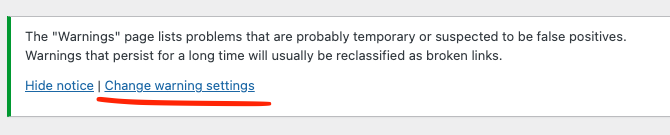
Regarding the warning, if I click the admin filter warnings, it shows up. It shows up below this text.
The “Warnings” page lists problems that are probably temporary or suspected to be false positives.
Warnings that persist for a long time will usually be reclassified as broken links.Forum: Plugins
In reply to: [Broken Link Checker] Undefined array key@wpmudevsupport14 thanks for the reply.
I have to correct you a bit. I didn’t EXCLUDE any acf fields, I included them and excluded the post type posts.
I know warnings don’t cause an issue, but they clutter up my logs, making it harder to identify more serious issues.
I posted this before the most recent update was released. After re-testing it, I haven’t seen any warnings in logs again, so maybe there was a fix in there as well (unknowingly).
On another note, I checked the warnings screen. There was a message/link, which said “Change warning settings” and links to /wp-admin/admin.php?page=link-checker-settings#blc_warning_settings where it says, “Sorry, you are not allowed to access this page.”
You are correct, this is a screenshot from a development site. I did notice the correct meta info being outputted in the source on the front-end.
I was not aware of this specific for development/staging environments.
Forum: Plugins
In reply to: [Broken Link Checker] _load_textdomain_just_in_time was called too earlyI understand they are notices, but as a developer I work on the development side where there are debug logs active.
Because of this notice (and similar ones from other plugins) the logs are flooded and real error/debug messages get buried.
The answer reg. the cloud is just an (extra) opinion to the question whether I use the cloud engine to scan for links.
- This reply was modified 1 year, 6 months ago by Beee.
Forum: Plugins
In reply to: [Broken Link Checker] _load_textdomain_just_in_time was called too earlyI am NOT using the cloud solution, nor do I want to.
I don’t like sharing info like this in a cloud.