Ben Meredith

Forum Replies Created
-
Hey @helpmelisa !
That’s certainly not what we want!
We’ve got lots of folks using the latest version with no issue, so it’s going to take a bit of digging to figure out what’s different about your site.Are you using a Braintree plugin of any sort? That error message mentions Braintree, so that’s got me chasing that lead.
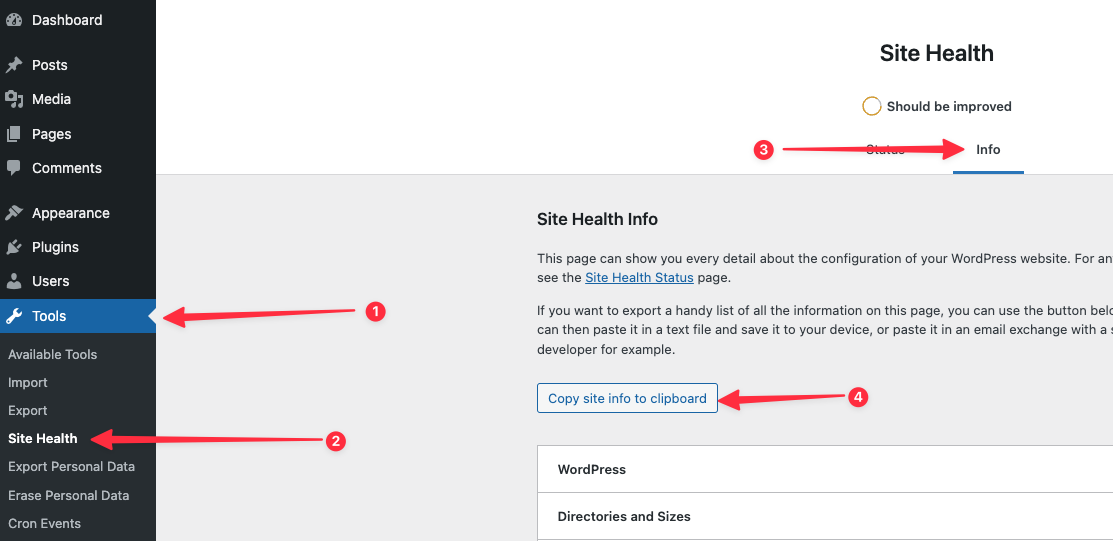
I’d be interested to see what other plugins, what theme, and what customizations you’ve got going on. Can you visit the Site Health screen and copy/paste in the site info?
Here’s a link to an image showing you where to get that:
https://givewp.com/wp-content/uploads/2023/09/CleanShot-2023-09-14-at-14.46.49.png
Paste that in your reply here, and remove any info that you don’t want public.
Hey @sdarnowsky
Is the number you called 888-350-2387?
That should get you to the correct PayPal department, according to my internal contacts at PayPal.
I wish we could be of more assistance from our side, but everything that happens between clicking on “Connect to PayPal” and actually being connected is handled by the team there.
Let me know if you’re still having issues.
hi @siobhanpepper !
To uninstall the recurring donations add-on, temporarily reinstall and activate the main GiveWP plugin, and then attempt to uninstall the add-on again. Once it’s uninstalled, you can then deactivate and uninstall the main plugin again.
Thanks!
Forum: Plugins
In reply to: [GiveWP - Donation Plugin and Fundraising Platform] Q: Donation methodsHey @mballew !
That’s a great feature request! We do not currently support that, and have historically shied away from “pay later” in favor of generating the revenue immediately for your organization. You could use a form plugin or similar to collect those email addresses in the meantime.
One related feature request we get every so often: Pledges. I’ve added your comment to an internal list related to that, but feel free to elaborate more there on how this feature would be useful to you.We really do listen to our users, and this is the type of thing that I’d love to see us build, after 3.0 launches.
Forum: Plugins
In reply to: [GiveWP - Donation Plugin and Fundraising Platform] Conflict with Avada ThemeHi @germars !
We’re actually not allowed by forum rules to support premium add-ons on this forum. Please reach out to our priority support team at https://givewp.com/priority-support to get this resolved as fast as possible.
In that message, please also include your system info.
Navigate to Donations –> Tools –> System Info (tab) and click the button to “Get System Report” and copy/paste that in your reply here.
That will give us some more context to be able to help.
That’s certainly not what we want! I just attempted to replicate what you are seeing on a test install of mine, and so far I’ve not been able to:
Here’s what I tried:- Create a test site with the latest GiveWP on it (2.31.0)
- Change the timezone to
America/Los_Angelesper the error message. - Change the timezone to
America/Sao_Pauloper your coment. - Turn on WP_DEBUG mode
- Upgraded my PHP version to 8.1.x
So far, I’ve not been able to replicate the issue at all. It’s possible that something in a third party plugin or the theme is also trying to do something having to do with timezones. Can you temporarily deactivate all other plugins and see if the problem goes away, or switch to a different theme temporarily?
I’m eager to get this resolved for you, but until I can replicate the problem I’m a bit stuck.
@digittalpi ah yes that clears things up. That’s an email sent by the plugin for sure, and not by our marketing team or anything.
It’s a “Security Bulletin” that is sent to outline problems found on your site. Of course, something is going haywire and triggering that message over and over on your site, which explains the problem, but doesn’t isolate the cause. Usually those emails triggering incorrectly is a result of a process called “wp-cron” (that handles scheduled or background processes) malfunctioning.
I’m the head of support for this plugin and happy to look into what’s going sideways, but it sounds like you don’t want to isolate it.
If you change your mind, I’m happy to personally look into it. We take your feedback very seriously. Have a great weekend!
Hey @digittalpi !
Well that’s certainly not intentional! It sounds like something has gone majorly haywire for your specific email address. I just attempted to replicate a problem with several different email addresses on test sites, and I’m not 100% clear how to do it, so maybe that’s why I’ve had trouble so far. At most we would send three emails (counting the ones confirming you opted into the list) when you opt in.
Also, I searched through our internal support notes but I can’t find any interaction that is what you are describing. That’s not saying it’s not there, just that I don’t see it in my searches. I searched for all sorts of things related to your username here, but found nothing.
Rest assured, we have no intention of sending that many emails on a regular basis.
I’d like to take this off of the forums here only because it’s going to take less back-and-forth to resolve your issue that way. Please reach out to [email protected] and mention this review so that the team can forward your inquiry to me.
Thanks!Hey @calebprenger85
That’s certainly not what we want! Apologies for the slow turnaround on this reply. I’m hoping you’ve resolved this by now, but definitely here to help if not.
The error you are seeing there is related to an older version of the Form Field Manager Add-on. Update to the latest version of that add-on (2.1.1) and the issue is resolved.
Of course, you can only update to the latest version of a premium add-on if you have an active license. We’re technically not even allowed to provide support for premium add-ons here, so if you need continued support we’ll need to take this to a different channel at https://givewp.com/priority-support
For that reason, I’m marking this issue as “resolved” but definitely reach out there if it’s not.
In the meantime, deactivating the Form Field Manager add-on will resolve the problem.
Forum: Plugins
In reply to: [GiveWP - Donation Plugin and Fundraising Platform] Oxygen Builder SupportHey @ladydev!
The only known issues with Oxygen builder relate to our (premium) Peer-to-Peer add-on and the (premium) Form Field Manager add-on.
Oxygen builder essentially hijacks the normal WordPress theme system, and while there’s nothing necessarily wrong with that, it makes things a little more tricky to support. Our Peer-to-Peer Fundraising add-on relies on the WordPress theme system, and so therefore Oxygen completely breaks it.
If you’re looking for a theme and “builder” system that works well with GiveWP (and is constantly being tested for compatibility), We’d recommend KadenceWP, and the robust community supporting that theme with blocks and starter templates. It’s a free theme (with some paid upgrade options) and owned by the same company that owns GiveWP.
I’m happy to answer any followup questions, but this forum explicitly forbids pre-sales conversations. Our contact form at https://givewp.com/contact-us is the best place to reach out!Hey @antisemitism
I’m the head of support here (and also the head of Quality Assurance) so I’m definitely working to wipe the egg off of my face with regards to the 2.27.3 release.
We released that yesterday afternoon, and were immediately made aware of an incompatibility with our Form Field Manager add-on, which was causing the “critical error” you saw. Over the next few hours, we rushed to patch the issue in version 2.28.0. From the time we were made aware of the bug (6:40PM Eastern US time) it was just over 2 hours until we released patches for both GiveWP and our Form Field Manager add-on.
I’ll spare you all the technical details as to what caused the incompatibility, but the main point is that we made some changes that were to facilitate things coming in version 3.0 of GiveWP, and neglected to run one final test before shipping the plugin update last night. Rest assured I take full responsibility for that, and I’m kicking myself for not catching this.
One thing I want to highlight here is that we did release a bug, but we did *not* crash your site. The power of WordPress is that you own all of your data, and you control updates to files and database. I don’t want to go full Spider-Man on you, but that power does come with responsibility. It’s your website, hosted on servers we have no control over, alongside third-party software we have no control over.
If you are running mission-critical infrastructure like donation software, you should have a website freeze policy around events like the one you’re describing, and you should never ever update the live site without testing first on a staging environment. Most good web hosts offer that as a standard feature these days.
I absolutely hate that this bug made it through to live websites, and am going to keep shoring up our Quality Assurance processes to catch more and more of these things.
Your success with online donations is our number one priority, and I look forward to earning back your trust. I’m happy to clarify if you’ve got further questions.Hey @lokangeric !
Welcome to the GiveWP family. We’re super glad to have you.
I have good news and bad news on this request. I’ll start with the bad news.
It’s not all that easy to style GiveWP forms, even if you know CSS, these days. I recently responded to a different support post, here: https://ww.wp.xz.cn/support/topic/great-but-175/#post-16710811
I’ll spare you the long version here, since I wrote a veritable book there.
That leads to the good news: the time is quickly approaching where easy styles are returning! Stay tuned to GiveWP 3.0 news for the latest.
Hey @webguy411 !
I share your frustration here with how difficult it is to set up GiveWP with PayPal’s newest API. We’re actively working with PayPal currently to resolve some of the pain points (some of them are resolvable from our side, and some of them require PayPal to make some changes).
One thing (which we are working to make more clear) is that if your site is in GiveWP test mode, then clicking on the “connect to PayPal” button is actually taking you to PayPal’s sandbox to log in. So if you want to connect to a live PayPal account, you have to toggle GiveWP’s test mode to “disabled” before clicking that button to connect to PayPal.
We’re also making a handful of other changes to the onboarding process with PayPal to make things more seamless.
It’s not much consolation for someone who has wrestled with the current implementation, but I do want you to know that we’re aware of the problems, and fixing as many of them as we can from our side.
PayPal is a large and complicated beast, and we’ve not had much historical success in even getting their development team’s attention. As recently as the last couple of months we were given access to an internal team there where we can ask questions, and actually get knowledgable answers. We’re putting those answers to use in making some needed updates, hopefully soon.
As you mentioned, Stripe works flawlessly, and has the added bonus of clearly logging errors and other problems so that if something does arise it’s easily resolved. I wish that were the case with PayPal.
Hi there @antiracismdaily
That’s certainly not what we like to hear! I’m the head of Support here, and I checked our system to try and find where you reached out, but I am not seeing anything. We are more than willing to help resolve issues like this.
What you experienced is what we call “donor spam.” This can happen for a wide variety of reasons, and it is sadly very common across all donation platforms, not just GiveWP.
Your success with online donations is our number one priority, and spam donations can be a real detriment. We’ve done lots over the years to combat it, but there’s still more to be done. You can follow this post on our feedback site where we are tracking additional spam protection options, and I’ve added your name to the list of folks asking for it. You can see that here: https://feedback.givewp.com/bug-reports/p/additional-spam-donation-protection
It sounds like you’ve already moved on to another solution, but heads up in case you want to give GiveWP another shot (and these tips work with any other WordPress-based solution), here’s some ways to combat this:
1) Our Akismet Integration
Install or activate the free Akismet plugin. Then go to “Donations > Settings > Advanced” and ensure that our Akismet SPAM protection is enabled there and save changes.2) Use Cloudflare or Sucuri
These are third-party services that help both speed up your website and provide protection against bot attacks like what you are experiencing. Some sites get added to bot lists and there’s nothing you can do to prevent them from just continually attacking your site, except using a strong and dedicated firewall/security service like these two. Cloudflare has a paid option, but it also has a free basic plan in case that is a better fit.3) Set a higher minimum donation amount
Sometimes, simply increasing the minimum donation amount is a huge method of preventing these types of attacks. Bots tend to test forms with $1 or up to $5 amounts. If your form only accepts donations of $10 or higher you can prevent these low-hanging easy bots.4) Use a spam-stopping plugin
You can use these plugins: https://ww.wp.xz.cn/plugins/zero-spam/ and https://ww.wp.xz.cn/plugins/recaptcha-give/. Zero Spam is a heavy favorite of our team. They offer excellent support and are pros at managing the ins and outs of stopping spam. Both plugins integrate very nicely with GiveWP.Also, one of the things on our roadmap to implement is an optional reCAPTCHA block on the form itself. That won’t happen until after GiveWP 3.0, because the current architecture of the form itself just is not conducive to adding something like that easily. After 3.0 (you can read more about that and sign up to be alerted when 3.0 launches here: https://givewp.com/next-generation-donation-forms/ ) It’s going to be among our top priorities.
Again, I hate you had that experience, and would love the chance to earn back your trust.
Forum: Reviews
In reply to: [GiveWP - Donation Plugin and Fundraising Platform] Great butHey @willoftheweb
I replied over on the support request you made, So I won’t repeat that here, but short version is you’re right: it’s too difficult to style things today.
But in the very near future (that you can already help test the beta for) it’ll get better.Try out the new Beta here: https://givewp.com/next-generation-donation-forms/
When you do, switch over to the “design” tab of the builder, and try adding your own custom CSS. It’s SO NICE.