Ben

Forum Replies Created
-
Forum: Plugins
In reply to: [LiteSpeed Cache] Litespeed cache crawler doesn’t startYes this the full log with the added URL “async_litespeed”
And yes you’re right. It seems that a security plugin is blocking some request.
After disabling it the crawler is OK. Trying to find the setting that causes the issue.
Thanks for your help btw
- This reply was modified 1 year, 9 months ago by Ben.
Forum: Plugins
In reply to: [LiteSpeed Cache] Litespeed cache crawler doesn’t startHere is the log : https://pastebin.ubuntu.com/p/wdCTnJ5nKw/
Forum: Plugins
In reply to: [LiteSpeed Cache] Refresh twice to get page cachedThanks a lot for your help !
Forum: Plugins
In reply to: [LiteSpeed Cache] Refresh twice to get page cachedI made the change and it seems to work better now : https://prnt.sc/cRTaMDzNyANG
Is also get everytime a HIT for each crawler, no more MISS :
03/20/24 19:20:03.656 [109.234.166.218:15579 1 AcT] 🕸️ [status] ✅ Hit [url] https://www.dptelec.fr/climatisation/choisir-sa-climatisation/
03/20/24 19:20:03.656 [109.234.166.218:15579 1 AcT] 🕸️ [status] ✅ Hit [url] https://www.dptelec.fr/climatisation/entretien-de-votre-climatisation/
03/20/24 19:20:03.656 [109.234.166.218:15579 1 AcT] 🕸️ [status] ✅ Hit [url] https://www.dptelec.fr/electricite/securite-electrique-10-conseils-maison/
03/20/24 19:20:03.656 [109.234.166.218:15579 1 AcT] 🕸️ [status] ✅ Hit [url] https://www.dptelec.fr/electricite/renover-son-installation-electrique/
03/20/24 19:20:03.656 [109.234.166.218:15579 1 AcT] 🕸️ [status] ✅ Hit [url] https://www.dptelec.fr/
I guess it’s OK now ?
Forum: Plugins
In reply to: [LiteSpeed Cache] Refresh twice to get page cachedI made the change. Here are current settings : https://prnt.sc/dvu0w2vLK577
What is weird is that the crawlers wait for 5min before running despite the 60 seconds parameter.
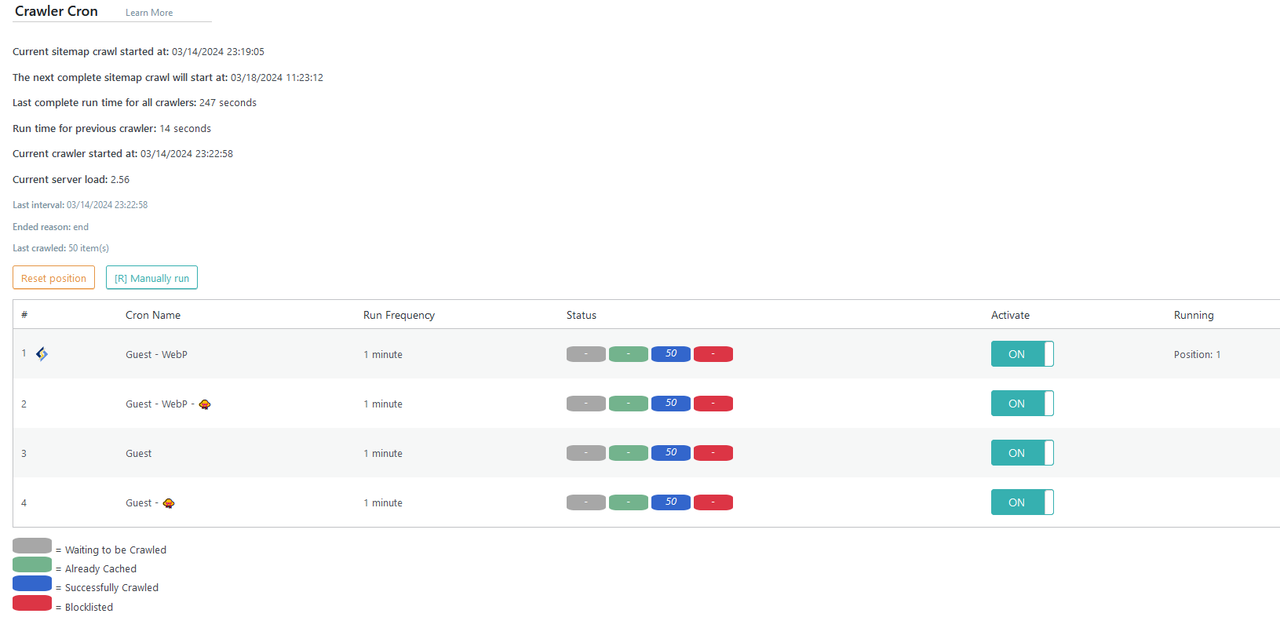
Here is my crawler status for the last minutes : https://prnt.sc/dA581a85F4DI
In the Debug logs I don’t see any more “Cron abort / cache warmed already, but i’m still wondering why my crawlers statuses remain Blue : https://prnt.sc/HchPK2kDIO_I
Last question, is it normal that the crawler resets the cache every time it restarts the global sitemap crawling, even if no changes were made since last sitemap crawl ?
Unfortunately with these settings, I get my website uncached with varying durations :
- Crawler #1 : Guest – WebP ==> All cache varies get uncached (truncates sitemap and regenerates it) and #1 gets cached at T
- Crawler #2 : Guest – WebP (Guest Mode) ==> gets uncached at T (for 5min) and cached at T+5min
- Crawler #3 : Guest ==> gets uncached at T (for 10 min) and cached again at T+10min
- Crawler #4 : Guest (Guest mode) ==> gets uncached at T (for 15min) and cached again at T+15min
- Crawler #1 gets uncached at T+20min and the cycle goes on
Forum: Plugins
In reply to: [LiteSpeed Cache] Refresh twice to get page cachedI made the change and waited for 20 minutes.
The 3 first crawlers had successfully run. I ran the 4th manually and here is the updated screenshot : https://prnt.sc/e_uNL8Qx8pu7
What is weird is that the “Current sitemap crawl started at” refers to the first crawling only. It says that the next complete sitemap crawl will start start 10min later but when it’s time it doesn’t change the “current sitemap crawl started at” value.
In the logs I still the same data :
03/18/24 17:55:02.875 [109.234.166.218:27004 1 U8T] [Router] parsed type: crawler => LiteSpeed\Router::verify_type()@475 => LiteSpeed\Task::async_litespeed_handler()@79 => WP_Hook->apply_filters(,ARRAY)@324
03/18/24 17:55:02.875 [109.234.166.218:27004 1 U8T] ⏰ type=crawler
03/18/24 17:55:02.875 [109.234.166.218:27004 1 U8T] 🕸️ ------------async-------------start_async_handler
03/18/24 17:55:02.893 [109.234.166.218:27004 1 U8T] 🕸️ Init w/ CPU cores=80
03/18/24 17:55:02.893 [109.234.166.218:27004 1 U8T] 🕸️ Take over lane as lane is free: /home/nona3840/www.dptelec.fr/wp-content/litespeed/crawler/meta.data.pid
03/18/24 17:55:02.906 [109.234.166.218:27004 1 U8T] 🕸️ ......crawler started......
03/18/24 17:55:02.907 [109.234.166.218:27004 1 U8T] 🕸️ Cron abort: cache warmed already.
03/18/24 17:55:02.907 [109.234.166.218:27004 1 U8T] 🕸️ Release lane
03/18/24 17:55:02.908 [109.234.166.218:27004 1 U8T] 💰 [Tag] Add --- HTTP.200
03/18/24 17:55:02.908 [109.234.166.218:27004 1 U8T] [Core] CHK html bypass: miss footer const
03/18/24 17:55:02.909 [109.234.166.218:27004 1 U8T] [Ctrl] not cacheable before ctrl finalize
03/18/24 17:55:02.909 [109.234.166.218:27004 1 U8T] [Router] get_role:
03/18/24 17:55:02.909 [109.234.166.218:27004 1 U8T] [Vary] role id: failed, guest
And then the Crawler summary page remains in the “Blue” stage.
I then edited 1 page and got a Purge_all triggered according to my purge settings.
Next crawler sitemap run got everything cached again.
But when I don’t update any page or post, the crawling state is always the same (Blue status). It aborts cause pages are actually cached but it doesn’t update the Crawler Status.
Is this the normal behavior ?
Forum: Plugins
In reply to: [LiteSpeed Cache] Refresh twice to get page cachedYou can just click on the “blurry” image it will be displayed full screen and sharp.
Forum: Plugins
In reply to: [LiteSpeed Cache] Refresh twice to get page cachedHere is the Crawler summary screenshot https://i.postimg.cc/05LHhcXC/image.png
The report number is : NWEAFHWZ
Forum: Plugins
In reply to: [LiteSpeed Cache] Refresh twice to get page cachedI added
add_filter( 'litespeed_const_DONOTCACHEPAGE', '__return_false' );and it seems to work for Divi (as I read in another topic).When I update my page, I can get it cached with only one refresh instead of two before.
But I’m still facing the issue with the crawler not doing its job. As soon as it starts, it aborts saying the cache is already warmed up :
03/15/24 01:15:03.425 [109.234.166.218:45464 1 faA] 🕸️ Init w/ CPU cores=80
03/15/24 01:15:03.425 [109.234.166.218:45464 1 faA] 🕸️ Take over lane as lane is free: /home/nona3840/www.dptelec.fr/wp-content/litespeed/crawler/meta.data.pid
03/15/24 01:15:03.438 [109.234.166.218:45464 1 faA] 🕸️ ......crawler started......
03/15/24 01:15:03.439 [109.234.166.218:45464 1 faA] 🕸️ Cron abort: cache warmed already.
03/15/24 01:15:03.439 [109.234.166.218:45464 1 faA] 🕸️ Release lane
03/15/24 01:15:03.442 [109.234.166.218:45464 1 faA] 💰 [Tag] Add --- HTTP.200
In fact it is not and the page I updated needs to be refreshed manually to be actually cached.
Why is the crawler not viewing the updated and cache purged page ?
Forum: Plugins
In reply to: [LiteSpeed Cache] Refresh twice to get page cachedYes, I’m using Divi
Forum: Plugins
In reply to: [WP Ghost (Hide My WP Ghost) - Security & Firewall] admin-ajax.php redirectHi Peter,
Thanks for your answer. I tried it but it didn’t change my 302 redirect problem.
Finally, I set a custom admin-ajax URL and it worked. So I keep my new ajax url as it seems to work with all my plugins.
Thanks for your help
Forum: Plugins
In reply to: [W3 Total Cache] Unable to exclude REST URL from cachingHello @vmarko ,
Thanks for your help.
The URL called within the page is https://www.bluminance.fr/wp-json/wappointment/v1/availability
In the meantime I found a workaround with Cloudflare. I override the response header forcing Cache-control to no-cache and it works. The URL is now always got from server.
Forum: Plugins
In reply to: [WC Captcha] Conflict with WP 2FA plugin since updating to 1.3Hi and thank you very much for your bug fix. It works without problem now !
Forum: Plugins
In reply to: [WP 2FA - Two-factor authentication for WordPress] It has stopped working@robert681 Sorry for my mistake, I will create my own thread.
Forum: Plugins
In reply to: [WP 2FA - Two-factor authentication for WordPress] It has stopped workingI made several tests to find out that, in my case, it was the last WC Captcha plugin update (1.2.2 > 1.3) that was causing the issue.
I downgraded WC Captcha to 1.2.2 and everything works fine again.
Are you using that plugin too Gabriel ?