blubor

Forum Replies Created
-
I am and I have already created a ticket.
That code did not resolve the issue. I have cleared my cache to make sure.
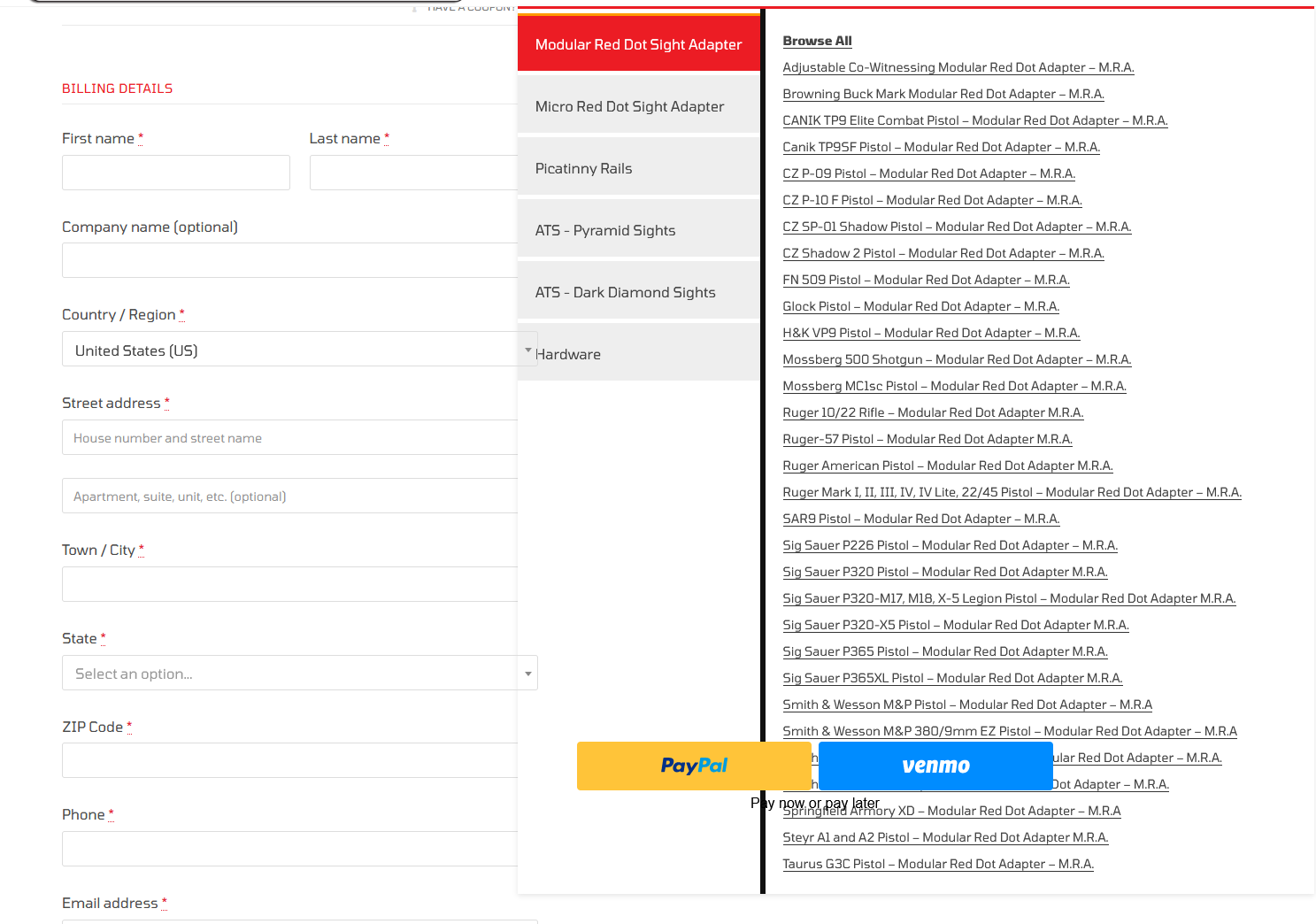
You have to select PayPal as the payment option to see the result, which it doesn’t look like you did. Here is a screenshot with the issue present: https://snipboard.io/CxdeXk.jpg
I will open a ticket as we need this resolved ASAP.
https://outerimpact.com/home/fa/
You will need to add a product to your cart, then visit the checkout page. You can see that, when you hover over the menu, page elements are placed over the menu, preventing its use. The PayPal buttons are an example of this.
Forum: Plugins
In reply to: [Mega Addons For WPBakery Page Builder] Security concernsA moderator responded, saying the forum “is not a good place to ask,” despite it being the only place to ask for this plugin. I’m deleting it from our sites, and everyone else should do the same.
If the support forum isn’t a good place to ask, it shouldn’t be listed under “Support” on the plugin page.
Has there been an update on this issue?
Forum: Plugins
In reply to: [Product Carousel Slider for Elementor] Featured ProductsIs this a feature that can be provided? Also, is automated pagination scrolling possible?
On the Form Fields page:
I clicked “Save” and the email field was still missing.
Instead, on the next attempt, I clicked, “Reset,” then “Save,” and now the email field appears again.
The plugin does not show any available updates. We are on version 2.2.
- This reply was modified 5 years, 11 months ago by blubor.
We are also experiencing this issue.
I have tried saving fields via the Form Fields menu as indicated above, but it does not fix the issue. The email field is still missing.
Any word on this configuration?
Per item free shipping: Shipping can be discounted per item instead of generally for a whole order.
Combination product deals: Discounts can be automatically applied if specific products are in a cart together.
Itemized discounts on checkout page: Each discount appears on the checkout page so customers can see which discounts are being applied.
Forum: Plugins
In reply to: [Sequential Order Numbers for WooCommerce] Order Numbers Out of SequenceWooCommerce Admin Version: 0.18.0
This issue is intermittent.Forum: Plugins
In reply to: [Sequential Order Numbers for WooCommerce] Order Numbers Out of SequenceJust to follow up on this issue, disabling the WooCommerce Admin plugin fixed this issue for us. I realize this is only a workaround, and since the WooCommerce Admin plugin is advertised on new installs of WooCommerce, this will likely affect many more users of the WooCommerce Sequential Order Number plugin. However, the WooCommerce Admin plugin didn’t provide functionality that we didn’t already have, so disabling it until full compatibility between the two plugins exists was our best option.