broganm

Forum Replies Created
-
Forum: Plugins
In reply to: [Order Delivery Date for WooCommerce] Wrong delivery date shownNo this didn’t fix the problem. Any other ideas?
Forum: Plugins
In reply to: [Order Delivery Date for WooCommerce] Wrong delivery date shownHi Tychesoftwares,
It’s been 4 weeks since I last heard from you on this. Has anything been done about it? Is the developer still working on it?
Kind regards,
Forum: Plugins
In reply to: [Order Delivery Date for WooCommerce] Wrong delivery date shownHi Tychesoftwares,
My client is getting very upset about this error since it’s causing confusion with a lot of his clients. If, as you say, this is a bug, I would have thought it was important for the development team to fix it as soon as possible.
If you need me to provide more information, then please let e know. In the meantime please put the utmost urgency on this.
Kind regards,
Forum: Plugins
In reply to: [Order Delivery Date for WooCommerce] Wrong delivery date shownHi Tychsoftwares,
Answers below
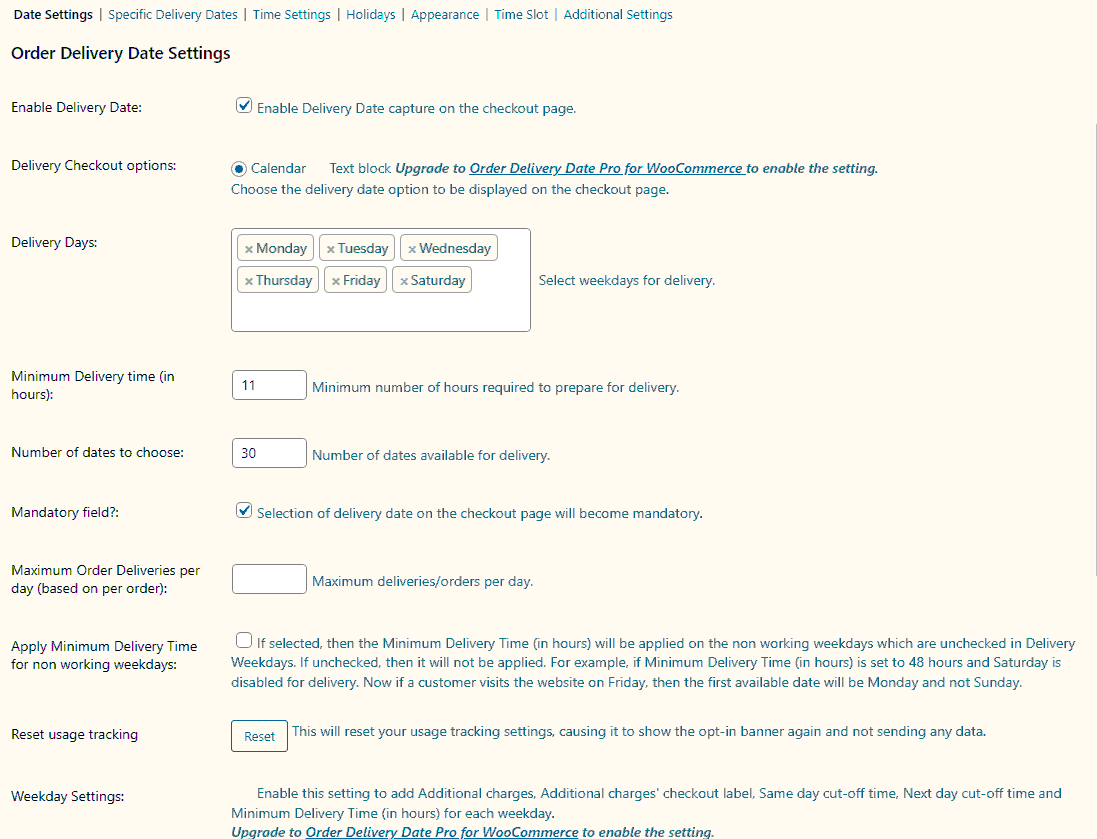
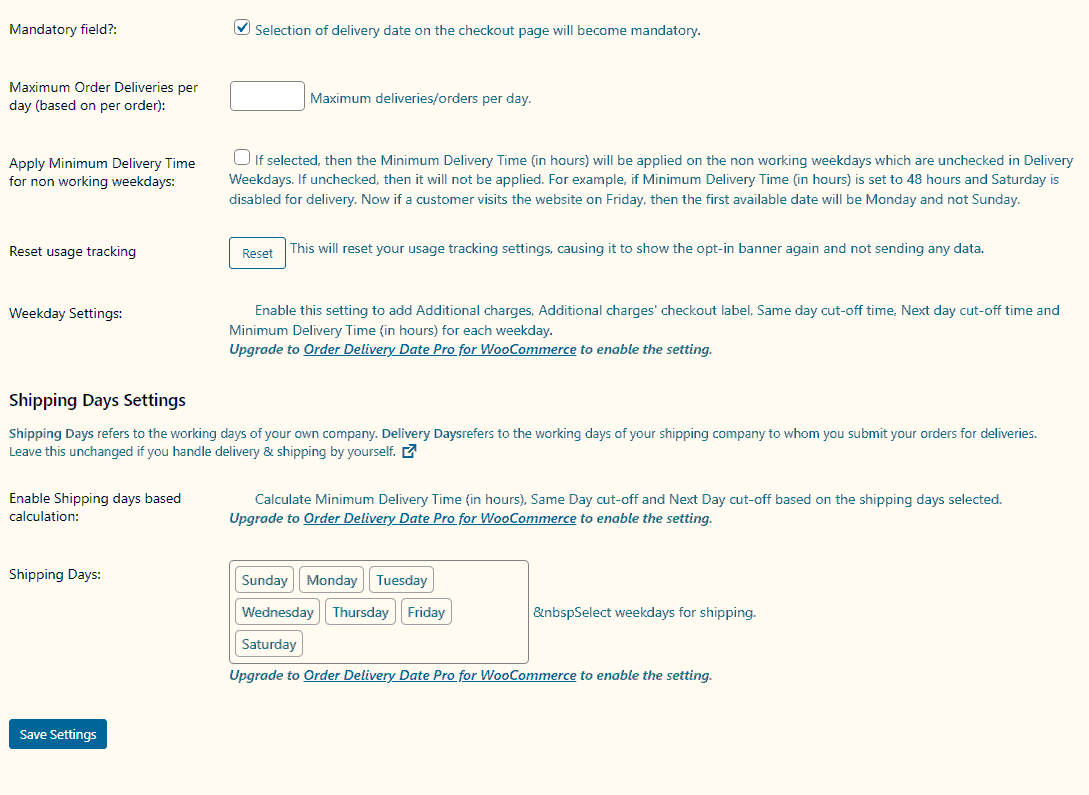
1. Plugin setup – https://www.day10.co.uk/odd_settings1.gif and https://www.day10.co.uk/odd_settings2.gif
2. Payment method for this transaction was cheque. The live site uses Monek gateway to Lloyds Cardnet and gets the same result for delivery dates,
3. The debug.log file is here https://www.day10.co.uk/debug.log
4 Capture video is here https://youtu.be/ENgyAeARiJgForum: Plugins
In reply to: [Order Delivery Date for WooCommerce] Wrong delivery date shownHi Tychesoftware,
Thanks for the reply. This is a pretty serious bug which makes the plugin pretty unusable. Our customers are continually complaining about confusion over the delivery dates they enter.
Can a fix be be fast tracked on this other wie we will have no option to ditch the pluin and look elsewhere?
Kind regards
- This reply was modified 4 years, 8 months ago by broganm.
PHP Version 5.3.2
No records in the error log file
I have enabled debug mode and mothing is flaggedForum: Plugins
In reply to: [DB Toolkit] DBToolkit – ConcatenateI can concatenate the 4 text fields into a dropdown label using “join Table” but I want to be able to concatenate them so that I have text1text2text2tex4 stored in a separate field within the table or within a separate table.
Forum: Plugins
In reply to: [DB Toolkit] Timestamps – DB Toolkit 0.3.2.026Finally figured out Auto timestamp. You need to make sure the field type is set to TIMESTAMP in the database. This enables the field to auto increment.
Forum: Plugins
In reply to: [DB Toolkit] Timestamps – DB Toolkit 0.3.2.026Thanks rhellem. That seems to have fixed the Auto Timestamp as well. However, all the date/timestamp field types seem to be one time write. In other words the date/timestamp is added when the record is first entered but not updated when the record is edited. Default to Today doesn’t seem to work either. It seems that the only way I can get a date/time updated when the record is edited is to use the date picker and select today’s date manually.
Any one else come up against this problem or a fix?
Forum: Plugins
In reply to: [Simplr Registration Form Plus+] Trouble getting Moderation to workI have the same problem. I want the Admin to be able review and activate the account before the user gets anything.