cagy79

Forum Replies Created
-
Enabling the Twenty Twenty-One theme makes the website fast and using Insights I don’t see the unnessesary HTTP calls to Google.
Conclusion: the problem is in the Hestia theme. It is loading the galleries on the home page without even displaying them, also when using excerpts.
Thanks for your support and fantastic plugin.
Hi Sayontan,
Thanks for the effort!
I updated my configuration and checked both :
+ Turn off Photonic on “Latest Posts”
+ Turn off Photonic on Archive PagesI still get the same slow responses though.
Load times for https://www.marysesmosaics.be/ pages:
Homepage = 10 seconds (should have no photonic gallery images?)
Who am I = 1.4 seconds (no photonic gallery)
Mosaic Gallery = 3.73 seconds (photonic gallery)
https://www.marysesmosaics.be/2020/11/26/the-making-of/ = 1.78 seconds (no photonic gallery)I installed the ‘Query monitor’ plugin and this provides the following insights:
++ Homepage
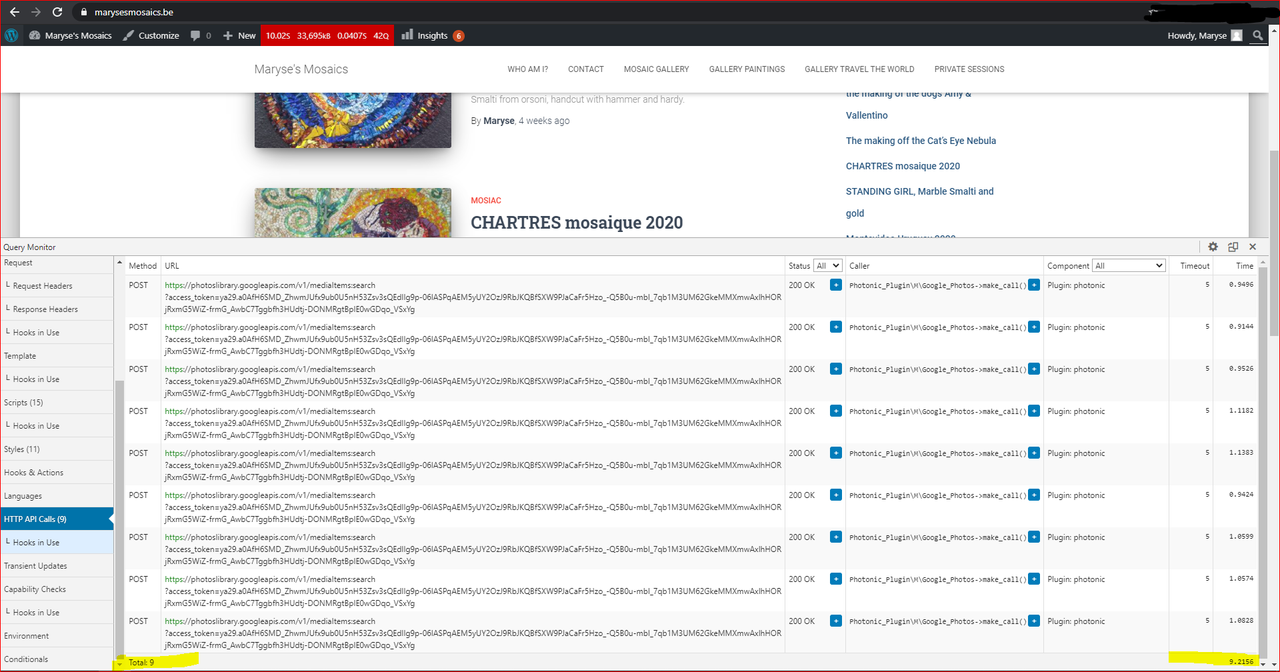
9 HTTP POSTS to https://photoslibrary.googleapis.com/v1/mediaItems:search++ Who Am I page
0 HTTP POST to https://photoslibrary.googleapis.com/v1/mediaItems:search++ Mosaic Gallery
1 HTTP POST to https://photoslibrary.googleapis.com/v1/mediaItems:search++ https://www.marysesmosaics.be/2020/11/26/the-making-of/
0 HTTP POSTS = normal as there is no photonic gallerySo it seems the BLOG page is still performing HTTP POST requests to googleapis with these settings enabled.
I uploaded a screenshot of the Query Monitor result for the homepage here: https://i.postimg.cc/BZkcGDkn/Capture.png
FYI, I’m using the Hestia theme Version: 3.0.8
Can I be of more assistance with debugging?
Regards,
KFRJ- This reply was modified 5 years, 5 months ago by cagy79. Reason: added a screenshot to clarify number of HTTP posts