cmerrick

Forum Replies Created
-
Forum: Plugins
In reply to: [TablePress - Tables in WordPress made easy] cannot import dataHow odd, it never occurred to me to look dozens of columns over (the spreadsheet was supplied by a client). Next time I’ll do as you suggest and copy over just the cells I need to a new file. Thank you very much for looking into this!
Forum: Plugins
In reply to: [TablePress - Tables in WordPress made easy] cannot import dataThanks for the response! It’s not a big table at all, but I will send you a copy at the email you linked to now.
Forum: Plugins
In reply to: [List View Google Calendar] suddenly stopped finding eventsThank you! I was out of town for a few days so I just got the chance to try the debugger. It gave me this message:
“error”: { “code”: 403, “message”: “Google Calendar API has not been used in project [number redacted by me] before or it is disabled. Enable it by visiting https://console.developers.google.com/apis/api/calendar-json.googleapis.com/overview?project=%5Bnumber redacted by me] then retry. If you enabled this API recently, wait a few minutes for the action to propagate to our systems and retry.”
I just followed the link they gave me and clicked the “Enable” button.
I still don’t know why it had been working for a few months and then suddenly stopped (which was before I tried the new API key) but it’s working now. Many thanks for your help on this.
Forum: Plugins
In reply to: [List View Google Calendar] suddenly stopped finding eventsI have it set up now to use no parameters at all in the shortcode; on the test page itself I’m just using [gc_list_view]. This is how it was set up before it stopped working.
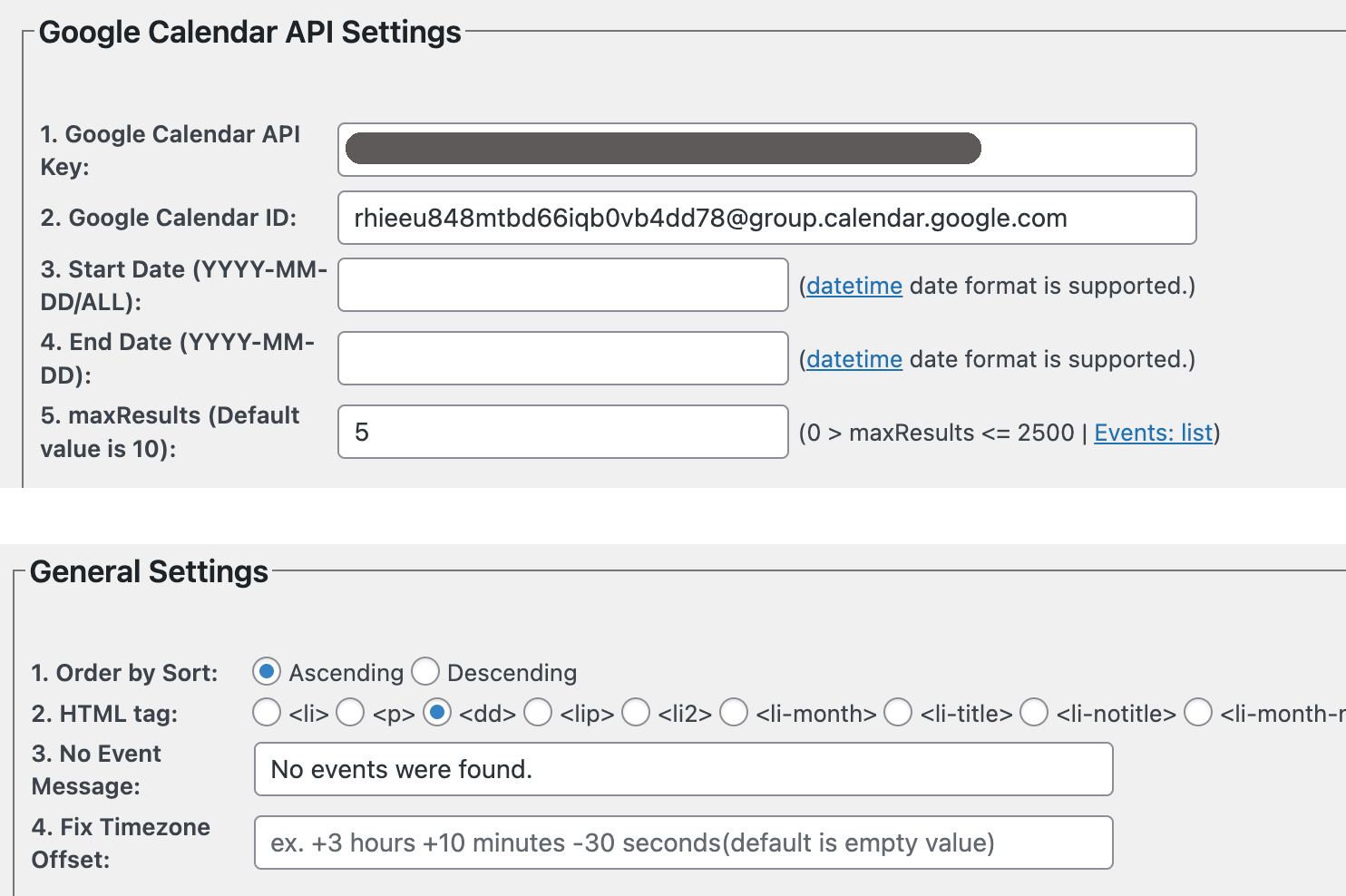
Here’s a screenshot of the settings page:
https://cs2025.filadesign.com/wp-content/uploads/2025/10/g-calendar-settings.png
It’s just the API key (blacked out but which I’ve now checked at least four times to be sure it’s correct), the calendar ID, and a limit of 5 events. I’ve tried it both with and without start dates like “2025-09-01” or “today”. I also just tried switching to the Twenty Twenty-Four theme, and I tried switching to a different public google calendar. In all case, it still finds no events.
Forum: Plugins
In reply to: [List View Google Calendar] suddenly stopped finding eventsHi, thanks for the reply! I tried adding the start date in the plugin settings, then in the shortcode, then I tried following your full shortcode example with my calendar ID and API key, and I still keep getting the “no results found” message. It’s a public calendar, this is the ID:
I’ve got a custom theme but this was working until very recently, and nothing significant has changed in the theme files. Thanks!
Forum: Plugins
In reply to: [YMC Filter] sidebar filter without toggleGotcha, thanks!
For anyone else who wants the sidebar menu open all the time (at sizes > 1024px) this will do it. Or you can use fewer selectors and use !important.
@media (min-width: 1024px) {
  #content .ymc-smart-filter-container .filter-layout4 .filter-entry .group-filters .sub-filters {
    display: block;
  }
}
Thanks for the cool plugin.
Forum: Plugins
In reply to: [VS Event List] show upcoming events on paginated pagesOkay, thanks for the reply! I may work around it by adding a “see upcoming events” link above the past events and then hide it on the first page using CSS, so all the subsequent pages will have a link back to page 1.
Hi! I can tell you it’s a site hosted on WP Engine, PHP v 8.2, WP v 6.8.1, Block Visibility v 3.7.1. I just tested again by deactivating every plugin and switching to the Twenty Twenty Five theme, and as soon as I activated BV, I get this fatal error:
An error of type E_COMPILE_ERROR was caused in line 89 of the file /[path to site]/wp-content/plugins/block-visibility/includes/utils/user-functions.php. Error message: Namespace declaration statement has to be the very first statement or after any declare call in the script
The PostX plugin had the same problem, and they fixed it by removing whitespace before the namespace declaration.
I just updated to v 4.1.29 and the error is resolved. Many thanks for the quick action on this!
Great, I will check for that. Thanks for the fast reply.
Apparently this is going around. I’ve had four different plugins give this same error in the last two weeks. I thought I was going mad 🙂
I have this issue as well on a site running PHP 8.1. On a different host, running PHP 8.3, I do not get this notice.
- This reply was modified 1 year ago by cmerrick.
Forum: Plugins
In reply to: [GenerateBlocks] visited link colorThank you for the fast reply. I already have GB Pro, I just hadn’t activated it for this site since I didn’t think Pro was necessary for basic things like links to be usable.
I have just updated the site to us GB Pro and I still don’t see a way to set a visited link color. Under Selectors I see Main Selector and under that Hover, Hover & Focus, Links, and Hovered Links. Nothing for Visited.
Ok, thanks for the reply!
It does seem to be working now (with version 2.0.1); possibly a caching issue, though I had done a hard refresh. Anyway, thank you for the quick fix!
Thank you for the fast response! Unfortunately, as soon as I updated to 2.0.1, the issue returned. I currently have a check for the function
if (function_exists(‘get_taxonomy_image’))
so if it’s not found it bypasses the whole thing, which unfortunately means the icons don’t show, but at least the rest of the page works. I’m re-enabling auto-updates, in the hope that a future update will restore the function and it will start working.