codepeople

Forum Replies Created
-
Forum: Plugins
In reply to: [Calculated Fields Form] submit buttonHello @itzikn,
You can check the changes in the changelog.txt file distributed with the plugin.
Best regards.
Forum: Plugins
In reply to: [Calculated Fields Form] submit buttonHello @itzikn
Thank you very much for using our plugin.
If you want to deactivate the submit button from every form at once, go to the plugin settings page through the “Calculated Fields Form” menu option, untick the “Display Submit Button by Default” checkbox, tick the “Apply To Existing Forms (It will modify the settings of existing forms)” checkbox, and finally press the “Update” button.
Best regards.
Forum: Plugins
In reply to: [Calculated Fields Form] Form Sample QuestionHello @pexel,
The example you need includes a commercial feature, to send confirmation emails to the users’ entered email addresses. You can request custom forms through the plugin website. Contact Us
Best regards.
Forum: Reviews
In reply to: [Calculated Fields Form] A very good pluginHi,
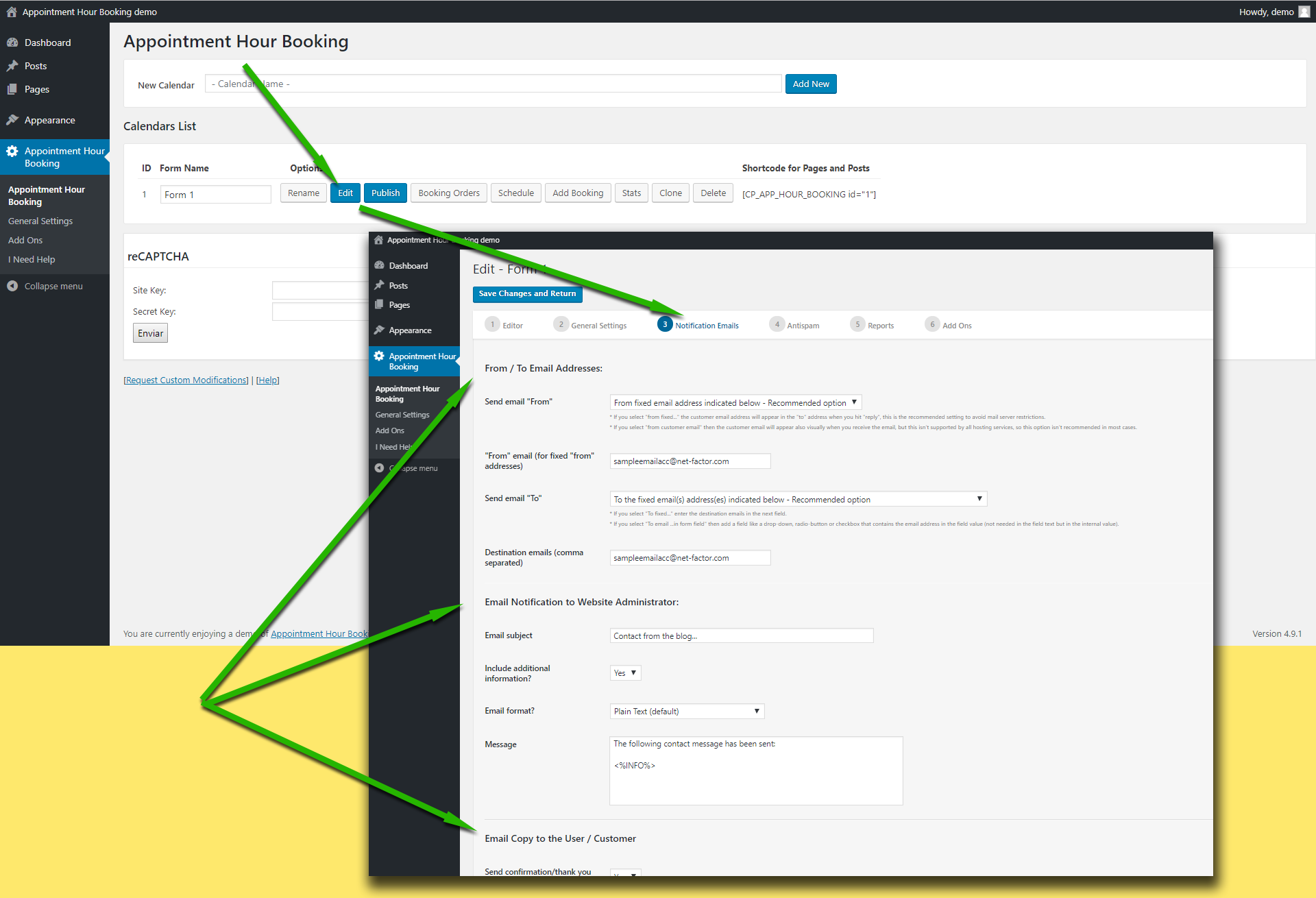
Please first check the “from” email address used in the settings. Note that if you use a “from” email from a public email service like “@hotmail.com”, “@aol.com”, “@outlook.com”, “@gmail.com”, … it will be filtered by most antispam systems since the email will be identified as “not originated at the expected server”.
That’s in the following settings area:
https://apphourbooking.dwbooster.com/customdownloads/email-settings.png
If that’s OK, then it should be a email delivery issue in the email server. To confirm this I recommend you to install a WordPress email log plugin, these type of plugins will register every email sent from WordPress to the email server and you can detect this way on which side the email is being lost.
Note that the plugin uses the settings specified into the WordPress website to deliver the emails, if your hosting/email service has some specific requirements like a fixed “from” address or a custom “SMTP” server those settings must be configured into the WordPress website.
Thank you for using the plugin!
Forum: Reviews
In reply to: [WP Time Slots Booking Form] PerfectThank you very much for the review!
Best regards.
Forum: Plugins
In reply to: [Calculated Fields Form] Auto complete..Hello @loppisinorge
Instead of summing fieldname2+fieldname4+… directly, you must use the IF operation to exclude from the sum those operands whose dropdown fields’ values are zero:
fieldname2*IF(fieldname3, 1, 0)+fieldname4*IF(fieldname7, 1, 0)+….
Best regards.
Forum: Plugins
In reply to: [Calculated Fields Form] Auto complete..Hello @loppisinorge
The issue is not caused by the plugin but by your form implementation. You have the equation fieldname11/fieldname1 where the equation of fieldname11 is the sum of the operations fieldname2*fieldname3+fieldname4*fieldname7+…. but the equation of fieldname1 is fieldname2+fieldname4+…
But when the fieldname3, fieldname7, … choice selected is “Velg karakter” the value of fieldname2*fieldname3 (or the pair of fields that correspond) is zero. However, it does not occur in the fieldname1 sum.
Basically, you are calculating:
(5*5+5*0 )/(5+5) = 25/10 = 2.5
Please note the support service does not cover implementing or debugging the users projects. If you need help implementing your project, you should contact us directly via the plugin website.
Best regards.
Forum: Reviews
In reply to: [Calculated Fields Form] great pluginForum: Plugins
In reply to: [Calculated Fields Form] Informations about the PluginHello,
The operation is available for texts entered directly in the form fields, not from the files. Extracting texts from files is not always possible. It depends on the files’ structures and the modules installed on the web server.
Best regards.
- This reply was modified 1 year, 11 months ago by codepeople.
Hello @vadim-s-sabinich
The idea of including the “dir” attribute in the shortcode is to generate the playlist from the files directory each time you load the page. This allows you to upload, remove, or update the audio files from the directory structure. Note that if your files directory has multiple levels the plugin must walk all of them. Note that the preload=”none” improves the performance because the audio files would be loaded only by the direct user action (pressing the play button).
Best regards.
Hello @sloganwp
You can emulate the process as follows. Assuming the field you use to enter the value is the fieldname123, and the file affected is the fieldname456. You can insert an “HTML Content” field in the form and enter the following piece of code as its content:
<script>
fbuilderjQuery(document).on('keyup', '[id*="fieldname123_"]', function(){
let $ = fbuilderjQuery;
if ( $('.cff-processing-form').length == 0 ) {
$('#fbuilder').prepend('<div class="cff-processing-form"></div>');
}
});

fbuilderjQuery(document).on('change', '[id*="fieldname456_"]', function(){
fbuilderjQuery('.cff-processing-form').remove();
});
</script>
If you need additional customizations, please contact us directly via the plugin website.
Best regards.
Forum: Plugins
In reply to: [Calculated Fields Form] RecordSet DS and leading zerosHi! We’d like to help but we can’t reply about that in this forum. We cannot support customers in these forums, and the DS fields are distributed with commercial versions of the plugin.
For pro or commercial product support please contact us directly on our site. This includes any pre-sales topics as well.
Commercial products are not supported in these forums. We will happily answer this and any other questions you can have on our own site.
Thank you.
Forum: Plugins
In reply to: [WP Time Slots Booking Form] No more slots availableHi,
Seems that the booking form doesn’t contains a booking/slots calendar field. Please check that and let me know if you need further assistance.
Thank you!
Forum: Plugins
In reply to: [Booking Calendar Contact Form] Option to have just availability enquiry?Hi,
You can do that with the plugin. In the settings field “Enable Paypal Payments?” select “No” and in the settings field “Accept overlapped reservations?” select “Yes“. This way no payment will be required to process the booking request and no dates will be blocked.
Thank you for using the plugin!