codepeople

Forum Replies Created
-
Forum: Plugins
In reply to: [Appointment Hour Booking - Booking Calendar] Appointment Hour Booking issueHi,
Seems there is a conflict with the Elementor version #3.33.5. Please temporary roll back to the previous Elementor version while we work in a permanent solution to the plugin conflict.
Thank you for the feedback!
Hi,
The problem stems from excessive optimization by a caching plugin, which is causing issues on the page. The cache and optimizations are not applied while you are logged in, which is why it appears to work in that scenario. Please check the options of the caching plugin and exclude the page that contains the booking form from some of those optimizations. This will help identify which specific optimization is causing the problem.
Thank you for using the plugin!
Forum: Reviews
In reply to: [CP Referrer and Conversion Tracking] greatThank you very much for the review!
Best regards.
Hi,
That code doesn’t enable the PHP GD Image Library. You should enable the PHP GD Image Library into the PHP.ini file. You may need to ask your hosting support service about the location of the PHP.ini file or ask them to enable the PHP GD Image Library.
Thank you for using the plugin!
Forum: Reviews
In reply to: [Appointment Hour Booking - Booking Calendar] Perfect for our site!Thank you very much for the review!
Best regards.
Hi,
The PHP GD Image Library may be missing on the website server, which prevents the image from being generated. There should be an error log related to this issue on the website. The solution is to enable the PHP GD Image Library in the PHP configuration.
Thank you for using the plugin!
Hi,
Please note that the calendar in that page isn’t generated with our plugin. Please confirm the name of the plugin you are using to generate that calendar.
Thank you!
Thank you very much for the review!
Best regards.
Hi,
Please check the following configuration area:

Confirm that the destination emails setup in that area are correct.
In addition to that it is recommended to install an email log plugin. These type of plugins will register every email sent from WordPress to the email server and you can detect this way on which side the email is being lost.
Thank you for using the plugin!
Forum: Reviews
In reply to: [Appointment Hour Booking - Booking Calendar] Useful and good pluginThank you very much for the review!
Best regards.
Hi,
In the “Year Range” settings field put “-0:+2”. Example:

Thank you for using the plugin!
Forum: Reviews
In reply to: [Appointment Hour Booking - Booking Calendar] easy to use! favourite one :)Thank you very much for the review!
Best regards.
Forum: Plugins
In reply to: [Appointment Hour Booking - Booking Calendar] Can’t see the services dropdownHi,
You can insert the booking form (shortcode or block) into a layer with a specific ID and then make the style apply only to the booking form into that ID.
Thank you for using the plugin!
Forum: Reviews
In reply to: [Appointment Hour Booking - Booking Calendar] Great plugin!Thank you very much for the review!
Best regards.
Forum: Plugins
In reply to: [Appointment Hour Booking - Booking Calendar] Can’t see the services dropdownHi,
Go to the following settings area:
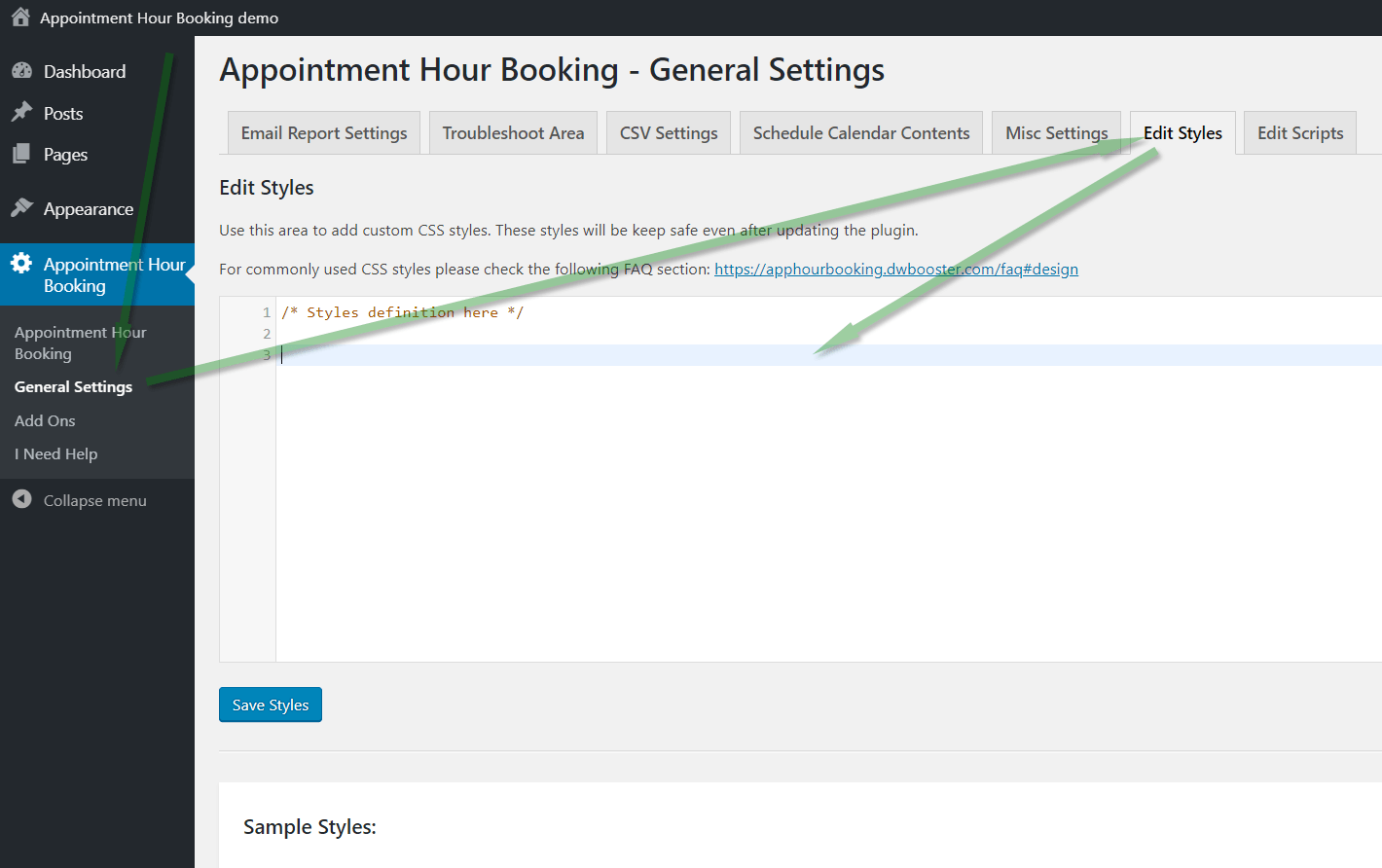
… and remove the line that says:
.ahbfield_service { display: none }Remember to clear the cache after that modification.
Thank you for using the plugin!