codepeople

Forum Replies Created
-
Forum: Plugins
In reply to: [Appointment Hour Booking - Booking Calendar] Repeat appointmentHi,
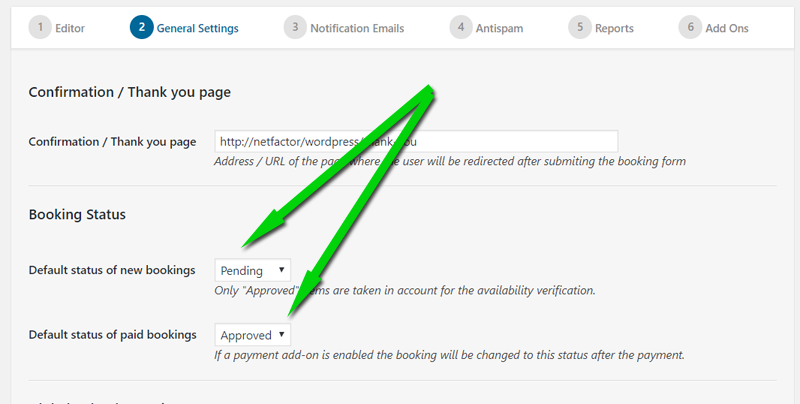
Please check the default booking status:
https://apphourbooking.dwbooster.com/images/articles/status-update-emails/default-booking-status.png
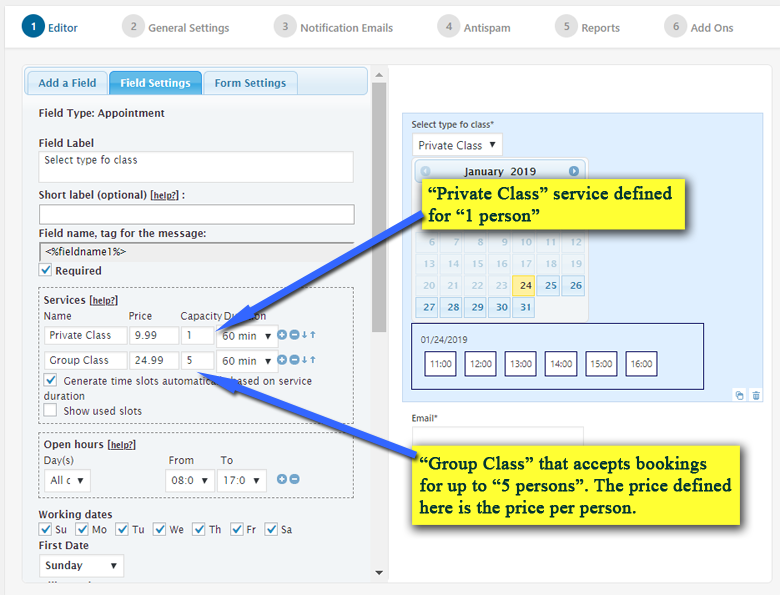
… check the maximum capacity set for the times:
https://apphourbooking.dwbooster.com/images/articles/multiple-booking/appointment-capacity.png
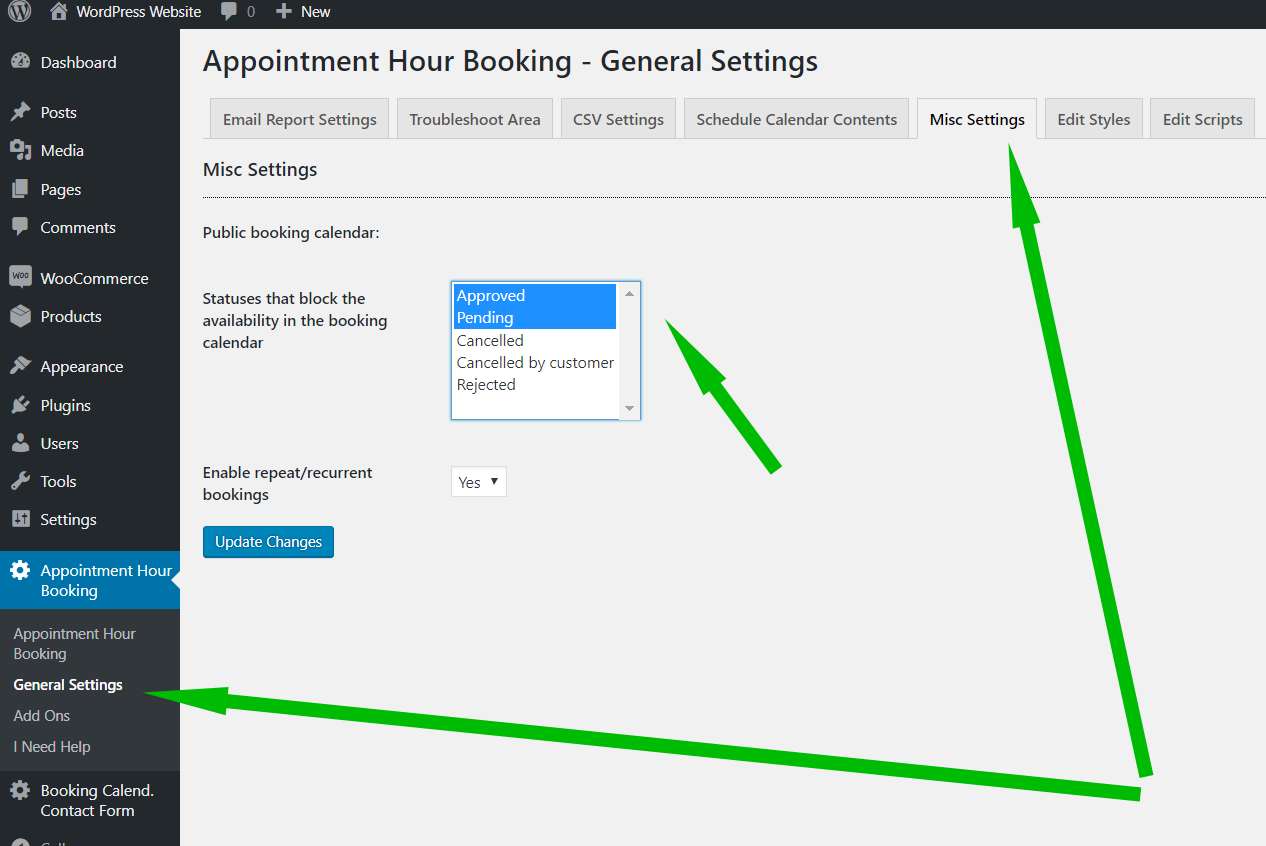
… and depending of the plugin version installed, check the statuses that blocks the availability:
https://apphourbooking.dwbooster.com/images/articles/statuses.png
Thank you for using the plugin!
Forum: Plugins
In reply to: [Calculated Fields Form] Excel worksheet calculationsHello @edit4ever,
Not exactly. You must save the Excel file as a CSV file, and use DS fields in the form to read the CSV file. The operations must be implemented in the form.
Learn more about DS fields by reading the following blog post:
https://cff.dwbooster.com/blog/2019/02/14/ds
If you need a custom coding service to implement your project, you can contact us through the plugin website: https://cff.dwbooster.com/customization
Best regards.
Forum: Plugins
In reply to: [Calculated Fields Form] Renaming VariablesHello @bergerlaw
Thank you very much for using our plugin. In the current plugin version, the fields’ names are generated dynamically to ensure they are unique on the page. Note a form can be inserted multiple times on the same page. To avoid errors by selecting fields or using them in the equations you can open the popup with the fields names and labels by pressing the “Fields List” button to have them as a reference beside your form.

Best regards.
Forum: Plugins
In reply to: [Calculated Fields Form] How to make volume calculateHello @franckw
To ensure the equation results have two decimal places, use the PREC operation as the outermost operation in the equation. PREC(X, Y) rounds the number X with Y decimal places.
So, continuing with the previous example, and displaying the result with two decimal places, you can edit the equation as follows:
PREC(SUM(0.8*fieldname1, 0.25*fieldname2, 3.6*fieldname3), 2)If you want to remove the decimals if the equation result is an integer number, you should pass true as its third parameter:
PREC(SUM(0.8*fieldname1, 0.25*fieldname2, 3.6*fieldname3), 2, true)If you want to display an image below enter number boxes, you can enter IMG tags with the images into their “Instructions for users” attribute. Ex.
<img src="https://www.t2m-demenagement.com/wp-content/uploads/armoire-2-portes.png">To include the image above the entry box, you can enter the IMG tag into the field’s title or label.
Finally, to distribute the fields into columns, you can use a DIV field, select the number of columns through its settings, and drag the “Number” fields into the DIV one. Please watch the video by visiting the following link:
Best regards.
Forum: Plugins
In reply to: [Calculated Fields Form] How to make volume calculateHello @franckw
Thank you very much for using our plugin. The process to build a volume calculator form similar to the page you sent me as a reference is very simple. I’ll try to describe it with an example.
Assuming you have three furniture pieces:
“Bureau large” whose volume is 0.8 m3
“Grande commode” with 0.25 m3
And “Lit king size” with 3.6 m3Each piece of furniture has a number field associated, configured to accept digits only, fieldname1, fieldname2, and fieldname3, respectively.
To calculate the total volume, you should insert a calculated field in the form and enter the equation below into the “Set equation” attribute in its settings:
SUM(0.8*fieldname1, 0.25*fieldname2, 3.6*fieldname3)Best regards.
Forum: Plugins
In reply to: [Calculated Fields Form] Countdown TimerHello @fibbu
Yes, of course. Please contact us through the plugin website. It would be a pleasure to provide the specific code for your project. Please note the plugin support does not cover the implementation of the users’ projects.
Best regards.
Forum: Plugins
In reply to: [Calculated Fields Form] Countdown TimerHello @fibbu
Yes, that’s possible. You should implement the equation that calculates the time and insert an “HTML Content” field in the form containing a script tag in its content with a timer that calls the EVALEQUATION operation (https://cff.dwbooster.com/documentation#managing-fields-module) each time interval you set in “setInterval” function.
If you require assistance with implementing this process, please feel free to contact us directly via the plugin website. Contact US
Best regards.
Forum: Plugins
In reply to: [Calculated Fields Form] About UpdateHello @pexel
Thank you very much for using our plugin. The main change is related to the support of AMP pages. AMP pages load the forms into amp-iframe tags. If you configure to load the form into an iframe tag, it is not possible to resize the amp-iframe when the form is loaded by the iframe tag, or when you resize the browser or the form height changes since dependencies. The plugin update chains the resize process from the form into the iframe until the amp-iframe tag in the page. Another issue the update fixes is related to the cookies and nonces. The AMP requires that the main page and amp-iframe content belong to different domains, which provokes the nonce validation fails. Embedding iframe tags into amp-iframe tags solves this problem because the main page and the page loaded by the internal iframe tag belong to the same domain.
Best regards.
Forum: Reviews
In reply to: [Calculated Fields Form] badHello @dominiks8318
Thank you very much. Yes, the plugin is in constant evolution. We will include an “Advanced” tab in the form settings, as in the field’s settings, to customize the appearance of the form title, description, and other general elements.
Best regards.
Forum: Reviews
In reply to: [Calculated Fields Form] badHello @dominiks8318
I’m sorry that our plugin doesn’t meet your expectations, but there’s no need to be offensive.
The plugin includes different alternatives to customize the form and fields appearance. Each field includes the “Advanced Settings” in tab in its settings that allow you to enter the CSS rules to apply the fields components (label, input tags, instructions for users, and others). For example, if you want to make a field’s label blue, you should select the field in the form, activate the “Advanced Settings” tab, and enter the CSS rule “color” with value “blue”:
https://resources.developers4web.com/cff/tmp/2024/06/07/brave_L2UkaPR7yL.png
Additionally, the plugin includes the “Customize Form Design” attribute in the “Form Settings” tab. It is a CSS editor with syntax highlighting and error checking and allows you to customize the design of multiple fields at once, or as you want, the color of the form title. Please click on the “Form Settings” tab, and enter the following style definition in the “Customize Form Design” attribute:
#fbuilder .cff-form-title{color: blue !important;}Or if you want to modify all fields labels at once:
#fbuilder .fields>label{color: blue !important;}Note I used the !important; modifier with the CSS rules to increase their precedence and avoid other CSS rules on the page affecting your custom styles.
Learn more about customizing the form design by reading the following blog post:
https://cff.dwbooster.com/blog/2020/01/12/form-design
Best regards.
- This reply was modified 2 years ago by codepeople.
Forum: Reviews
In reply to: [Search in Place] Great plugin and insanely helpful DevHello @ckrauter
Thank you very much for the review. Note the pro plugin distribution allows you to search by custom post types such as WooCommerce products and posts taxonomies 😉
Best regards.
Thank you very much for the review!
Best regards
Hello @ckrauter
We have released a plugin update, just now, that modifies the search in page results to give more relevance to the text with its context in the results popup instead of the search term.
Please install the plugin update and purge your website and browser caches.
Best regards.
Forum: Plugins
In reply to: [Search in Place] Change what search bar saysHello @ckrauter
Thank you very much for using our plugin. You can pass the placeholder directly through the shortcode:
[search-in-place-form placeholder="your text here"]Learn more about the search-in-place shortcode by visiting the following link:
https://searchinplace.dwbooster.com/documentation#shortcode
Best regards.
Hello @ckrauter
Are you using the search box to search the terms in the current page content, or pages and posts in the website?
Best regards.