CodePeople2

Forum Replies Created
-
Forum: Plugins
In reply to: [Calculated Fields Form] Answer fields on the imageHello @needfeed
The process is simpler by using the plugin operations.
Assuming the date field is the fieldname6, the equation would be:
(function(){
if(fieldname6|r == '') return;
let d = DAY(fieldname6);
return IF(d<=22,d,SUM(String(d).split('')));
})()
Best regards.
- This reply was modified 1 year, 3 months ago by CodePeople2.
Forum: Plugins
In reply to: [Calculated Fields Form] Issues Storing and Retrieving JSON in Hidden FieldsHello @eberkland
The answer to your question depends on your plugin version and the use you want to do of the JSON structure.
You can generate a stringified version of a JSON object from the equation, and assign it to a field. Then you can access this raw value from another equation, parse the string, and assign the values to other fields in the form. Please watch the following video:
https://resources.developers4web.com/cff/tmp/2025/03/21/video-json_o.mp4
However, if you want to generate and store the JSON structure and make it accessible from other forms or contexts, you can activate the “CFF – Server Side Equations” add-on (distributed with the Developer and Platinum plugin versions) to generate and store the JSON object on the server-side, and access it from other forms by calling another server-side equation:
https://cff.dwbooster.com/documentation#server-side-equations-addon
Best regards.
Forum: Plugins
In reply to: [Calculated Fields Form] Answer fields on the imageHello @needfeed
Loading the image with “Media” control is not bad, but you cannot include other tags with it. Using “HTML Content” fields gives you more control over the information to display.
I recorded a video to teach you the process. Please visit the following link:
https://resources.developers4web.com/cff/tmp/2025/03/21/image-label_o.mp4
Best regads.
Forum: Plugins
In reply to: [Calculated Fields Form] Answer fields on the imageHello @needfeed
Yes, of course that’s possible.
Assuming you have loaded the image into an “HTML Content” field, and the calculated field is the fieldname123, you can include a span tag (or any other tag) in the HTML Content field positioned with CSS in the place you prefer, and use the
data-cff-fieldattribute:<span data-cff-field="fieldname123"></span>The plugin will display the fieldname123 value in the tag.
Finally, as the calculated field is used as an auxiliary, you can hide it by ticking a checkbox in its settings.
Best regards.
Forum: Plugins
In reply to: [Calculated Fields Form] Exporting forms and value in calculated fieldHello @beentee
Thank you for using our plugin! Regarding your initial question, yes, you can install the same plugin copy on both websites. To move your forms, simply export them from your current website and then import them into another website. For detailed instructions, please refer to the corresponding section in our plugin documentation.
https://cff.dwbooster.com/documentation#import-export-form
In the calculated fields you can use intervals, you need only to click on the “Edit rule manually” link, and enter the expression
6<=value && value<=9Please watch the following video:
https://resources.developers4web.com/cff/tmp/2025/03/21/video_o.mp4
Please note that for complex dependency rules you can activate or ignore the fields directly from the equation as follows:
(function(){
    let result  = SUM(fieldname1, fieldname2);
    if(AND(6<=result, result<=9)) {
        ACTIVATEFIELD(fieldname3|n);
        ACTIVATEFIELD(fieldname4|n);
        ACTIVATEFIELD(fieldname5|n);
    } else {
        IGNOREFIELD(fieldname3|n);
        IGNOREFIELD(fieldname4|n);
        IGNOREFIELD(fieldname5|n);
    }

    return result;
})()
Or other rules as complex as you need.
Best regards.
Forum: Plugins
In reply to: [Calculated Fields Form] Issues Storing and Retrieving JSON in Hidden FieldsHello @eberkland
I don’t know were are you inserting the code to read or store the JSON structure, but if you are reading it into a calculated field, I recommend using:
(function(){
let parsedData = JSON.parse(fieldname173|r);
/* Your other code here */
})()
To access the fieldname173 raw value.
Also, to set the value the correct would be:
(function(){
/* The code that generates the addonSelections variable */
getField(fieldname173|n).setVal(storedData);
})()
Best regards.
Forum: Reviews
In reply to: [Music Player for WooCommerce] Simple, straightforwardForum: Plugins
In reply to: [Calculated Fields Form] Create Login session before submit the formHi! You have some alternatives. You can emulate the process by using a pair of server-side equations. The first equation can check if the user is logged in before displaying the popup to enter the username and password. The second equation would verify the username and password entered by the user and log him in before proceeding to the next section.
Please note we are not allowed to support any customers in these forums.
For pro or commercial product support please contact us directly on our site. This includes any pre-sales topics as well.
Commercial products are not supported in these forums. We will happily answer this and any other questions you can have on our own site.
Thank you.
Forum: Plugins
In reply to: [Calculated Fields Form] Getting raw value (with format)Hello @rotertal
Thank you so much for using our plugin. The plugin preprocesses the fields’ values in the equations to use them in mathematical expressions. However, you can use the
|rmodifier to use the field’s raw value without preprocessing.(function(){
switch(fieldname121) {
case 1: return fieldname57|r; break;
case 2: return fieldname58|r; break;
case 3: return fieldname59|r; break;
}
})();Best regards.
Hello @spacemakerman
I’m sorry, but I don’t know why you complicate the process. You don’t need any script, only to enter the piece of CSS below through the “Customize Form Design” attribute in the “Form Settings > Advanced Settings” tab:
@media (max-width:1280px){
.cff-popup-header{pointer-events:none;}
.cff-popup-header .cff-popup-close{pointer-events:auto;}
}
Please note that support does not include implementing users’ projects or customizing the plugin. If you require any of these services, please contact us through the plugin website. Contact Us
Best regards.
Hello @spacemakerman
Assuming the popup field is the fieldname123 and you have updated your plugin copy, please edit the piece of code:
fbuilderjQuery('.newform-b .cff-popup-field').removeClass('hide-strong');as follows:
SHOWFIELD('fieldname123','.newform-b');Replace fieldname123 in the previous code with the field’s name on your form.
Best regards.
Forum: Plugins
In reply to: [Calculated Fields Form] Problem colums with spinner buttonsHello @vince08
Please edit those fields and select the large option in their settings. You have selected the “Small” option.
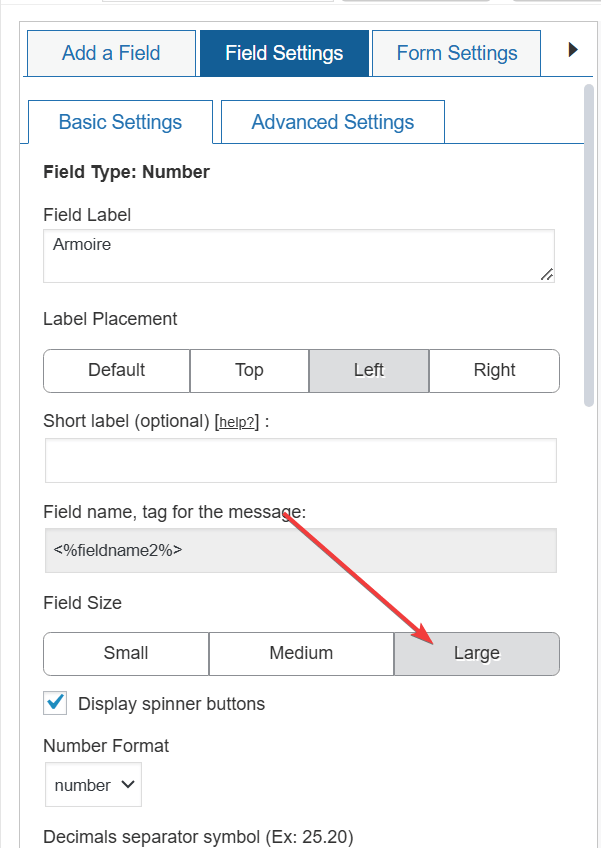
I emulated the process directly in the browser. Please watch the following video:
https://resources.developers4web.com/cff/tmp/2025/03/14/video-fields_o.mp4
Best regards.
Forum: Plugins
In reply to: [Loading Page with Loading Screen] disappears before page is loadedHello @pmonstad
Thank you for using our plugin! The GPX files are loaded on demand via your website scripts once the onload event is triggered. Since our plugin is not designed to control files loaded via custom code, an alternative solution is to increase the duration that the loading screen is displayed. To get it, navigate to the plugin settings page and specify the additional seconds in the “Additional Seconds” attribute.
Best regards.
Forum: Plugins
In reply to: [Calculated Fields Form] Form Validation and Button Blocking in CFFHello @spacemakerman
Please install the latest plugin update. It allows you to customize error bubbles through the “Form Settings > Advanced Settings” tab:

Best regards.
Forum: Plugins
In reply to: [Calculated Fields Form] highlight highest/lowest values with color(s)Hello @jesus-1
The code of the equation can check if the fieldname1 value is not empty before evaluating the rest of the equation’s code:
(function(){
    if (fieldname1){
        /* YOUR CODE HERE */
    }
})()
Best regards.