CodePeople2

Forum Replies Created
-
Forum: Plugins
In reply to: [Calculated Fields Form] multiple options formHello @benlashley80
The process is straightforward, but assembling the dataset is a tedious and repetitive task.
Best regards.
Forum: Plugins
In reply to: [Calculated Fields Form] multiple options formHello @benlashley80
Your solution is not optimal. A better alternative is to enter an object with the data definition and access this object directly from the equations.
For example assuming you have three fields in the form:
fieldname1, a dropdown field for products with values: Accident & Injuries, …
fieldname2, a dropdown field for types, with values: Individual, Single parent, Couple, …
fieldname3, a dropdown field for units, with values: 8, 4, 2, and 1Now you need only to insert an “HTML Content” field in the form (tick the checkbox in its settings that allows you to enter script tags in its content), and enter an array of objects:
<script>
db = [
{product: 'Accident & Injuries', type: 'individual', unit: 8, price: 78},
{product: 'Accident & Injuries', type: 'individual', unit: 4, price: 42},
{product: 'Accident & Injuries', type: 'individual', unit: 2, price: 24},
{product: 'Accident & Injuries', type: 'individual', unit: 1, price: 15},
/* The other tuples with the complete database */
];
</script>
Finally, the equation that determine the price is as simple as:
(function(){
for(let i in db) {
if(AND(db[i]['product'] == fieldname1, db[i]['type'] == fieldname2, db[i]['unit'] == fieldname3)) return db[i]['price'];
}
return '';
})()
And that’s all.
I needed only the fields to allow the users to enter the data for filtering, and an “HTML Content” field for entering the array of tuples (the tuples can include as much information as you want).
Using DS fields, you can enter your tuples in Google Sheets (a database, a JSON object, or simply a CSV file), and use them from the form:
https://cff.dwbooster.com/blog/2019/02/14/ds
This alternative allows you to update the Google Sheets document; the form will use the new data without editing it.
Best regards.
Forum: Plugins
In reply to: [Calculated Fields Form] accurate age calculatorHello @benlashley80
Could you please edit the equation as follows:
DATEDIFF(TODAY(), fieldname29|r,"mm-dd-yyyy","y")["years"]If the issue persists, please provide the link to the page containing the form, and indicate the value you entered through the fieldname29.
Best regards.
Forum: Plugins
In reply to: [Calculated Fields Form] accurate age calculatorHello @benlashley80
Thank you so much for using the plugin.
Assuming the birthday date is the fieldname1, your calculated field’s equation would be:
DATEDIFF(TODAY(), fieldname1, 'yyyy-mm-dd', 'y')['years']Note I used the DATEDIFF and TODAY operations in the date/time operations module:
https://cff.dwbooster.com/documentation#datetime-module
Best regards.
Forum: Plugins
In reply to: [Calculated Fields Form] Contact form by codepeopleHello @michelleh01
Please enter your questions in the correct plugin forum. This is the Calculated Fields Form plugin, and your questions are about the Contact Form to Mail plugin:
https://ww.wp.xz.cn/plugins/contact-form-to-email/
Best regards.
Forum: Plugins
In reply to: [Calculated Fields Form] Contact form by codepeopleHello @michelleh01
The contact form to mail is this plugin:
https://ww.wp.xz.cn/plugins/contact-form-to-email/
But please note I described the solution in the previous email.
Best regards.
Forum: Plugins
In reply to: [Calculated Fields Form] Contact form by codepeopleHello @michelleh01
Please note the error message is located in a “contact-form-to-email” plugin file. Not the Calculated Fields Form plugin:
/home/bespokep/public_html/wp-content/plugins/contact-form-to-email/captcha/captcha.phpHowever, the ” Call to undefined function imagecreatetruecolor()” error message means the GD Library, used by PHP to generate images (in this case, used to generate the images with the captcha code) is not installed on your web server. Please contact your hosting provider to enable the GD Library in your PHP installation.
Best regards.
Forum: Plugins
In reply to: [Loading Page with Loading Screen] Remove Fade Out EffectHello @sevenkader
Thank you so much for using our plugin. Please enter the piece of code below in the “Include an ad, or your own block of code” attribute of the plugin settings:
<script>document.addEventListener('DOMContentLoaded', function() {cp_loadingpage.graphics['logo']['complete'] = function(callback){callback();this.attr['overlay'].remove();};});</script>Best regards.
Forum: Plugins
In reply to: [Calculated Fields Form] Dropdown searchbox placeholderHello @ohtusabes
In the current version of the plugin, an alternative will require editing your copy of the plugin. If this behavior is crucial to your project, please reach out to us through the plugin website. Contact Us.
Best regards.
Forum: Plugins
In reply to: [Calculated Fields Form] Dropdown searchbox placeholderHello @ohtusabes
Please tick the “Includes an additional first choice as a placeholder.” checkbox in the dropdown field’s settings and enter the text in the “First choice text” attribute.
Best regards.
Forum: Plugins
In reply to: [Calculated Fields Form] Adapting a POP-up for Mobile VersionHello @spacemakerman
Please note you are requesting a custom behavior, in this case, you should request a custom coding service through the plugin website: https://cff.dwbooster.com/customization
Best regards.
Forum: Plugins
In reply to: [Calculated Fields Form] Adapting a POP-up for Mobile VersionHello @spacemakerman
Are you using the Popup control distributed with the plugin? It is compatible with both desktops and mobile devices. Please watch the following videos:
https://resources.developers4web.com/cff/tmp/2025/03/25/video1.mp4
Loading the form in a real mobile device:
https://resources.developers4web.com/cff/tmp/2025/03/25/video2.mp4
Could you please provide the link to the page containing the form and describe the steps needed to open the popup?
Best regards.
Forum: Plugins
In reply to: [Calculated Fields Form] Forms are not visible…Hello @wordpressivan007
Your website is loading cached versions of the pages, which were saved prior to the modifications made to the shortcodes.
Could you please contact us directly through the plugin website? Contact Us
Best regards.
Forum: Plugins
In reply to: [Calculated Fields Form] Forms are not visible…Hello @wordpressivan007
Thank you so much for using our plugin, the issue is caused by the plugin you use to optimize and cache the website. To ensure the optimizer plugin does not affect the forms, please insert the form shortcode with the iframe attribute set at 1:
e.g.
[CP_CALCULATED_FIELDS id="6" iframe="1"]If you are inserting the forms visually through the WordPress editor, you need only to tick a checkbox:
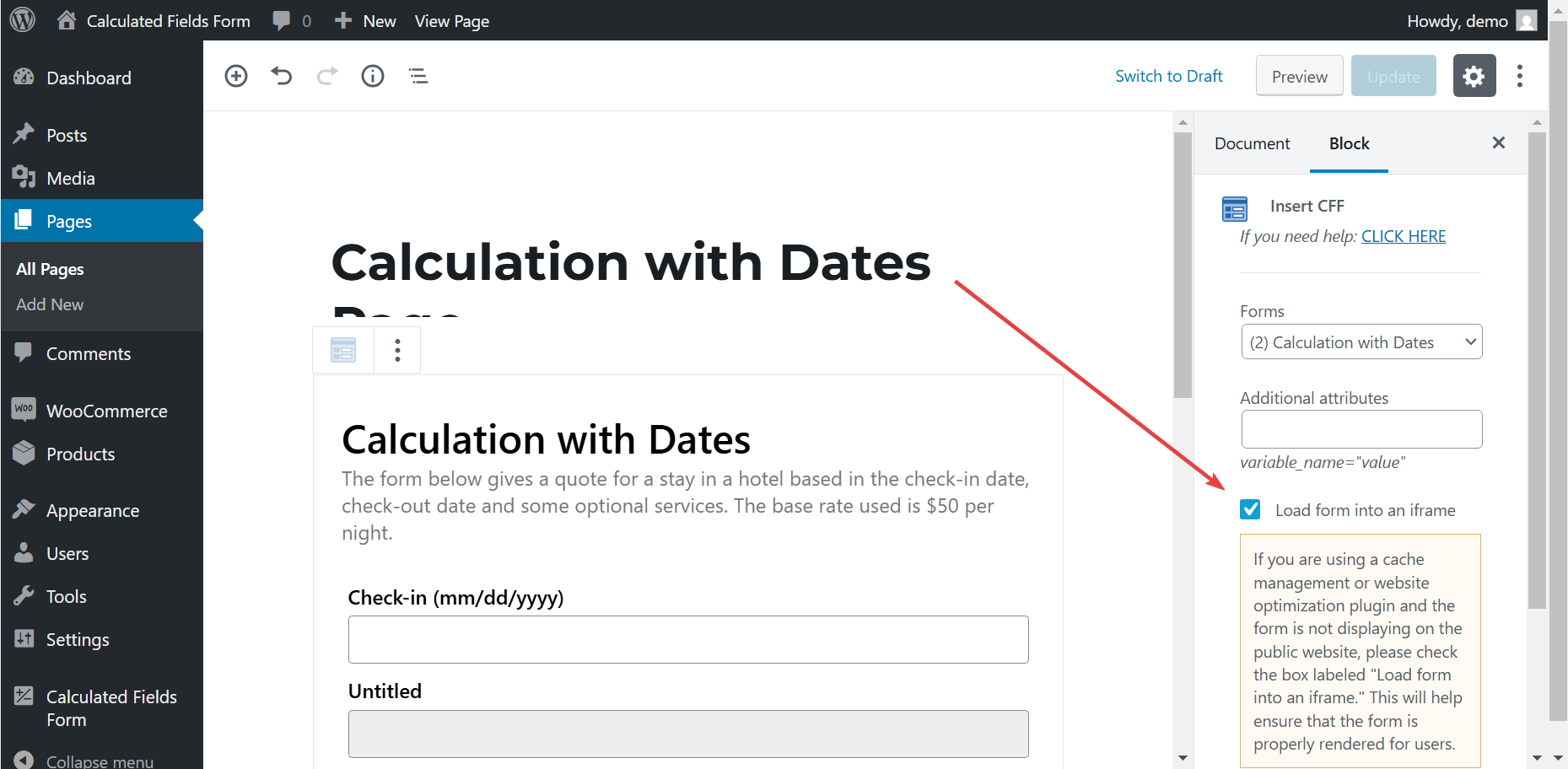
Please purge your website after modifying the forms insertion.
Best regards.
Forum: Plugins
In reply to: [Calculated Fields Form] Answer fields on the imageHello @needfeed
Yes, of course. The Date/Time operations are described in the “Date Time Operations” module:
https://cff.dwbooster.com/documentation#datetime-module
The “IF” operation in the “Logical Operations” module:
https://cff.dwbooster.com/documentation#conditions-module
The use of the modifiers, like “|r”, “|n”, and “|v” is described in the yellow box in the section that describes the structure of the equations:
https://cff.dwbooster.com/documentation#modules
The “SUM” operation is part of the “Mathematical Operations” module:
https://cff.dwbooster.com/documentation#mathematical-module
Best regards.